Osobný kalendár TeamGuru
Strojový preklad z angličtiny. Zobrazený je anglický originál.
Keep all important dates and events from across TeamGuru in one place, always at hand and up to date. Choose the events you are interested in and add the resulting calendar, for example to your phone, in iCal format.
Add a calendar
-
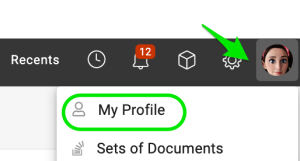
Open your profile. Click your Profile and select My Profile.
-
Add the calendar. Click Add Calendar.

-
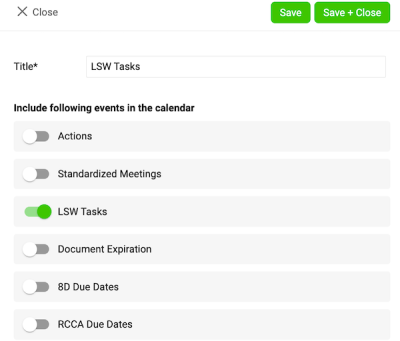
Choose the events. Choose the events you want to see in your calendar and save your settings.
-
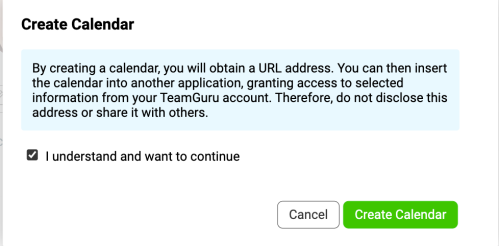
Confirm the calendar creation. After you click Save, a message appears:
- Tick the box I understand and want to continue.
- Click the Create Calendar button.
-
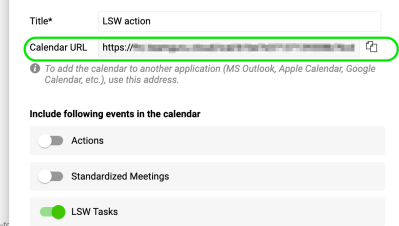
Copy the calendar link. A URL link is generated. Copy this link to add it to your Outlook calendar.
Add the URL to your Outlook calendar
-
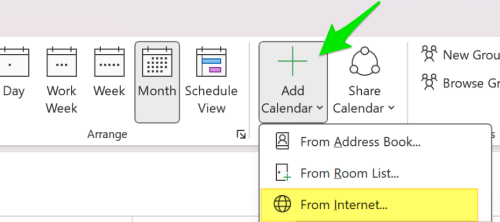
Subscribe to the calendar. In Outlook, click Add Calendar and choose From Internet (on Mac: Subscribe from Web). Paste the URL link you copied earlier.
-
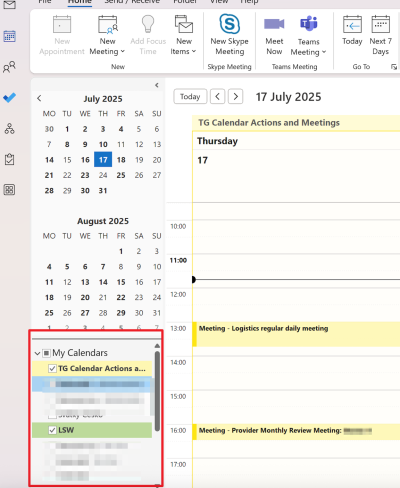
Adjust the calendar settings. Adjust the calendar settings (such as name and color) as needed, then save.
Please note: the integration works in one direction only, from TeamGuru to Outlook. Changes made in Outlook are not reflected in TG.
Majte všetky dôležité termíny a udalosti z celého TeamGuru na jednom mieste, vždy poruke a aktuálne. Vyberte udalosti, ktoré vás zaujímajú, a výsledný kalendár si vo formáte iCal pridajte napríklad do telefónu.
Pridajte kalendár
-
Otvorte svoj profil. Kliknite na Profil a vyberte Môj profil.
-
Pridajte kalendár. Kliknite na Pridať kalendár.
-
Zvoľte udalosti. Zvoľte udalosti, ktoré chcete vidieť v kalendári, a nastavenia uložte.
-
Potvrďte vytvorenie kalendára. Po kliknutí na Uložiť sa zobrazí správa:
- Zaškrtnite políčko Rozumiem a chcem pokračovať.
- Kliknite na tlačidlo Vytvoriť kalendár.
-
Skopírujte odkaz na kalendár. Vygeneruje sa URL odkaz. Skopírujte ho, aby ste ho mohli pridať do kalendára v Outlooku.
Pridajte URL do kalendára v Outlooku
-
Prihláste sa na odber kalendára. V Outlooku kliknite na Pridať kalendár a zvoľte Z internetu (na Macu: Prihlásiť sa na odber z webu). Vložte URL odkaz, ktorý ste predtým skopírovali.
-
Upravte nastavenia kalendára. Podľa potreby upravte nastavenia kalendára (napríklad názov a farbu) a uložte ich.
Upozornenie: integrácia funguje len jedným smerom, z TeamGuru do Outlooku. Zmeny vykonané v Outlooku sa v TG neprejavia.
Potrebujete ďalšiu pomoc?
Napíšte nám. V pracovné dni zvyčajne odpovedáme do hodiny.