如何为行动关联相关文档
本文由英文机器翻译。 当前显示英文原文。
You can attach a related document to a particular task in your action list, e.g. when one of the tasks of your main action list has its own lower-level action list.
Link a document to an action
-
Go to your action list. Open the action list that contains the task.
-
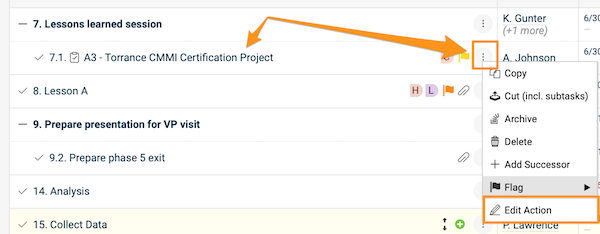
Open the action. Click the task title, or click the three dots next to the task and choose Edit action.
-
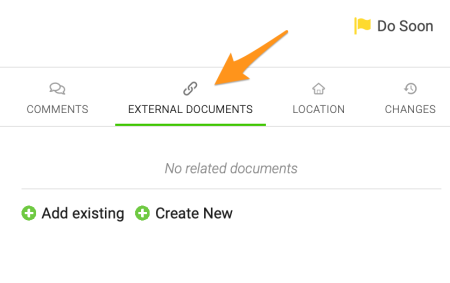
Find the External Documents section. Go to the External Documents section.
-
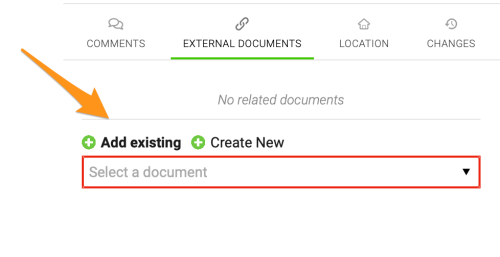
Add the document. Click the green plus button and either Add existing (select one of the existing documents in TeamGuru from the submenu) or Create New to create a new document.
-
Save. Save and close the action.
-
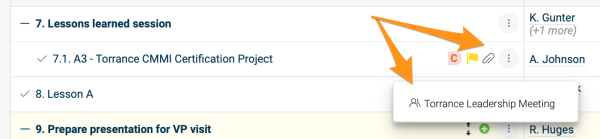
Open the related document. After you add a related document, a paperclip icon appears next to the action. Click the icon to see the title of the related document, and click the title to go directly to the document.
Please note that the related documents of individual actions and sub-actions are different from the related documents of the action list itself.
Link a document to the action list
Use the Related Documents tab
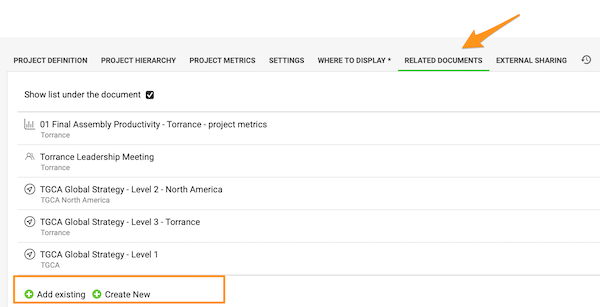
To set up related documents for the action list (not its individual actions), open the action list settings and go to the Related Documents tab. Click the green plus button to Add existing or Create New documents.
Use Related Documents above the action list
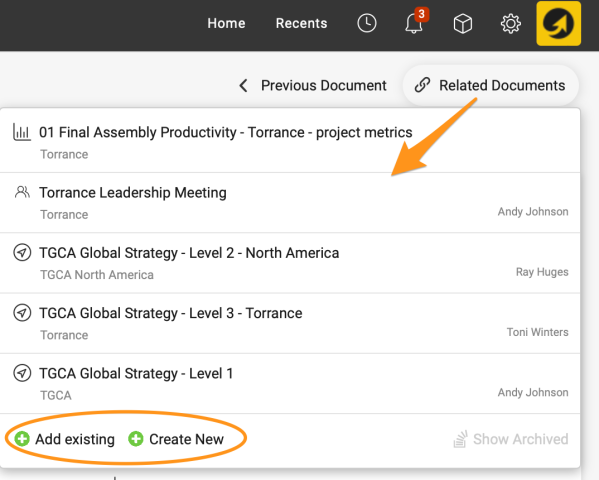
You can also set them up directly under Related Documents in the upper right corner above the action list. Here you can also view the related documents with a live link.
View related documents below the actions
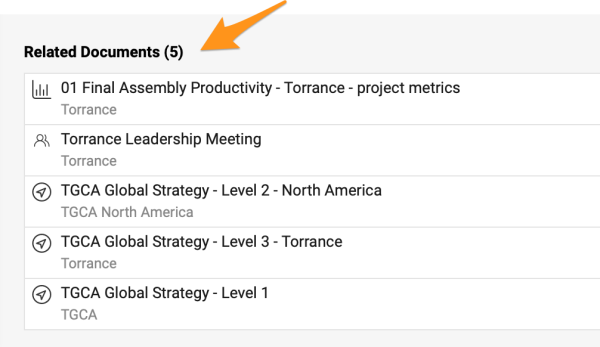
The related documents of the action list are also shown below the actions when you scroll down.
您可以为行动清单中的某项任务附加相关文档,例如主行动清单中的某项任务有自己的下级行动清单时。
为行动关联文档
-
进入行动清单。 打开包含该任务的行动清单。
-
打开行动。 点击任务标题,或点击任务旁的三个点并选择 编辑行动。
-
找到外部文档部分。 进入 外部文档 部分。
-
添加文档。 点击绿色加号按钮,然后选择 添加现有(从子菜单中选择TeamGuru中的现有文档)或 新建(创建新文档)。
-
保存。 保存并关闭行动。
-
打开相关文档。 添加相关文档后,行动旁边会出现回形针图标。点击该图标可查看相关文档的标题,点击标题即可直接打开该文档。
请注意,单个行动和子行动的相关文档与行动清单本身的相关文档是分开的。
为行动清单关联文档
使用相关文档选项卡
要为行动清单(而非其中的单个行动)设置相关文档,请打开行动清单设置,进入 相关文档 选项卡。点击绿色加号按钮,选择 添加现有 或 新建 文档。
使用行动清单上方的相关文档
您也可以直接在行动清单上方右上角的 相关文档 中进行设置。在这里还可以通过实时链接查看相关文档。
在行动下方查看相关文档
向下滚动时,行动清单的相关文档也会显示在行动下方。
还需要帮助吗?
请给我们留言。工作日我们通常会在一小时内回复。