如何在仪表板中设置RCCA电子邮件提醒
本文由英文机器翻译。 当前显示英文原文。
You can set up automatic email notifications that send RCCA reminders to the chosen responsible people according to your settings. Once an RCCA is triggered in your dashboard, the responsible people are reminded to initiate the RCCA.
Please note that your RCCA alert needs to be set up and the plan/forecast values need to be entered.
Set up the RCCA alert
Open the dashboard settings
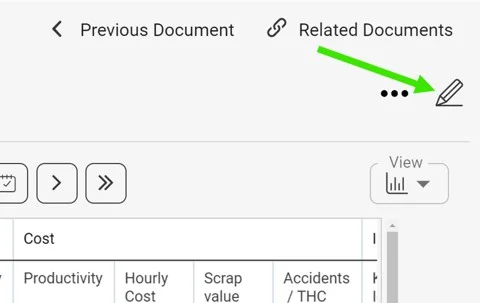
Click the edit pencil in the upper right corner above your dashboard.
Select the metric
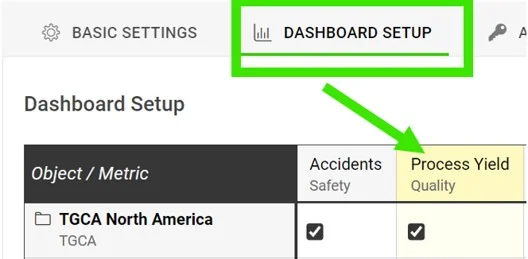
Go to the Dashboard Setup tab and click your metric.
Require an RCCA when the goal is not met
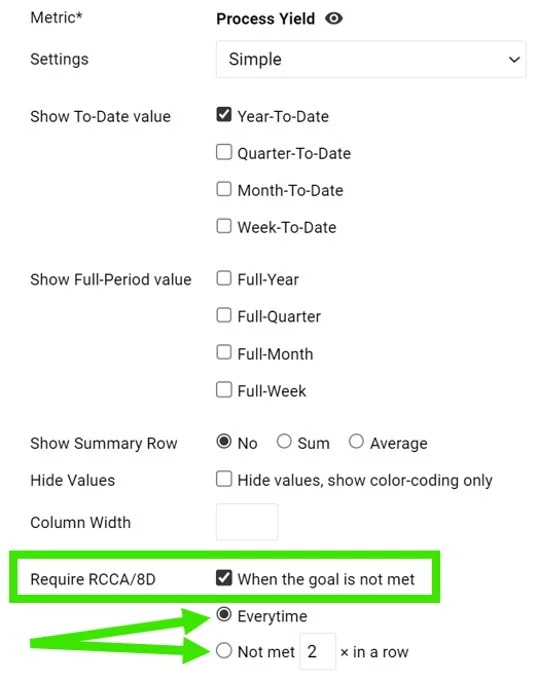
In the Require RCCA / 8D field, tick When the goal is not met and choose your preference, e.g. every time, not met 3 times in a row, etc.
See the alert in the dashboard
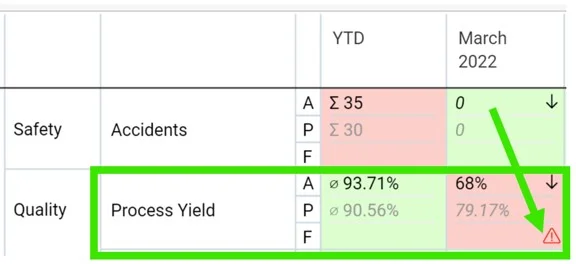
Once this is set up and your plan/forecast values are entered, an RCCA alert (a flashing red triangle) is triggered in your dashboard when the goal is not met.
Set up email notifications
Add an RCCA notification
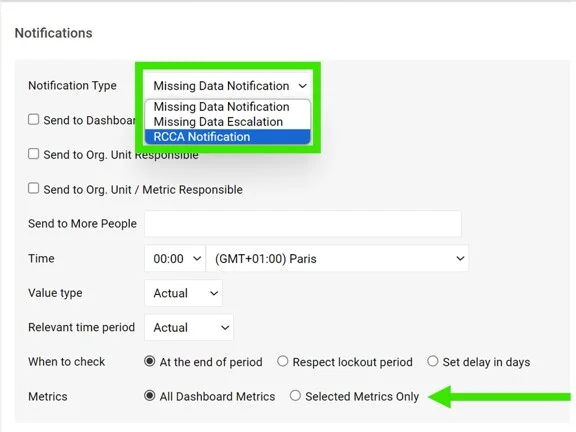
Go to your dashboard’s settings, open the Notifications tab, tick Add Notification and select RCCA notification from the drop-down menu. Reminders are sent to the responsible people according to your selection. Be sure to select specific metrics or all metrics, as applicable.

If you are using a dashboard template, you have to set up the notifications directly in your dashboard template.
Periods checked for existing RCCAs
The system checks whether there are any existing RCCA documents from your selected period (actual, last, before last). If there is no RCCA document for that period, the system checks the previous time periods too.
The time intervals are defined as follows:
- daily: current period + 6 previous days (a total of a week)
- weekly: current period + 2 previous weeks (a total of 3 weeks)
- monthly: current period + 1 previous month (a total of 2 months)
- quarterly: current period + 1 previous quarter (a total of 2 quarters)
- annual: current period + 1 previous year (a total of 2 years)
您可以设置自动电子邮件通知,按照您的设置向指定的负责人发送RCCA提醒。仪表板中触发RCCA后,系统会提醒负责人启动RCCA。
请注意,必须先设置RCCA警报,并输入计划值/预测值。
设置RCCA警报
打开仪表板设置
点击仪表板上方右上角的编辑铅笔图标。
选择指标
进入仪表板设置选项卡,点击您的指标。
未达成目标时要求RCCA
在要求RCCA/8D字段中,勾选未达成目标时,并选择您的偏好,例如每次、连续3次未达成等。
在仪表板中查看警报
完成此设置并输入计划值/预测值后,如果未达成目标,仪表板中会触发RCCA警报(闪烁的红色三角形)。
设置电子邮件通知
添加RCCA通知
打开仪表板设置,进入通知选项卡,勾选添加通知,并从下拉菜单中选择RCCA通知。系统会根据您的选择向负责人发送提醒。请务必根据需要选择特定指标或所有指标。
如果您使用的是仪表板模板,则必须直接在仪表板模板中设置通知。
检查现有RCCA的期间
系统会检查所选期间(当前、上一期、上上期)是否已有RCCA文档。如果该期间没有RCCA文档,系统还会检查之前的时间期间。
时间区间定义如下:
- 每日:当前期间+前6天(共一周)
- 每周:当前期间+前2周(共3周)
- 每月:当前期间+前1个月(共2个月)
- 每季度:当前期间+前1个季度(共2个季度)
- 每年:当前期间+前1年(共2年)
还需要帮助吗?
请给我们留言。工作日我们通常会在一小时内回复。