在哪里查看已告知和待告知的用户,以及如何将员工标记为已告知
本文由英文机器翻译。 当前显示英文原文。
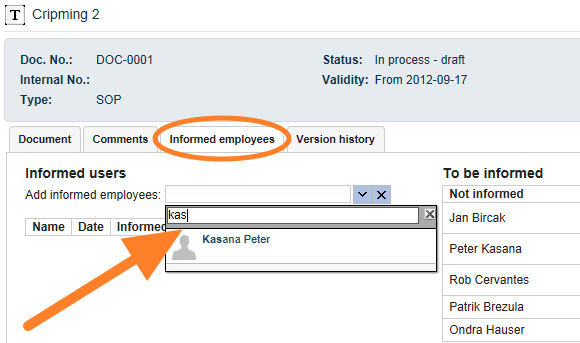
To see the list of informed or to-be-informed employees, go to the Informed Employees tab of the particular document. To mark an employee as informed:
-
Enter an employee manually. Enter the name of an employee who has been informed. This way is usually used for ad hoc users.
-
Or inform a predefined employee. Click the Inform button next to the employee’s name. These users are set up on the document edit screen, in the User groups tab, as predefined people who should be familiar with the document. If you also work with the Skill Matrix module and the document is part of the required knowledge, the employees set up in the Skill Matrix appear here as to-be-informed users automatically.

-
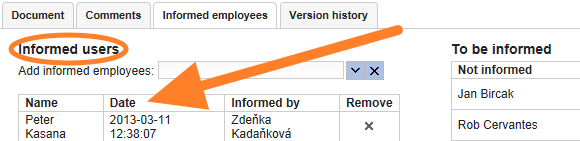
Check who was informed. You can see who was informed, when, and by whom.
要查看已告知或待告知员工的列表,请打开相应文档的 已告知员工 选项卡。将员工标记为已告知:
-
手动输入员工。 输入已告知员工的姓名。这种方式通常用于临时用户。
-
或告知预定义的员工。 点击员工姓名旁边的 告知 按钮。这些用户是在文档编辑界面的 用户组 选项卡中预先设置的、应当熟悉该文档的人员。如果您同时使用 技能矩阵 模块,并且该文档属于必备知识,技能矩阵中设置的员工会自动作为待告知用户显示在这里。
-
查看告知记录。 您可以查看谁在何时由谁告知。
还需要帮助吗?
请给我们留言。工作日我们通常会在一小时内回复。