谁可以审批文档?如何审批?
本文由英文机器翻译。 当前显示英文原文。
A document has to be approved before it can be activated.
Specify the approvers
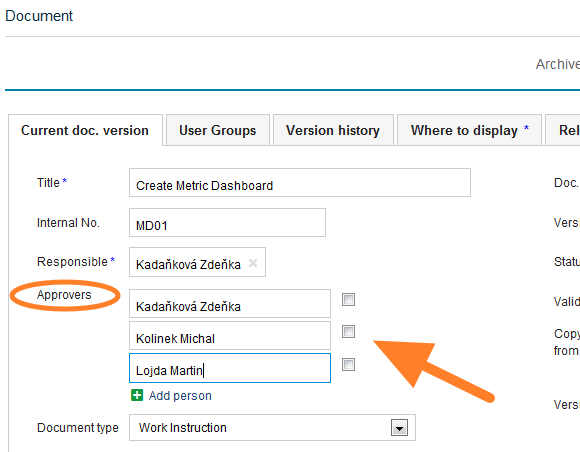
The people who can approve the document are specified on the document edit screen, as shown below.
Approve a newly created document
-
Save the draft. Click Save & View if you need to make other changes later. The document stays as a draft.
-
Send it for approval. Click Save & Send for Approval if no changes are to be made.
-
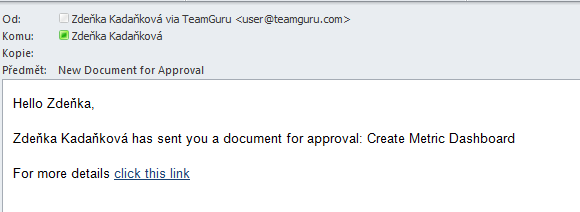
Approvers are notified. The approvers receive an email notification asking them to approve the document.
-
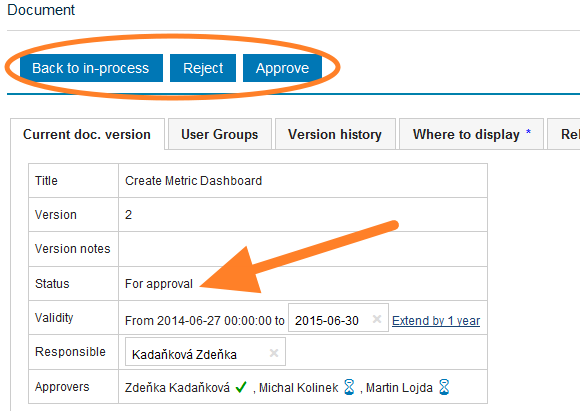
The approvers decide. The approvers approve or disapprove the document, or return it to the in-process status.
-
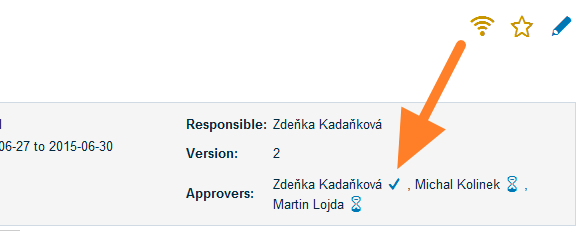
Check the approval progress. When you open the document, you can see who has approved it and whose approval is pending.
-
The document becomes active. Once all the approvers have approved the document, its status changes to Approved and the document becomes Active.
文档必须经过审批才能生效。
指定审批人
可以审批文档的人员在文档编辑界面中指定,如下图所示。
审批新创建的文档
-
保存草稿。 如果之后还需要修改,请点击 保存并查看。文档会保持 草稿 状态。
-
提交审批。 如果无需修改,请点击 保存并提交审批。
-
审批人收到通知。 审批人会收到电子邮件通知,请其审批该文档。
-
审批人做出决定。 审批人批准或驳回文档,或将其退回到处理中状态。
-
查看审批进度。 打开文档时,您可以看到谁已批准、谁尚未审批。
-
文档生效。 所有审批人都批准后,文档状态变为 已批准,文档随即 生效。
还需要帮助吗?
请给我们留言。工作日我们通常会在一小时内回复。