如何启用两步验证
本文由英文机器翻译。 当前显示英文原文。
When your company endorses Multi-Factor Authentication (MFA) for logging in, you can make your account more secure by enabling 2-Step Verification.
To enable or disable 2-Step Verification for your account, follow these steps:
-
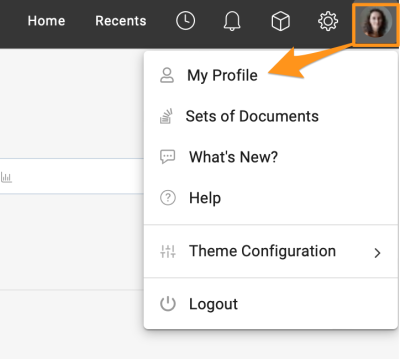
Open your profile. Go to your profile and select My Profile.
-
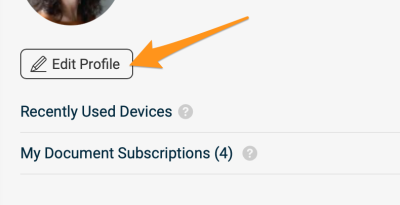
Edit your profile. Click the Edit Profile button to access your account settings.
-
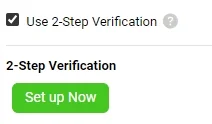
Switch 2-Step Verification on or off. In the Personal Information section, find the option to enable or disable 2-Step Verification.
To learn how to log in with it, see How to log in with 2-Step Verification.
Please note that if your company requires MFA for logging in, the option to disable this feature is not available.
如果贵公司支持使用多重身份验证(MFA)登录,您可以启用两步验证,提高账户安全性。
要为账户启用或停用两步验证,请按以下步骤操作:
-
打开个人资料。 进入个人资料菜单,选择 我的个人资料。
-
编辑个人资料。 点击 编辑个人资料 按钮,进入账户设置。
-
开启或关闭两步验证。 在 个人信息 部分,找到启用或停用 两步验证 的选项。
如需了解如何使用两步验证登录,请参阅如何使用两步验证登录。
请注意,如果贵公司要求使用MFA登录,则无法停用此功能。
还需要帮助吗?
请给我们留言。工作日我们通常会在一小时内回复。