如何将X-matrix导出为PDF、PowerPoint或PNG
本文由英文机器翻译。 当前显示英文原文。
Take your plan to the meeting. Click the download icon next to the title of the plan.
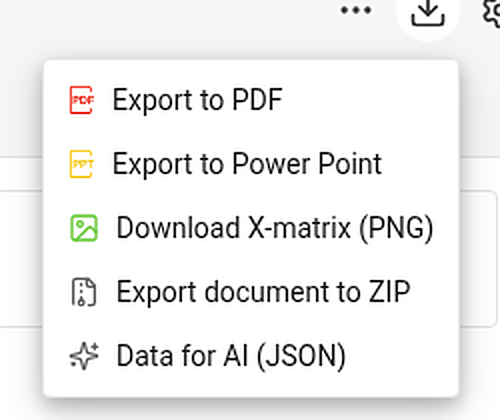
| Item | What you get |
|---|---|
| Export to PDF | A landscape PDF: a title page with the main objective, overall status and plan hierarchy, then the views you choose, then the overall status and every section – KPIs with their monthly values. |
| Export to Power Point | A 16:9 presentation: a title slide, a picture of each chosen view and, with the sections, editable tables with the codes colored by status. |
| Download X-matrix (PNG) | A picture of the matrix with its main objective and legend. |
| Export document to ZIP and Data for AI (JSON) | Whole-document exports. They appear only if your administrator has switched them on for your TeamGuru. |
Choose what to print
PDF and PowerPoint first ask what the file should contain.
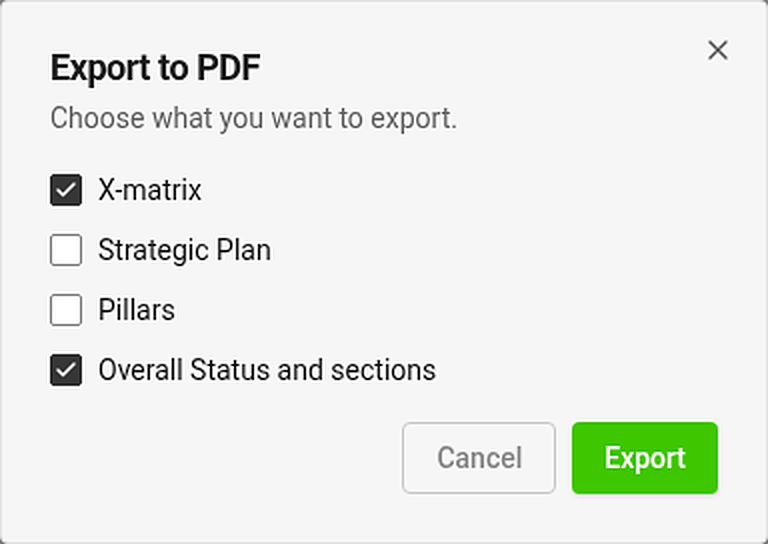
Tick any of the views – X-matrix, Strategic Plan, Pillars – and Overall Status and sections. The view you are looking at is ticked for you. Export is disabled while nothing is ticked.
Each chosen view is printed on its own page. A view that is too tall for a page is shrunk to fit (down to 60 %); if it would need to be smaller, it continues on more pages at its normal size.
Where is my file?
The export runs in the background and the file arrives in your async jobs tray. While an export of the same kind is running, its menu item is disabled.
Good to know
- Export is available once the plan has at least one 5-year or annual goal.
- You can export only what you may open. Documents and values you may not see are printed as hidden.
- Exports always contain the whole matrix, even if you have filtered the page to selected items.
- Print the page directly (Ctrl/⌘ + P) and the menus and buttons are left out.
把计划带到会议上。点击计划标题旁的下载图标。
| 选项 | 导出结果 |
|---|---|
| 导出为PDF | 横向PDF:首页为包含主要目标、整体状态和计划层级的标题页,然后是您选择的视图,再是整体状态和各个部分(含KPI及其月度数值)。 |
| 导出为PowerPoint | 16:9演示文稿:一张标题幻灯片、每个所选视图的图片,如果包含各部分,还有可编辑的表格,其中的编号按状态着色。 |
| 下载X-matrix(PNG) | 包含主要目标和图例的矩阵图片。 |
| 将文档导出为ZIP和AI数据(JSON) | 整个文档的导出。仅当管理员为您的TeamGuru开启后才会显示。 |
选择要打印的内容
导出PDF和PowerPoint时,系统会先询问文件应包含哪些内容。
勾选任意视图(X-matrix、战略计划、支柱)以及整体状态和各部分。您当前查看的视图已默认勾选。未勾选任何内容时,导出按钮不可用。
每个所选视图单独打印在一页上。如果视图过高,一页放不下,会缩小以适应页面(最小缩至60%);如果需要缩得更小,则会以正常大小延续到后续页面。
我的文件在哪里?
导出在后台进行,文件会出现在您的异步任务栏中。同类导出正在进行时,相应的菜单项不可用。
须知
- 计划中至少有一个5年目标或年度目标后,才能导出。
- 您只能导出有权打开的内容。无权查看的文档和数值会以隐藏形式打印。
- 导出内容始终包含整个矩阵,即使您已将页面筛选为部分条目。
- 直接打印页面(Ctrl/⌘ + P)时,菜单和按钮不会被打印。
还需要帮助吗?
请给我们留言。工作日我们通常会在一小时内回复。