How to unblock the user? Manual verification.
When a user fails verification, the system blocks their account automatically. The account remains active, but the user cannot log in until an instance administrator unblocks it.
Please contact your system administrator or support@teamguru.com to help you with this process.
Instructions for administrators
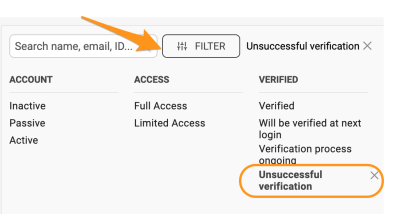
Filter the users by verification
Administrators can filter users by criteria such as Unsuccessful verification.
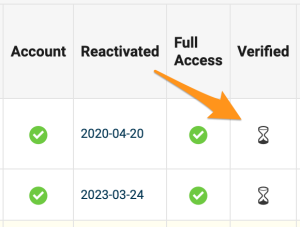
Check the Verified column
Users whose verification is pending or incomplete display a sandglass icon in the Verified column. Users with an unverified status have a red dot.
Verify the user manually
If the administrator is certain that the user should be validated, or wishes to restart the verification process, they can start the verification again or verify the user directly in the user’s profile:
-
Open the user’s edit screen. Go to the user edit screen.

-
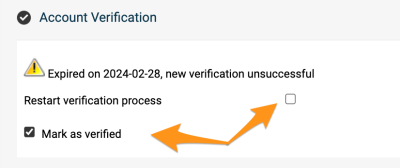
Show the account verification. Go to the Account Verification section and click Show.

-
Restart or confirm the verification. To restart the verification process, tick Restart verification process. To validate the user manually, select Mark as verified.
-
Save the changes. Save the user’s profile.
Related article: What is user verification and how does it work?
Still need help?
Write to us. We usually reply within an hour on business days.