如何解锁用户?手动验证
本文由英文机器翻译。 当前显示英文原文。
When a user fails verification, the system blocks their account automatically. The account remains active, but the user cannot log in until an instance administrator unblocks it.
Please contact your system administrator or support@teamguru.com to help you with this process.
Instructions for administrators
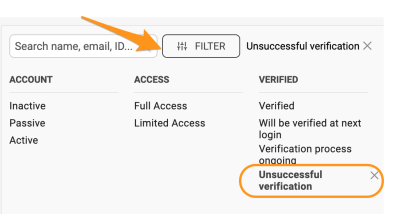
Filter the users by verification
Administrators can filter users by criteria such as Unsuccessful verification.
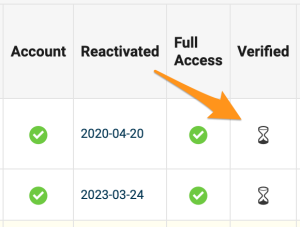
Check the Verified column
Users whose verification is pending or incomplete display a sandglass icon in the Verified column. Users with an unverified status have a red dot.
Verify the user manually
If the administrator is certain that the user should be validated, or wishes to restart the verification process, they can start the verification again or verify the user directly in the user’s profile:
-
Open the user’s edit screen. Go to the user edit screen.

-
Show the account verification. Go to the Account Verification section and click Show.

-
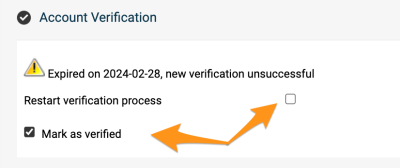
Restart or confirm the verification. To restart the verification process, tick Restart verification process. To validate the user manually, select Mark as verified.
-
Save the changes. Save the user’s profile.
Related article: What is user verification and how does it work?
用户验证失败时,系统会自动锁定其账户。账户仍处于活跃状态,但在实例管理员解锁之前,用户无法登录。
请联系您的系统管理员或support@teamguru.com,协助您完成此流程。
管理员操作说明
按验证状态筛选用户
管理员可以按 验证失败 等条件筛选用户。
查看已验证列
验证待处理或未完成的用户,会在 已验证 列中显示沙漏图标。未通过验证的用户显示红点。
手动验证用户
如果管理员确认该用户应通过验证,或希望重新开始验证流程,可以在用户的个人资料中重新启动验证或直接验证该用户:
-
打开用户编辑界面。 进入用户编辑界面。
-
显示账户验证。 进入 账户验证 部分,点击 显示。
-
重新开始或确认验证。 要重新开始验证流程,请勾选 重新开始验证流程。要手动验证用户,请选择 标记为已验证。
-
保存更改。 保存用户的个人资料。
相关文章:什么是用户验证?如何进行?
还需要帮助吗?
请给我们留言。工作日我们通常会在一小时内回复。