Managing Organization Structure: A Quick Guide
The organization structure is the backbone of your entire TeamGuru system: it organizes the documents across all modules and the access to them. Knowing how to manage it is key to an efficient, well-structured environment. This quick guide walks you through the essential steps for creating, reordering and deleting organization units, for smooth operation and optimal user and document management.
-
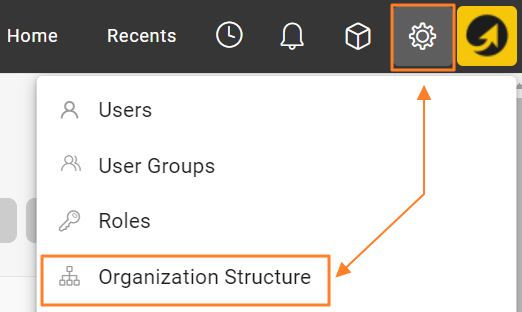
Open the organization structure. Go to the Settings menu and select Organization Structure to view the current structure.
-
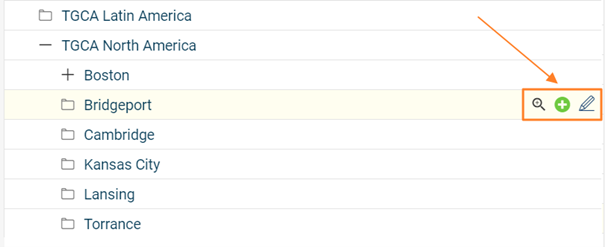
Add, edit or delete units. Modify your organization structure using the buttons next to each organization unit: add new units, edit existing ones, or delete units that are no longer needed.
-
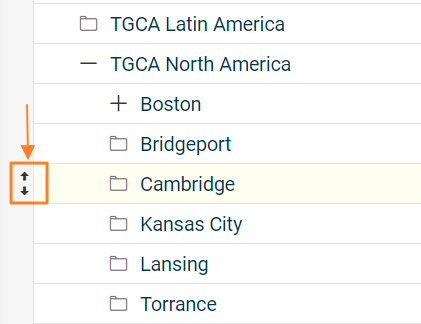
Rearrange the units. Rearrange the units within the structure by drag and drop to move them to the desired position (up/down, left/right).
-
Consider the impact of moving a unit. Moving an organization unit to a different place in the structure also relocates all linked documents that were created and saved under that unit. Take this into account when restructuring, to keep the documents continuous and accessible. Reordering organization units may also affect user rights, so plan accordingly.
-
Delete units with caution. Deleting an organization unit permanently removes the unit and all metrics collected for it. Make sure all relevant data has been properly backed up or transferred before you delete it.
Read the topic Locating Documents Linked to Organization Units before moving or deleting existing organization units.
By following these steps, you can confidently manage your organization structure, optimize the organization of your documents and keep your TeamGuru system streamlined.
Still need help?
Write to us. We usually reply within an hour on business days.