管理组织结构:快速指南
本文由英文机器翻译。 当前显示英文原文。
The organization structure is the backbone of your entire TeamGuru system: it organizes the documents across all modules and the access to them. Knowing how to manage it is key to an efficient, well-structured environment. This quick guide walks you through the essential steps for creating, reordering and deleting organization units, for smooth operation and optimal user and document management.
-
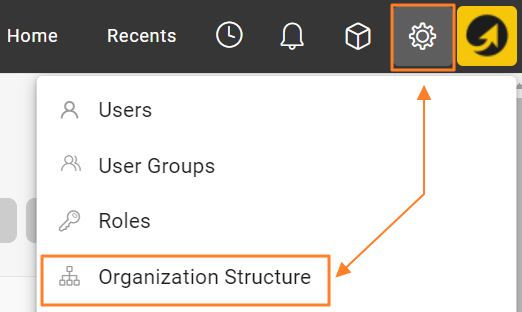
Open the organization structure. Go to the Settings menu and select Organization Structure to view the current structure.
-
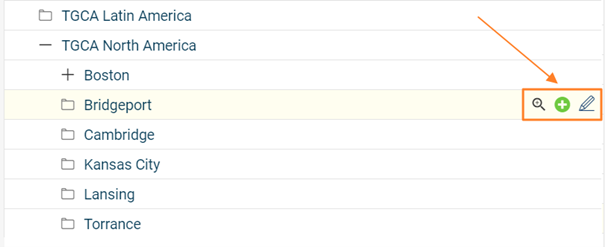
Add, edit or delete units. Modify your organization structure using the buttons next to each organization unit: add new units, edit existing ones, or delete units that are no longer needed.
-
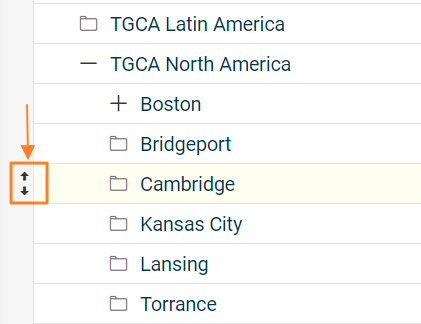
Rearrange the units. Rearrange the units within the structure by drag and drop to move them to the desired position (up/down, left/right).
-
Consider the impact of moving a unit. Moving an organization unit to a different place in the structure also relocates all linked documents that were created and saved under that unit. Take this into account when restructuring, to keep the documents continuous and accessible. Reordering organization units may also affect user rights, so plan accordingly.
-
Delete units with caution. Deleting an organization unit permanently removes the unit and all metrics collected for it. Make sure all relevant data has been properly backed up or transferred before you delete it.
Read the topic Locating Documents Linked to Organization Units before moving or deleting existing organization units.
By following these steps, you can confidently manage your organization structure, optimize the organization of your documents and keep your TeamGuru system streamlined.
组织结构是整个TeamGuru系统的骨架:它决定了所有模块中文档的归属以及访问权限。掌握组织结构的管理方法,是打造高效、有序的工作环境的关键。本快速指南介绍创建、重新排序和删除组织单元的基本步骤,帮助您顺畅运行系统,更好地管理用户和文档。
-
打开组织结构。 进入设置菜单,选择组织结构,查看当前结构。
-
添加、编辑或删除单元。 使用每个组织单元旁边的按钮修改组织结构:添加新单元、编辑现有单元,或删除不再需要的单元。
-
重新排列单元。 通过拖放将单元移动到结构中的目标位置(上下、左右)。
-
考虑移动单元的影响。 将组织单元移到结构中的其他位置时,在该单元下创建和保存的所有关联文档也会随之移动。调整结构时请考虑这一点,确保文档保持连续、可访问。重新排列组织单元还可能影响用户权限,请提前做好规划。
-
谨慎删除单元。 删除组织单元会永久删除该单元及其收集的所有指标。删除前,请确保所有相关数据已妥善备份或转移。
移动或删除现有组织单元之前,请阅读查找与组织单元关联的文档。
按照这些步骤操作,您就能放心地管理组织结构,优化文档的组织方式,让TeamGuru系统保持简洁高效。
还需要帮助吗?
请给我们留言。工作日我们通常会在一小时内回复。