Zarządzanie strukturą organizacyjną: krótki przewodnik
Tłumaczenie maszynowe z angielskiego. Wyświetlany jest oryginał po angielsku.
The organization structure is the backbone of your entire TeamGuru system: it organizes the documents across all modules and the access to them. Knowing how to manage it is key to an efficient, well-structured environment. This quick guide walks you through the essential steps for creating, reordering and deleting organization units, for smooth operation and optimal user and document management.
-
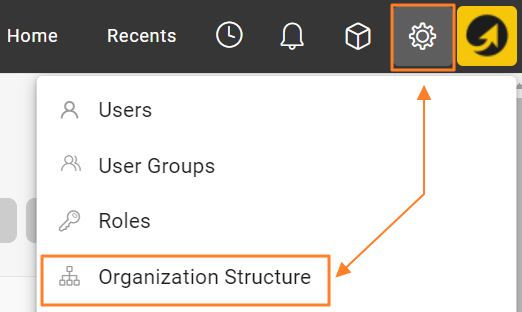
Open the organization structure. Go to the Settings menu and select Organization Structure to view the current structure.
-
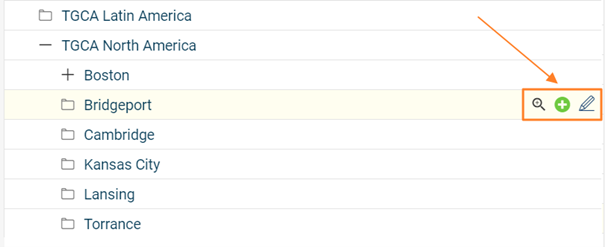
Add, edit or delete units. Modify your organization structure using the buttons next to each organization unit: add new units, edit existing ones, or delete units that are no longer needed.
-
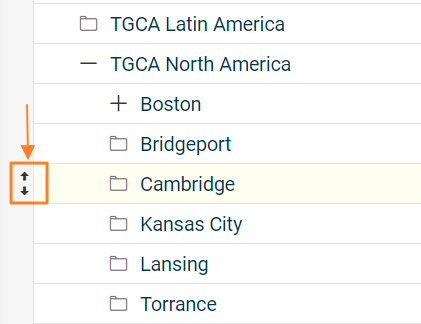
Rearrange the units. Rearrange the units within the structure by drag and drop to move them to the desired position (up/down, left/right).
-
Consider the impact of moving a unit. Moving an organization unit to a different place in the structure also relocates all linked documents that were created and saved under that unit. Take this into account when restructuring, to keep the documents continuous and accessible. Reordering organization units may also affect user rights, so plan accordingly.
-
Delete units with caution. Deleting an organization unit permanently removes the unit and all metrics collected for it. Make sure all relevant data has been properly backed up or transferred before you delete it.
Read the topic Locating Documents Linked to Organization Units before moving or deleting existing organization units.
By following these steps, you can confidently manage your organization structure, optimize the organization of your documents and keep your TeamGuru system streamlined.
Struktura organizacyjna to podstawa całego systemu TeamGuru: porządkuje dokumenty we wszystkich modułach i dostęp do nich. Umiejętne zarządzanie nią jest kluczem do sprawnego, dobrze uporządkowanego środowiska. Ten krótki przewodnik pokazuje najważniejsze kroki tworzenia, przestawiania i usuwania jednostek organizacyjnych, tak aby system działał płynnie, a użytkownicy i dokumenty były dobrze zarządzane.
-
Otwórz strukturę organizacyjną. Przejdź do menu Ustawienia i wybierz Struktura organizacyjna, aby zobaczyć bieżącą strukturę.
-
Dodawaj, edytuj lub usuwaj jednostki. Zmieniaj strukturę organizacyjną przyciskami obok każdej jednostki: dodawaj nowe jednostki, edytuj istniejące lub usuwaj niepotrzebne.
-
Przestaw jednostki. Przeciągnij jednostkę i upuść ją w wybranym miejscu struktury (w górę, w dół, w lewo, w prawo).
-
Weź pod uwagę skutki przeniesienia jednostki. Przeniesienie jednostki organizacyjnej w inne miejsce struktury przenosi też wszystkie powiązane dokumenty, które utworzono i zapisano w tej jednostce. Uwzględnij to przy zmianie struktury, aby dokumenty zachowały ciągłość i pozostały dostępne. Zmiana kolejności jednostek może też wpłynąć na uprawnienia użytkowników, więc zaplanuj ją z wyprzedzeniem.
-
Usuwaj jednostki ostrożnie. Usunięcie jednostki organizacyjnej trwale usuwa jednostkę i wszystkie zebrane dla niej dane wskaźników. Przed usunięciem upewnij się, że wszystkie potrzebne dane zostały zarchiwizowane lub przeniesione.
Zanim przeniesiesz lub usuniesz istniejące jednostki organizacyjne, przeczytaj artykuł Wyszukiwanie dokumentów powiązanych z jednostkami organizacyjnymi.
Dzięki tym krokom pewnie zarządzisz strukturą organizacyjną, lepiej uporządkujesz dokumenty i utrzymasz porządek w systemie TeamGuru.
Potrzebujesz dalszej pomocy?
Napisz do nas. W dni robocze zwykle odpowiadamy w ciągu godziny.