Eskalation von Problemen Schritt für Schritt
Maschinelle Übersetzung aus dem Englischen. Englisches Original wird angezeigt.
The Problem Escalation (PE) module enables a rapid response to a production stoppage through immediate notifications and an escalation system.
Overview of the steps
-
Create a list of problem / reject types. Before you start to create PE documents, prepare the types of problems you want to escalate.
-
Create escalation templates. Also prepare the escalation templates before you create PE documents.
-
Create a new problem escalation. Once the problem / reject types and the escalation templates are ready, you can create a new PE document.
The first two steps are done only at the beginning, when you start using Problem Escalation. System admins usually create the templates and the problem types.
Create problem / reject types
Create a list of problem / reject types, such as an equipment problem, a material shortage, a quality issue, etc.
-
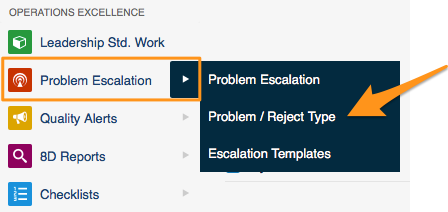
Open the problem types. Go to the Problem Escalation menu and the Problem / Reject Type submenu.
-
Add a new type. Click the Add icon to create a new type.

Create escalation templates
-
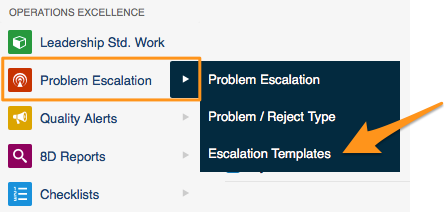
Open the escalation templates. Go to the Problem Escalation menu and the Escalation Templates submenu.
-
Add a new template. Click the Add icon to create a new template.
-
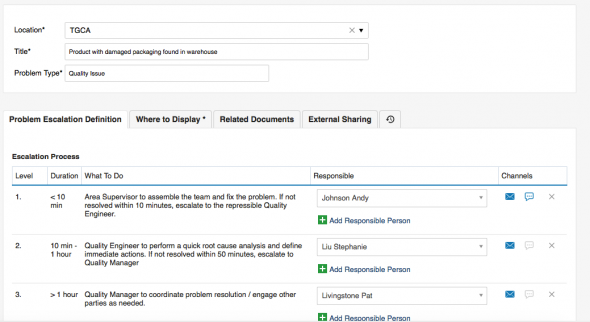
Select the location. In Location, select the org. unit of your structure that this template should be used for (each site or org. unit may have a different process).
-
Enter a title. Fill in the Title of the template.
-
Select the problem type. Select the Problem Type that this template should be used for (a material shortage may have a different process than a quality issue).
-
Set up the escalation levels. Set up the individual levels of the Escalation Process: who is responsible for solving the PE at each level, and after what time the system should escalate the issue if it is not solved.
-
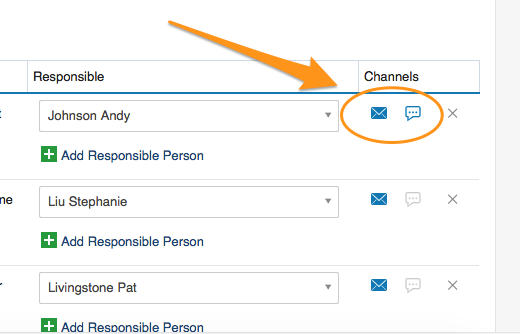
Select the channels. Select the information channels (email, SMS).
Create a new problem escalation
-
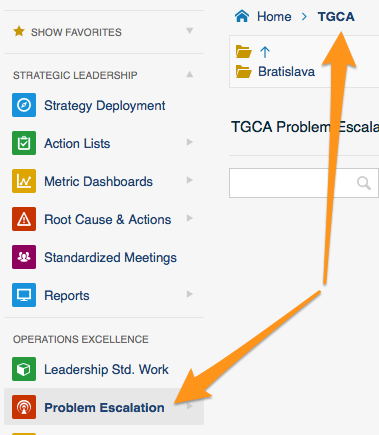
Open the org. unit. Click the Problem Escalation menu and go to the relevant organization unit of your structure.
-
Add a new PE. Click the Add icon to create a new PE.
-
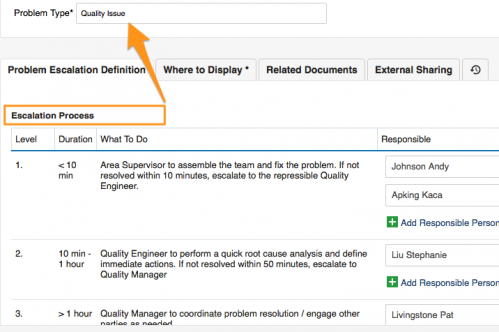
Check the location and the problem type. Check the Location and select the correct Problem Type. The Title and the Escalation Process are predefined according to your escalation template.
-
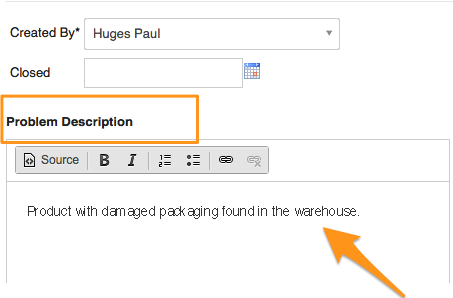
Describe the problem. Fill in the problem description.
-
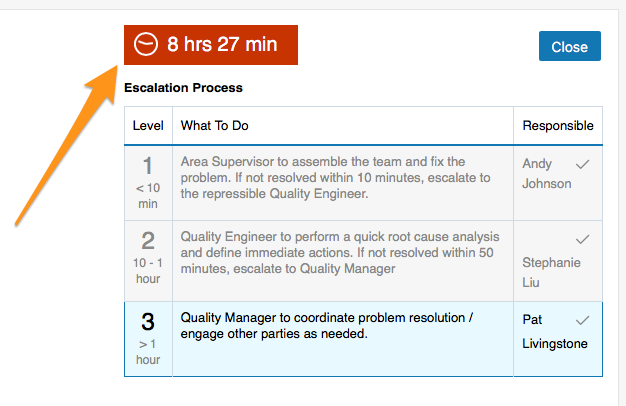
Save the PE. Click Save + Close. The time countdown begins.
-
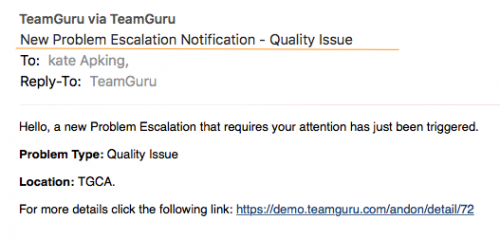
First-level contacts are notified. Once a new PE has been saved, an email notification (SMS) is sent to the first-level contacts of your escalation process.
-
The issue is escalated if not solved. If the PE is not closed within the time specified for the first-level contacts, an escalation email is automatically sent to the second-level contacts.
-
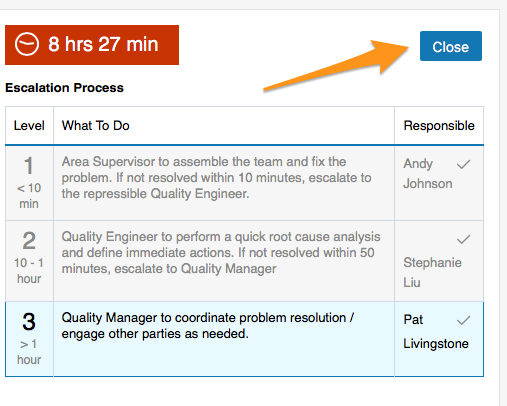
Close the PE. Click the Close button once the issue has been solved.
Share your progress
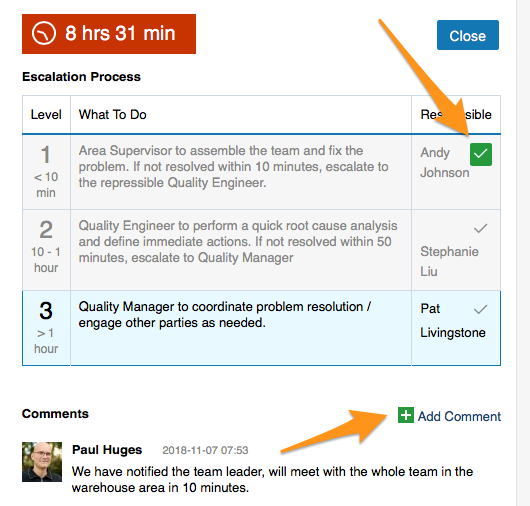
- Click the tick icon next to your name to make it green. Your colleagues can see that you are working on solving the issue.
- Use the Comments field to keep your colleagues informed about the progress.
Video guide
Das Modul Eskalation von Problemen (PE) ermöglicht mit sofortigen Benachrichtigungen und einem Eskalationssystem eine schnelle Reaktion auf einen Produktionsstillstand.
Die Schritte im Überblick
-
Legen Sie eine Liste der Problem-/Fehlertypen an. Bevor Sie PE-Dokumente erstellen, legen Sie die Problemtypen fest, die Sie eskalieren möchten.
-
Erstellen Sie Eskalationsvorlagen. Bereiten Sie vor dem Erstellen von PE-Dokumenten auch die Eskalationsvorlagen vor.
-
Erstellen Sie eine neue Problemeskalation. Sobald die Problem-/Fehlertypen und die Eskalationsvorlagen bereitstehen, können Sie ein neues PE-Dokument erstellen.
Die ersten beiden Schritte erledigen Sie nur einmal, wenn Sie mit der Eskalation von Problemen beginnen. Vorlagen und Problemtypen legen in der Regel die Systemadministratoren an.
Problem-/Fehlertypen anlegen
Legen Sie eine Liste der Problem-/Fehlertypen an, z. B. Anlagenproblem, Materialmangel, Qualitätsproblem usw.
-
Öffnen Sie die Problemtypen. Öffnen Sie im Menü Eskalation von Problemen das Untermenü Problem-/Fehlertyp.
-
Fügen Sie einen neuen Typ hinzu. Klicken Sie auf das Symbol Hinzufügen, um einen neuen Typ anzulegen.
Eskalationsvorlagen erstellen
-
Öffnen Sie die Eskalationsvorlagen. Öffnen Sie im Menü Eskalation von Problemen das Untermenü Eskalationsvorlagen.
-
Fügen Sie eine neue Vorlage hinzu. Klicken Sie auf das Symbol Hinzufügen, um eine neue Vorlage anzulegen.
-
Wählen Sie den Ort. Wählen Sie unter Ort die Organisationseinheit Ihrer Struktur, für die diese Vorlage gilt (jeder Standort und jede Org.-Einheit kann einen anderen Ablauf haben).
-
Geben Sie einen Titel ein. Füllen Sie den Titel der Vorlage aus.
-
Wählen Sie den Problemtyp. Wählen Sie den Problemtyp, für den diese Vorlage gilt (ein Materialmangel kann anders ablaufen als ein Qualitätsproblem).
-
Legen Sie die Eskalationsstufen fest. Richten Sie die einzelnen Stufen des Eskalationsprozesses ein: wer auf jeder Stufe für die Lösung der PE verantwortlich ist und nach welcher Zeit das System das Problem eskalieren soll, wenn es nicht gelöst ist.
-
Wählen Sie die Kanäle. Wählen Sie die Informationskanäle (E-Mail, SMS).
Neue Problemeskalation erstellen
-
Öffnen Sie die Org.-Einheit. Klicken Sie auf das Menü Eskalation von Problemen und wechseln Sie in die betreffende Organisationseinheit Ihrer Struktur.
-
Fügen Sie eine neue PE hinzu. Klicken Sie auf das Symbol Hinzufügen, um eine neue PE anzulegen.
-
Prüfen Sie Ort und Problemtyp. Prüfen Sie den Ort und wählen Sie den richtigen Problemtyp. Titel und Eskalationsprozess sind gemäß Ihrer Eskalationsvorlage vorausgefüllt.
-
Beschreiben Sie das Problem. Füllen Sie die Problembeschreibung aus.
-
Speichern Sie die PE. Klicken Sie auf Speichern + Schließen. Der Countdown beginnt.
-
Die Kontakte der ersten Stufe werden benachrichtigt. Sobald eine neue PE gespeichert ist, erhalten die Kontakte der ersten Stufe Ihres Eskalationsprozesses eine E-Mail-Benachrichtigung (SMS).
-
Ungelöste Probleme werden eskaliert. Wird die PE nicht innerhalb der für die erste Stufe festgelegten Zeit geschlossen, geht automatisch eine Eskalations-E-Mail an die Kontakte der zweiten Stufe.
-
Schließen Sie die PE. Klicken Sie auf die Schaltfläche Schließen, sobald das Problem gelöst ist.
Fortschritt teilen
- Klicken Sie auf das Häkchen neben Ihrem Namen, damit es grün wird. So sehen Ihre Kollegen, dass Sie an der Lösung arbeiten.
- Halten Sie Ihre Kollegen im Feld Kommentare über den Fortschritt auf dem Laufenden.
Video-Anleitung
Brauchen Sie weitere Hilfe?
Schreiben Sie uns. An Werktagen antworten wir meist innerhalb einer Stunde.