How to create a working instruction document
Working instructions are a specific type of document, created in the Documents module.
Before you create your first document, you have to set up your document type as Working Instructions. To do so, see How to create a new document type. Once the document type is created, you can start creating a document.
Create the document
-
Add a new document. Go to the Documents module and click the Add icon.

-
Fill in the heading data.
-
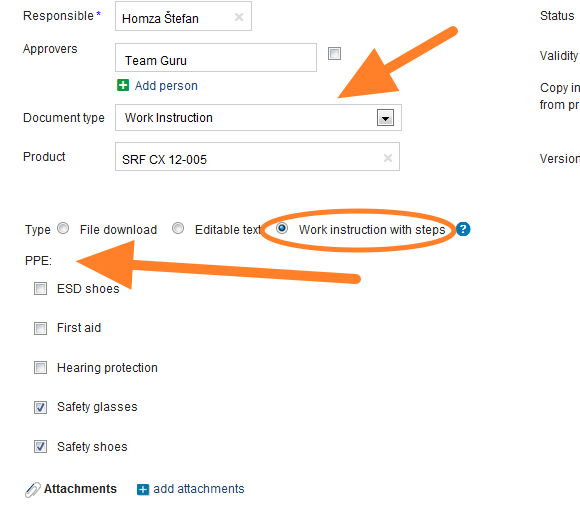
Select the responsible person.
-
Choose the approvers. Choose one or more approvers for the document.
-
Set up the header details. Set up all the header details: document type, version and validity.
-
Select the type. Select Work Instruction with Steps as the Type.
-
Select the required PPE.
-
Save the document. Save the document, then start entering the working steps.
Add the working steps
-
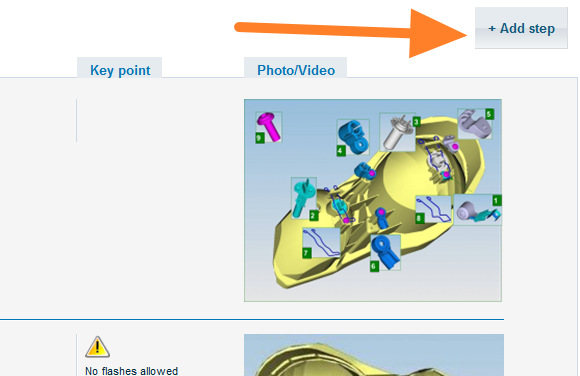
Add the first step. Click the Add step button.
-
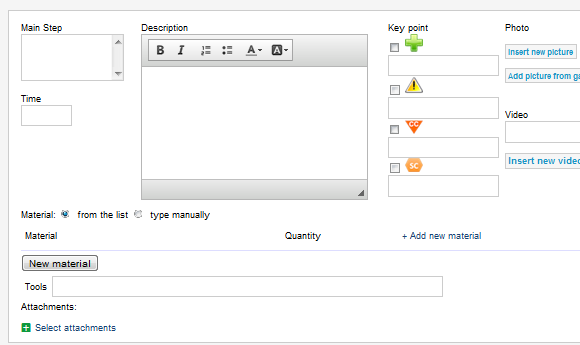
Enter the step details. On the screen that opens, enter all the details of the step. You can add attachments, pictures or videos. Once all the details are entered, click Save and go on to the next step.
-
Send the document for approval. Once your document is complete, click Save & Send for Approval. For more details, see the article describing the approval process: Who can approve a document and how.
Video guide
Still need help?
Write to us. We usually reply within an hour on business days.