Jak utworzyć instrukcję stanowiskową
Tłumaczenie maszynowe z angielskiego. Wyświetlany jest oryginał po angielsku.
Working instructions are a specific type of document, created in the Documents module.
Before you create your first document, you have to set up your document type as Working Instructions. To do so, see How to create a new document type. Once the document type is created, you can start creating a document.
Create the document
-
Add a new document. Go to the Documents module and click the Add icon.

-
Fill in the heading data.
-
Select the responsible person.
-
Choose the approvers. Choose one or more approvers for the document.
-
Set up the header details. Set up all the header details: document type, version and validity.
-
Select the type. Select Work Instruction with Steps as the Type.
-
Select the required PPE.
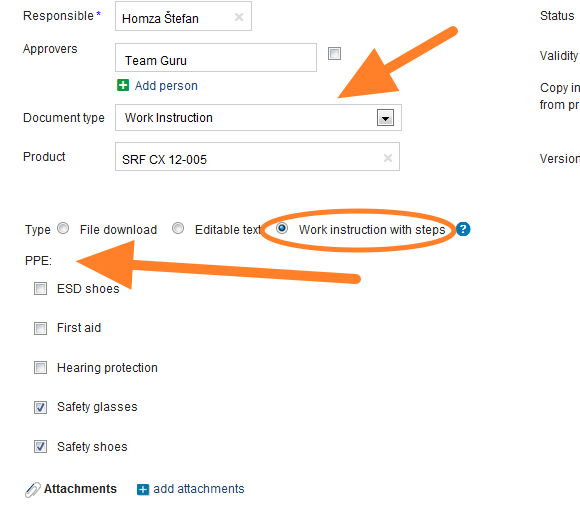
-
Save the document. Save the document, then start entering the working steps.
Add the working steps
-
Add the first step. Click the Add step button.
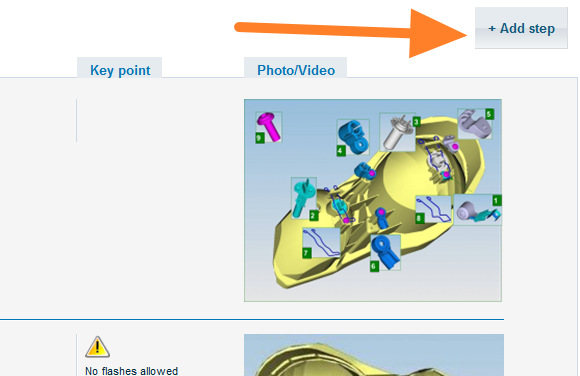
-
Enter the step details. On the screen that opens, enter all the details of the step. You can add attachments, pictures or videos. Once all the details are entered, click Save and go on to the next step.
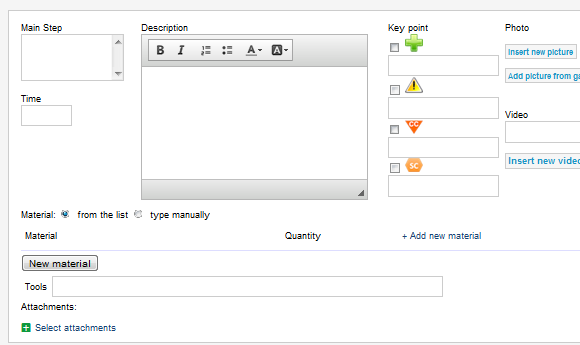
-
Send the document for approval. Once your document is complete, click Save & Send for Approval. For more details, see the article describing the approval process: Who can approve a document and how.
Video guide
Instrukcje stanowiskowe to szczególny typ dokumentu, który tworzysz w module Dokumenty.
Zanim utworzysz pierwszy dokument, ustaw typ dokumentu Instrukcje stanowiskowe. Jak to zrobić, opisujemy w artykule Jak utworzyć nowy typ dokumentu. Gdy typ dokumentu jest gotowy, możesz zacząć tworzyć dokument.
Utwórz dokument
-
Dodaj nowy dokument. Otwórz moduł Dokumenty i kliknij ikonę Dodaj.
-
Uzupełnij dane w nagłówku.
-
Wybierz osobę odpowiedzialną.
-
Wybierz osoby zatwierdzające. Wybierz jedną lub kilka osób, które zatwierdzą dokument.
-
Uzupełnij nagłówek. Uzupełnij wszystkie dane nagłówka: typ dokumentu, wersję i ważność.
-
Wybierz typ. Jako Typ wybierz Instrukcja stanowiskowa z krokami.
-
Wybierz wymagane ŚOI.
-
Zapisz dokument. Zapisz dokument, a potem zacznij dodawać kroki pracy.
Dodaj kroki pracy
-
Dodaj pierwszy krok. Kliknij przycisk Dodaj krok.
-
Wpisz szczegóły kroku. Na ekranie, który się otworzy, wpisz wszystkie szczegóły kroku. Możesz dodać załączniki, zdjęcia lub filmy. Gdy wszystko będzie wpisane, kliknij Zapisz i przejdź do następnego kroku.
-
Wyślij dokument do zatwierdzenia. Gdy dokument jest gotowy, kliknij Zapisz i wyślij do zatwierdzenia. Więcej informacji znajdziesz w artykule o zatwierdzaniu: Kto i jak może zatwierdzić dokument.
Wideo
Potrzebujesz dalszej pomocy?
Napisz do nas. W dni robocze zwykle odpowiadamy w ciągu godziny.