如何创建作业指导书文档
本文由英文机器翻译。 当前显示英文原文。
Working instructions are a specific type of document, created in the Documents module.
Before you create your first document, you have to set up your document type as Working Instructions. To do so, see How to create a new document type. Once the document type is created, you can start creating a document.
Create the document
-
Add a new document. Go to the Documents module and click the Add icon.

-
Fill in the heading data.
-
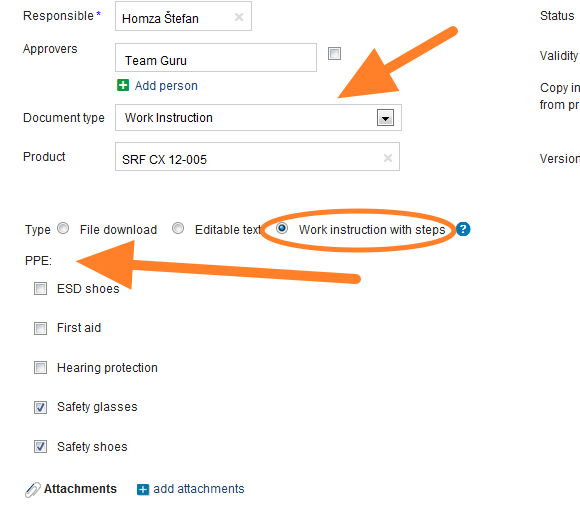
Select the responsible person.
-
Choose the approvers. Choose one or more approvers for the document.
-
Set up the header details. Set up all the header details: document type, version and validity.
-
Select the type. Select Work Instruction with Steps as the Type.
-
Select the required PPE.
-
Save the document. Save the document, then start entering the working steps.
Add the working steps
-
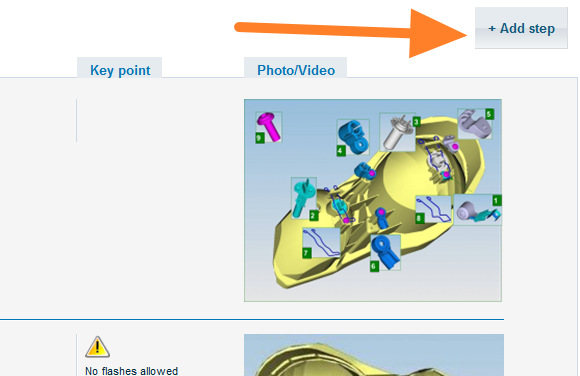
Add the first step. Click the Add step button.
-
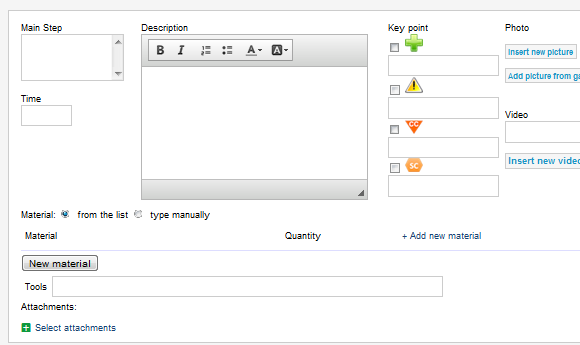
Enter the step details. On the screen that opens, enter all the details of the step. You can add attachments, pictures or videos. Once all the details are entered, click Save and go on to the next step.
-
Send the document for approval. Once your document is complete, click Save & Send for Approval. For more details, see the article describing the approval process: Who can approve a document and how.
Video guide
作业指导书是一种特定类型的文档,在 文档 模块中创建。
创建第一份文档之前,需要先将文档类型设置为 作业指导书。具体方法请参阅如何创建新的文档类型。创建文档类型后,即可开始创建文档。
创建文档
-
添加新文档。 进入 文档 模块,点击 添加 图标。
-
填写标题数据。
-
选择负责人。
-
选择审批人。 为文档选择一个或多个审批人。
-
设置标题信息。 设置所有标题信息:文档类型、版本和有效期。
-
选择类型。 在 类型 中选择 分步作业指导书。
-
选择所需的个人防护装备(PPE)。
-
保存文档。 保存文档,然后开始输入作业步骤。
添加作业步骤
-
添加第一步。 点击 添加步骤 按钮。
-
输入步骤详细信息。 在打开的界面中输入该步骤的所有详细信息。您可以添加附件、图片或视频。输入所有详细信息后,点击 保存 并继续下一步。
-
提交文档审批。 文档完成后,点击 保存并提交审批。详情请参阅介绍审批流程的文章:谁可以审批文档?如何审批?
视频教程
还需要帮助吗?
请给我们留言。工作日我们通常会在一小时内回复。