Cómo mostrar los valores acumulados del año
Traducción automática del inglés. Se muestra el original en inglés.
Metric dashboards give you the option to see all “to date” values.
Define the to-date formula
The formula for the YTD/QTD/MTD/WTD calculation is defined directly in the metric’s general settings, under Optional: Advanced Settings, as shown in the picture below.
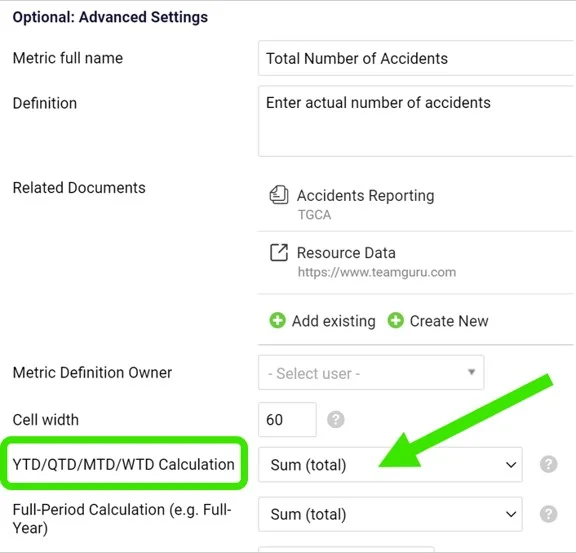
The calculation is usually defined when creating a new metric.
Show to-date values in the dashboard
To see the values in your metric dashboard, open the dashboard’s edit screen and follow these steps:
-
Open the dashboard settings. Go to the metric dashboard and click the Edit icon.

-
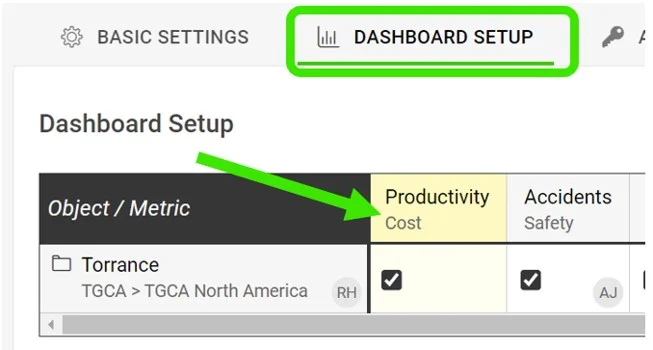
Select the metric. Click the particular metric you want to set up the to-date calculation for.
-
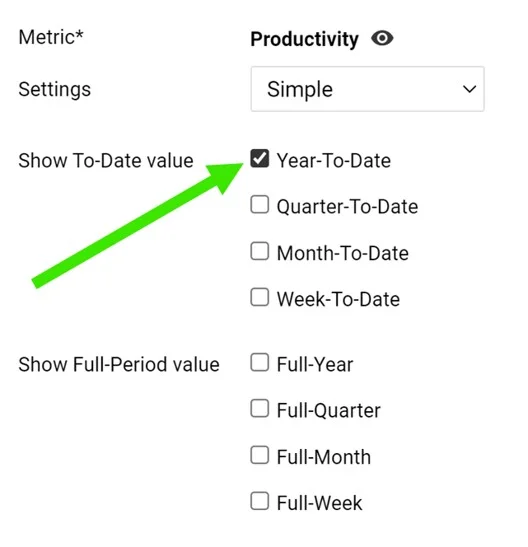
Tick the to-date values. Tick the boxes for YTD, QTD, MTD or WTD to display the values.
-
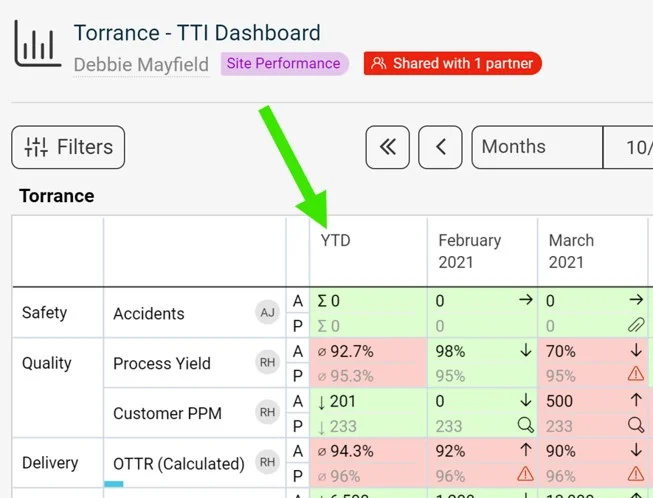
Save and view the dashboard. Click Save, then Save & View.
Los dashboards de KPI le permiten ver todos los valores acumulados a la fecha.
Definir la fórmula del acumulado
La fórmula del cálculo YTD/QTD/MTD/WTD se define directamente en la configuración general del indicador, en Opcional: Configuración avanzada, como se ve en la imagen siguiente.
Normalmente el cálculo se define al crear un nuevo indicador.
Mostrar los valores acumulados en el dashboard
Para ver los valores en su dashboard de KPI, abra la pantalla de edición del dashboard y siga estos pasos:
-
Abra la configuración del dashboard. Vaya al dashboard de KPI y haga clic en el ícono Editar.
-
Seleccione el indicador. Haga clic en el indicador para el que quiere configurar el cálculo del acumulado.
-
Marque los valores acumulados. Marque las casillas YTD, QTD, MTD o WTD para mostrar esos valores.
-
Guarde y vea el dashboard. Haga clic en Guardar y luego en Guardar y ver.
¿Necesita más ayuda?
Escríbanos. En días laborables solemos responder en menos de una hora.