Champs grisés dans TeamGuru
Traduction automatique de l'anglais. Original en anglais affiché.
A grey field means one of the following:
- No value applicable for the combination of metric, org. unit and time period.
- Data is not being collected for the combination of metric and org. unit.
- The combination of org. unit and metric is deactivated in the dashboard.
No value applicable for this period
Mark a cell as not applicable
If no value applies to an org. unit/metric combination in a specific time period (e.g. a holiday period), tick the appropriate box instead of entering values. The cell is then greyed out.
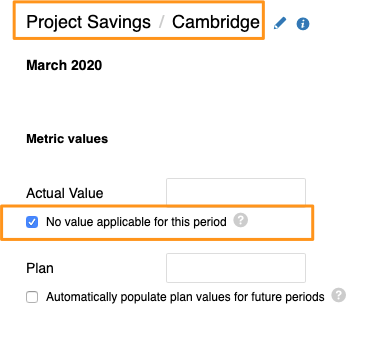
If you need to set No value applicable for several metrics, org. units or time periods in your dashboard, you can use the following two functions.
Use the spreadsheet view
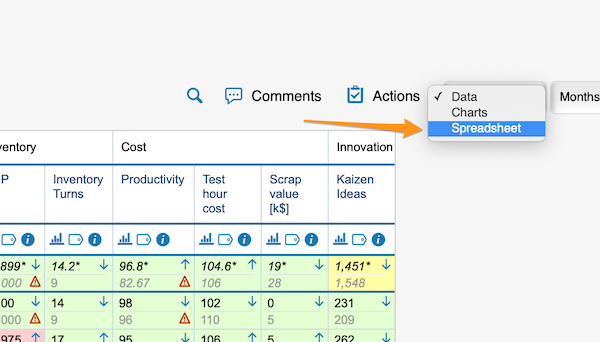
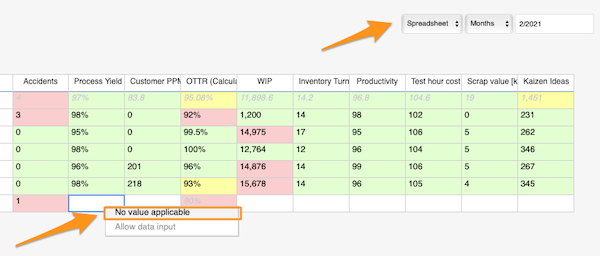
Change the Data view above your dashboard to the Spreadsheet view. In the spreadsheet view, right-click the cell, select No value applicable and copy it as needed.
Use mass data entry
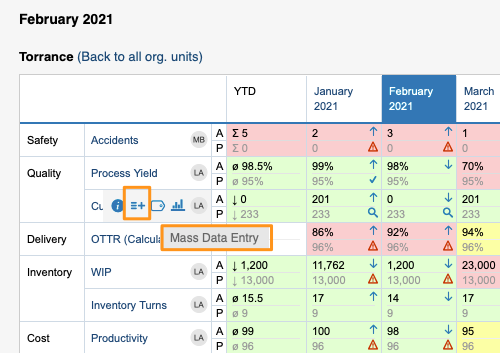
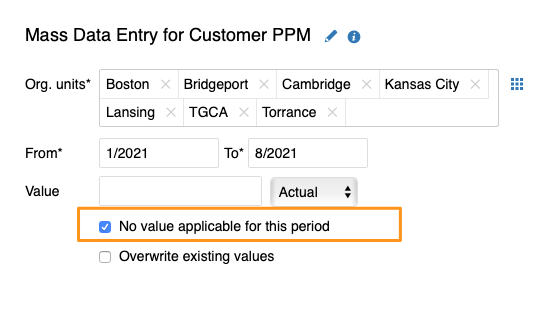
Hover over your metric and click the Mass Data Entry icon (=+). Then select your org. units and time period, tick the No value applicable for this period box and save.
Org. units for which data is not collected
Exclude org. units in the metric settings
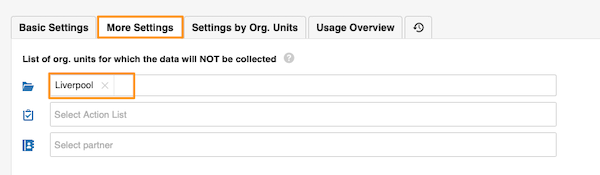
In the metric settings, on the More Settings tab, you can select the org. units which, in combination with this metric, will not appear in the dashboards.
Org. unit/metric combination deactivated in the dashboard
Uncheck the combination in the dashboard setup
You can grey out the fields of an org. unit/metric combination in your dashboard. They are greyed out only in this dashboard and nowhere else.
To set it up, go to your dashboard’s settings and, on the Dashboard Setup tab, uncheck the box for the metric/org. unit combination.
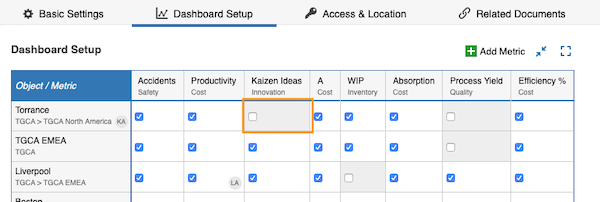
A grey field is not a locked field. Users can still enter values, but the values will not be displayed.
Un champ grisé signifie l’un des cas suivants :
- Aucune valeur applicable pour la combinaison indicateur, unité organisationnelle et période.
- Les données ne sont pas collectées pour la combinaison indicateur et unité organisationnelle.
- La combinaison unité organisationnelle et indicateur est désactivée dans le tableau de bord.
Aucune valeur applicable pour cette période
Marquer une cellule comme non applicable
Si aucune valeur ne s’applique à une combinaison unité/indicateur pour une période donnée (par exemple une période de congés), cochez la case correspondante au lieu de saisir des valeurs. La cellule devient alors grise.
Pour définir Aucune valeur applicable sur plusieurs indicateurs, unités ou périodes de votre tableau de bord, vous pouvez utiliser les deux fonctions suivantes.
Utiliser la vue tableur
Au-dessus du tableau de bord, passez de la vue Données à la vue Tableur. Dans cette vue, faites un clic droit sur la cellule, sélectionnez Aucune valeur applicable et copiez-la où vous en avez besoin.
Utiliser la saisie groupée
Survolez votre indicateur et cliquez sur l’icône Saisie groupée de données (=+). Sélectionnez ensuite les unités et la période, cochez la case Aucune valeur applicable pour cette période et enregistrez.
Unités organisationnelles sans collecte de données
Exclure des unités dans les paramètres de l’indicateur
Dans les paramètres de l’indicateur, onglet Autres paramètres, vous pouvez sélectionner les unités organisationnelles qui, combinées à cet indicateur, n’apparaîtront pas dans les tableaux de bord.
Combinaison unité/indicateur désactivée dans le tableau de bord
Décocher la combinaison dans la configuration du tableau de bord
Vous pouvez griser les champs d’une combinaison unité/indicateur dans votre tableau de bord. Ils sont grisés uniquement dans ce tableau de bord, nulle part ailleurs.
Pour cela, ouvrez les paramètres du tableau de bord et, dans l’onglet Configuration du tableau de bord, décochez la case de la combinaison indicateur/unité.
Un champ grisé n’est pas un champ verrouillé. Les utilisateurs peuvent toujours saisir des valeurs, mais elles ne seront pas affichées.
Besoin d'aide supplémentaire ?
Écrivez-nous. Les jours ouvrés, nous répondons en général en moins d'une heure.