TeamGuru中的灰色字段
本文由英文机器翻译。 当前显示英文原文。
A grey field means one of the following:
- No value applicable for the combination of metric, org. unit and time period.
- Data is not being collected for the combination of metric and org. unit.
- The combination of org. unit and metric is deactivated in the dashboard.
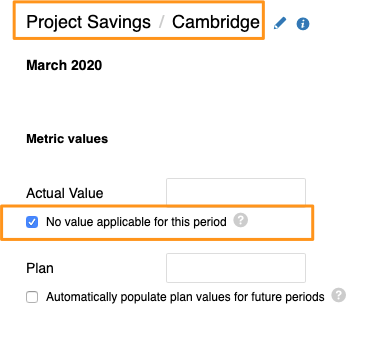
No value applicable for this period
Mark a cell as not applicable
If no value applies to an org. unit/metric combination in a specific time period (e.g. a holiday period), tick the appropriate box instead of entering values. The cell is then greyed out.
If you need to set No value applicable for several metrics, org. units or time periods in your dashboard, you can use the following two functions.
Use the spreadsheet view
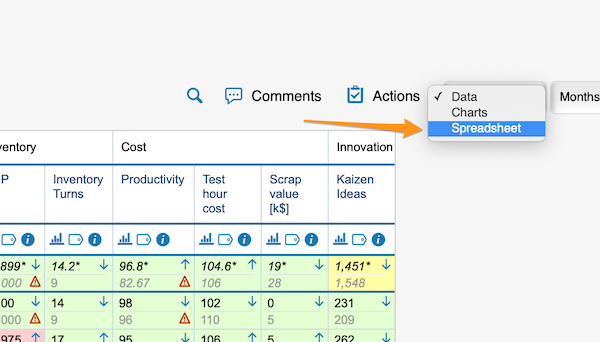
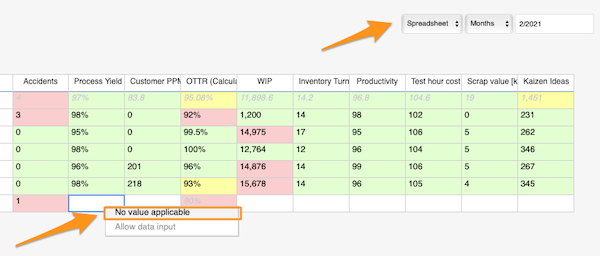
Change the Data view above your dashboard to the Spreadsheet view. In the spreadsheet view, right-click the cell, select No value applicable and copy it as needed.
Use mass data entry
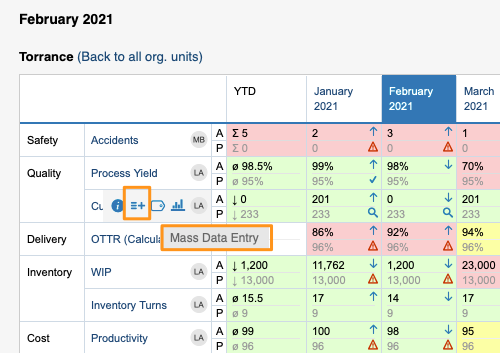
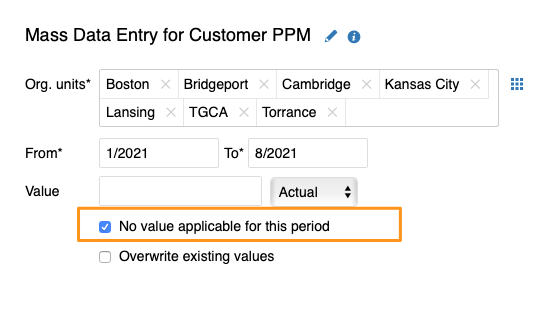
Hover over your metric and click the Mass Data Entry icon (=+). Then select your org. units and time period, tick the No value applicable for this period box and save.
Org. units for which data is not collected
Exclude org. units in the metric settings
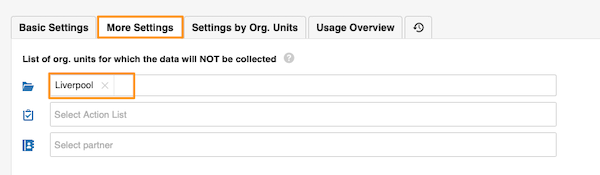
In the metric settings, on the More Settings tab, you can select the org. units which, in combination with this metric, will not appear in the dashboards.
Org. unit/metric combination deactivated in the dashboard
Uncheck the combination in the dashboard setup
You can grey out the fields of an org. unit/metric combination in your dashboard. They are greyed out only in this dashboard and nowhere else.
To set it up, go to your dashboard’s settings and, on the Dashboard Setup tab, uncheck the box for the metric/org. unit combination.
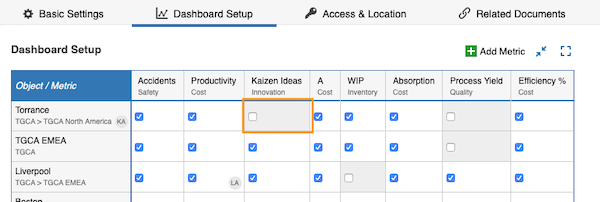
A grey field is not a locked field. Users can still enter values, but the values will not be displayed.
灰色字段表示以下情况之一:
- 不适用任何值:针对该指标、组织单元和时间期间的组合。
- 不收集数据:针对该指标和组织单元的组合。
- 该组织单元和指标的组合已在仪表板中停用。
本期间不适用任何值
将单元格标记为不适用
如果某个组织单元/指标组合在特定时间期间(例如假期)不适用任何值,请勾选相应的复选框,而不是输入数值。该单元格随即变为灰色。
如果需要为仪表板中的多个指标、组织单元或时间期间设置不适用任何值,可以使用以下两种功能。
使用电子表格视图
将仪表板上方的数据视图切换为电子表格视图。在电子表格视图中,右键单击单元格,选择不适用任何值,并根据需要复制。
使用批量数据录入
将鼠标悬停在指标上,点击批量数据录入图标(=+)。然后选择组织单元和时间期间,勾选本期间不适用任何值复选框并保存。
不收集数据的组织单元
在指标设置中排除组织单元
在指标设置的更多设置选项卡中,您可以选择与该指标组合时不在仪表板中显示的组织单元。
在仪表板中停用的组织单元/指标组合
在仪表板设置中取消勾选该组合
您可以将仪表板中某个组织单元/指标组合的字段设为灰色。这些字段只在此仪表板中显示为灰色,不影响其他地方。
设置方法:打开仪表板设置,在仪表板设置选项卡中取消勾选该指标/组织单元组合的复选框。
灰色字段并不是锁定字段。用户仍然可以输入数值,但这些数值不会显示。
还需要帮助吗?
请给我们留言。工作日我们通常会在一小时内回复。