Sivé polia v TeamGuru
Strojový preklad z angličtiny. Zobrazený je anglický originál.
A grey field means one of the following:
- No value applicable for the combination of metric, org. unit and time period.
- Data is not being collected for the combination of metric and org. unit.
- The combination of org. unit and metric is deactivated in the dashboard.
No value applicable for this period
Mark a cell as not applicable
If no value applies to an org. unit/metric combination in a specific time period (e.g. a holiday period), tick the appropriate box instead of entering values. The cell is then greyed out.
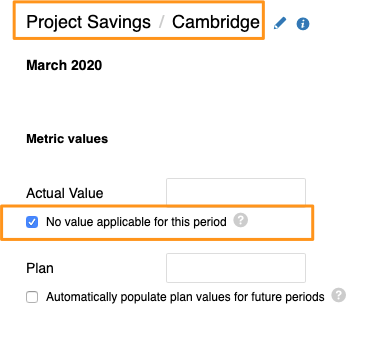
If you need to set No value applicable for several metrics, org. units or time periods in your dashboard, you can use the following two functions.
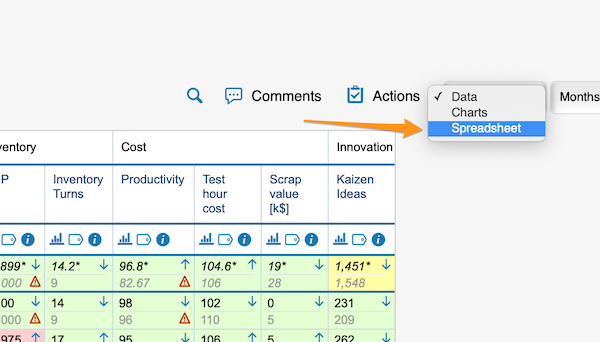
Use the spreadsheet view
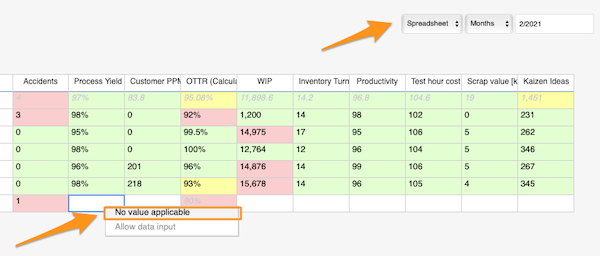
Change the Data view above your dashboard to the Spreadsheet view. In the spreadsheet view, right-click the cell, select No value applicable and copy it as needed.
Use mass data entry
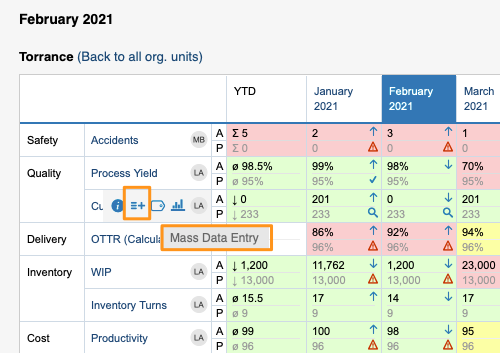
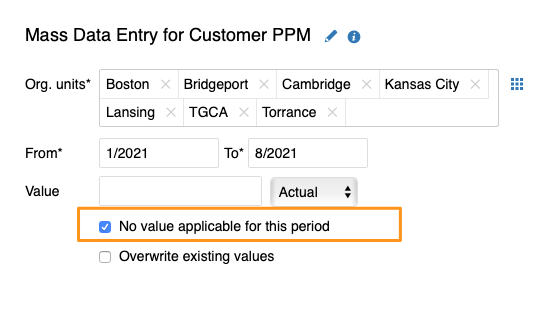
Hover over your metric and click the Mass Data Entry icon (=+). Then select your org. units and time period, tick the No value applicable for this period box and save.
Org. units for which data is not collected
Exclude org. units in the metric settings
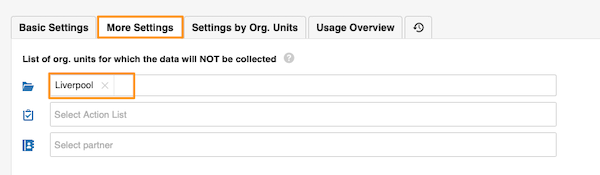
In the metric settings, on the More Settings tab, you can select the org. units which, in combination with this metric, will not appear in the dashboards.
Org. unit/metric combination deactivated in the dashboard
Uncheck the combination in the dashboard setup
You can grey out the fields of an org. unit/metric combination in your dashboard. They are greyed out only in this dashboard and nowhere else.
To set it up, go to your dashboard’s settings and, on the Dashboard Setup tab, uncheck the box for the metric/org. unit combination.
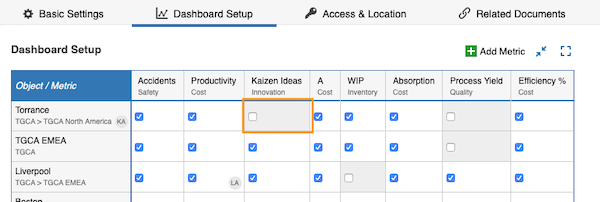
A grey field is not a locked field. Users can still enter values, but the values will not be displayed.
Sivé pole znamená jednu z týchto situácií:
- Žiadna hodnota sa neuplatňuje pre kombináciu metriky, org. jednotky a obdobia.
- Dáta sa nezbierajú pre kombináciu metriky a org. jednotky.
- Kombinácia org. jednotky a metriky je v dashboarde vypnutá.
Za toto obdobie sa žiadna hodnota neuplatňuje
Označte bunku ako neuplatniteľnú
Ak pre kombináciu org. jednotky a metriky v určitom období žiadna hodnota neprichádza do úvahy (napríklad počas dovoleniek), namiesto zadania hodnôt začiarknite príslušné políčko. Bunka potom zosivie.
Ak potrebujete nastaviť Žiadna hodnota sa neuplatňuje pre viac metrík, org. jednotiek alebo období v dashboarde, použite jednu z nasledujúcich dvoch funkcií.
Použite tabuľkové zobrazenie
Nad dashboardom prepnite zobrazenie Dáta na Tabuľka. V tabuľkovom zobrazení kliknite na bunku pravým tlačidlom, vyberte Žiadna hodnota sa neuplatňuje a podľa potreby ju skopírujte.
Použite hromadné zadávanie dát
Prejdite myšou na metriku a kliknite na ikonu Hromadné zadávanie dát (=+). Potom vyberte org. jednotky a obdobie, začiarknite políčko Žiadna hodnota sa za toto obdobie neuplatňuje a uložte.
Org. jednotky, za ktoré sa dáta nezbierajú
Vylúčte org. jednotky v nastaveniach metriky
V nastaveniach metriky na karte Ďalšie nastavenia môžete vybrať org. jednotky, ktoré sa v kombinácii s touto metrikou v dashboardoch nezobrazia.
Kombinácia org. jednotky a metriky vypnutá v dashboarde
Zrušte začiarknutie kombinácie v nastavení dashboardu
Polia kombinácie org. jednotky a metriky môžete v dashboarde zosiviť. Sivé budú len v tomto dashboarde, nikde inde.
Otvorte nastavenia dashboardu a na karte Nastavenie dashboardu zrušte začiarknutie políčka pre kombináciu metriky a org. jednotky.
Sivé pole nie je zamknuté. Používatelia doň stále môžu zadať hodnoty, tie sa však nezobrazia.
Potrebujete ďalšiu pomoc?
Napíšte nám. V pracovné dni zvyčajne odpovedáme do hodiny.