Relier des priorités à des projets et suivre leur avancement
Traduction automatique de l'anglais. Original en anglais affiché.
Priorities (list 3 of the matrix) are the work that brings the change. Link every priority to a project in Action Lists and the review dashboard shows its progress for you.
Link a project, a metric dashboard or a child X-matrix
- Click Edit above the matrix.
- Click the pencil under Key Improvement Priorities (the list names come from the template of your plan).
- In the row of the priority, click + in the Documents column.
- Search for the document and pick it – an action list (project), a metric dashboard or another X-matrix. You can also create a new one straight from the picker.
- Click Done.
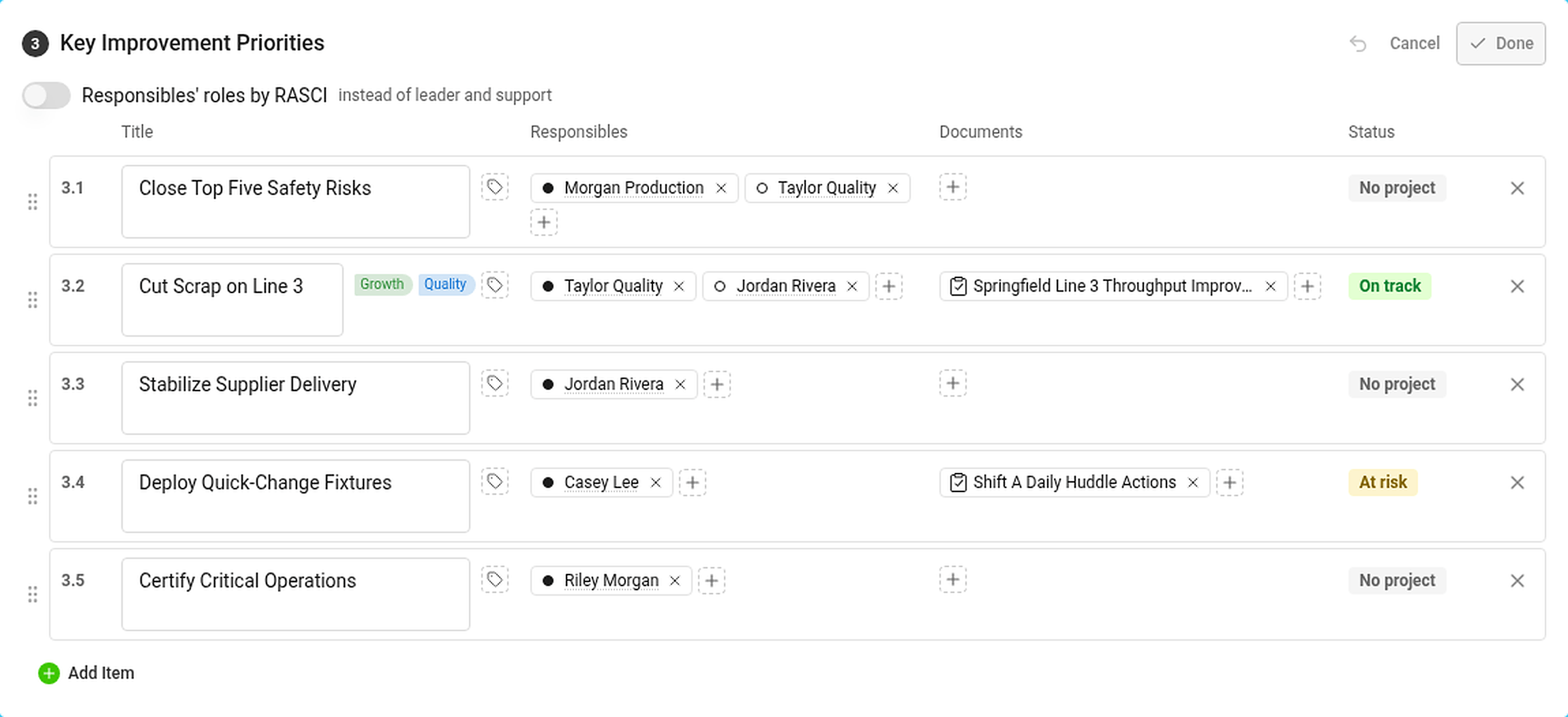
In the Responsibles column, click + to add the person who answers for the priority. The dot in front of the name is the role: filled for leader, hollow for support (or RASCI letters, if you turned RASCI on).
The Status column shows the status of the priority – see How statuses are calculated.
Where you see the progress

The Projects section lists every project linked to a priority:
- the status of the project and its progress bar – the black tick is where the project should be today according to its plan,
- the days left (or overdue) and the percentage done,
- the codes of the priorities and the pillars it belongs to.
Hover over a project for its leader, milestones and the number of tasks – total, closed and overdue. In the Strategic Plan view the projects are in the column Projects and documents.
If you are not allowed to open a project, its status still counts but its dates and progress are hidden.
A priority with its own X-matrix
Link another X-matrix to a priority and its overall status counts towards the status of the priority. Use this to connect the plan of a plant to the plan of a department. See How to link X-matrices into a plan hierarchy.
Les priorités (liste 3 de la matrice) sont le travail qui produit le changement. Reliez chaque priorité à un projet dans Plans d’action : le tableau de revue affiche son avancement pour vous.
Relier un projet, un tableau de bord KPI ou une X-Matrix enfant
- Cliquez sur Modifier au-dessus de la matrice.
- Cliquez sur le crayon sous Priorités d’amélioration clés (les noms des listes viennent du modèle de votre plan).
- Sur la ligne de la priorité, cliquez sur + dans la colonne Documents.
- Recherchez le document et choisissez-le : un plan d’action (projet), un tableau de bord KPI ou une autre X-Matrix. Vous pouvez aussi en créer un directement depuis le sélecteur.
- Cliquez sur Terminé.
Dans la colonne Responsables, cliquez sur + pour ajouter la personne qui répond de la priorité. Le point devant le nom indique le rôle : plein pour le pilote, creux pour le soutien (ou les lettres RASCI, si vous avez activé RASCI).
La colonne Statut affiche le statut de la priorité : voir Calcul des statuts.
Où voir l’avancement
La section Projets liste tous les projets reliés à une priorité :
- le statut du projet et sa barre de progression (le trait noir indique où le projet devrait en être aujourd’hui selon son plan),
- les jours restants (ou de retard) et le pourcentage réalisé,
- les codes des priorités et les piliers auxquels il appartient.
Survolez un projet pour voir son pilote, ses jalons et le nombre de tâches : total, clôturées et en retard. Dans la vue Plan stratégique, les projets figurent dans la colonne Projets et documents.
Si vous n’êtes pas autorisé à ouvrir un projet, son statut compte quand même, mais ses dates et son avancement sont masqués.
Une priorité avec sa propre X-Matrix
Reliez une autre X-Matrix à une priorité : son statut global compte dans le statut de la priorité. Vous reliez ainsi le plan d’une usine à celui d’un service. Voir Relier des X-Matrix dans une hiérarchie de plans.
Besoin d'aide supplémentaire ?
Écrivez-nous. Les jours ouvrés, nous répondons en général en moins d'une heure.