Jak propojit priority s projekty a sledovat jejich postup
Strojový překlad z angličtiny. Zobrazen anglický originál.
Priorities (list 3 of the matrix) are the work that brings the change. Link every priority to a project in Action Lists and the review dashboard shows its progress for you.
Link a project, a metric dashboard or a child X-matrix
- Click Edit above the matrix.
- Click the pencil under Key Improvement Priorities (the list names come from the template of your plan).
- In the row of the priority, click + in the Documents column.
- Search for the document and pick it – an action list (project), a metric dashboard or another X-matrix. You can also create a new one straight from the picker.
- Click Done.
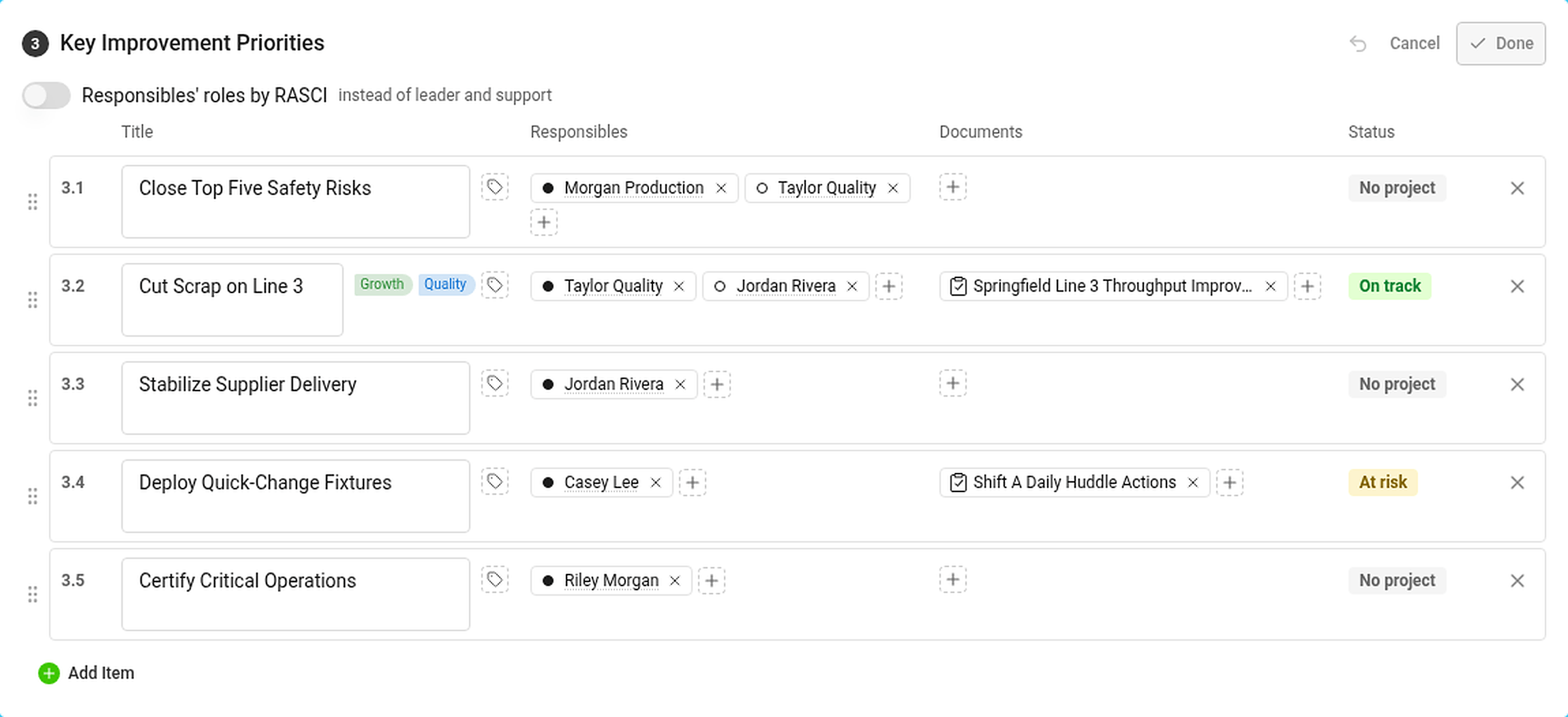
In the Responsibles column, click + to add the person who answers for the priority. The dot in front of the name is the role: filled for leader, hollow for support (or RASCI letters, if you turned RASCI on).
The Status column shows the status of the priority – see How statuses are calculated.
Where you see the progress

The Projects section lists every project linked to a priority:
- the status of the project and its progress bar – the black tick is where the project should be today according to its plan,
- the days left (or overdue) and the percentage done,
- the codes of the priorities and the pillars it belongs to.
Hover over a project for its leader, milestones and the number of tasks – total, closed and overdue. In the Strategic Plan view the projects are in the column Projects and documents.
If you are not allowed to open a project, its status still counts but its dates and progress are hidden.
A priority with its own X-matrix
Link another X-matrix to a priority and its overall status counts towards the status of the priority. Use this to connect the plan of a plant to the plan of a department. See How to link X-matrices into a plan hierarchy.
Priority (3. seznam matice) jsou práce, která přináší změnu. Propojte každou prioritu s projektem v modulu Akční listy a přehledový dashboard bude jeho postup ukazovat za vás.
Propojení projektu, metrikového dashboardu nebo podřízené X-Matrix
- Klikněte na Upravit nad maticí.
- Klikněte na tužku pod Klíčovými prioritami zlepšení (názvy seznamů pocházejí ze šablony plánu).
- V řádku priority klikněte na + ve sloupci Dokumenty.
- Vyhledejte dokument a vyberte ho – akční list (projekt), metrikový dashboard nebo jinou X-Matrix. Nový dokument můžete vytvořit i přímo z výběru.
- Klikněte na Hotovo.
Ve sloupci Odpovědné osoby klikněte na + a přidejte osobu, která za prioritu odpovídá. Tečka před jménem označuje roli: plná pro vedoucí roli, prázdná pro podporu (nebo písmena RASCI, pokud jste RASCI zapnuli).
Sloupec Stav ukazuje stav priority – viz Jak se počítají stavy.
Kde postup uvidíte
Sekce Projekty obsahuje všechny projekty propojené s prioritou:
- stav projektu a jeho ukazatel postupu – černá značka ukazuje, kde by projekt měl podle plánu dnes být,
- počet zbývajících dní (nebo dní po termínu) a procento dokončení,
- kódy priorit a pilíře, ke kterým patří.
Po najetí myší na projekt uvidíte jeho vedoucího, milníky a počet úkolů – celkem, uzavřených a po termínu. V zobrazení Strategický plán jsou projekty ve sloupci Projekty a dokumenty.
Pokud projekt nesmíte otevřít, jeho stav se počítá, ale termíny a postup jsou skryté.
Priorita s vlastní X-Matrix
Propojte s prioritou jinou X-Matrix a její celkový stav se započítá do stavu priority. Takto propojíte plán závodu s plánem oddělení. Viz Jak propojit X-Matrix do hierarchie plánů.
Potřebujete další pomoc?
Napište nám. V pracovní dny obvykle odpovídáme do hodiny.