Jak powiązać priorytety z projektami i śledzić ich postęp
Tłumaczenie maszynowe z angielskiego. Wyświetlany jest oryginał po angielsku.
Priorities (list 3 of the matrix) are the work that brings the change. Link every priority to a project in Action Lists and the review dashboard shows its progress for you.
Link a project, a metric dashboard or a child X-matrix
- Click Edit above the matrix.
- Click the pencil under Key Improvement Priorities (the list names come from the template of your plan).
- In the row of the priority, click + in the Documents column.
- Search for the document and pick it – an action list (project), a metric dashboard or another X-matrix. You can also create a new one straight from the picker.
- Click Done.
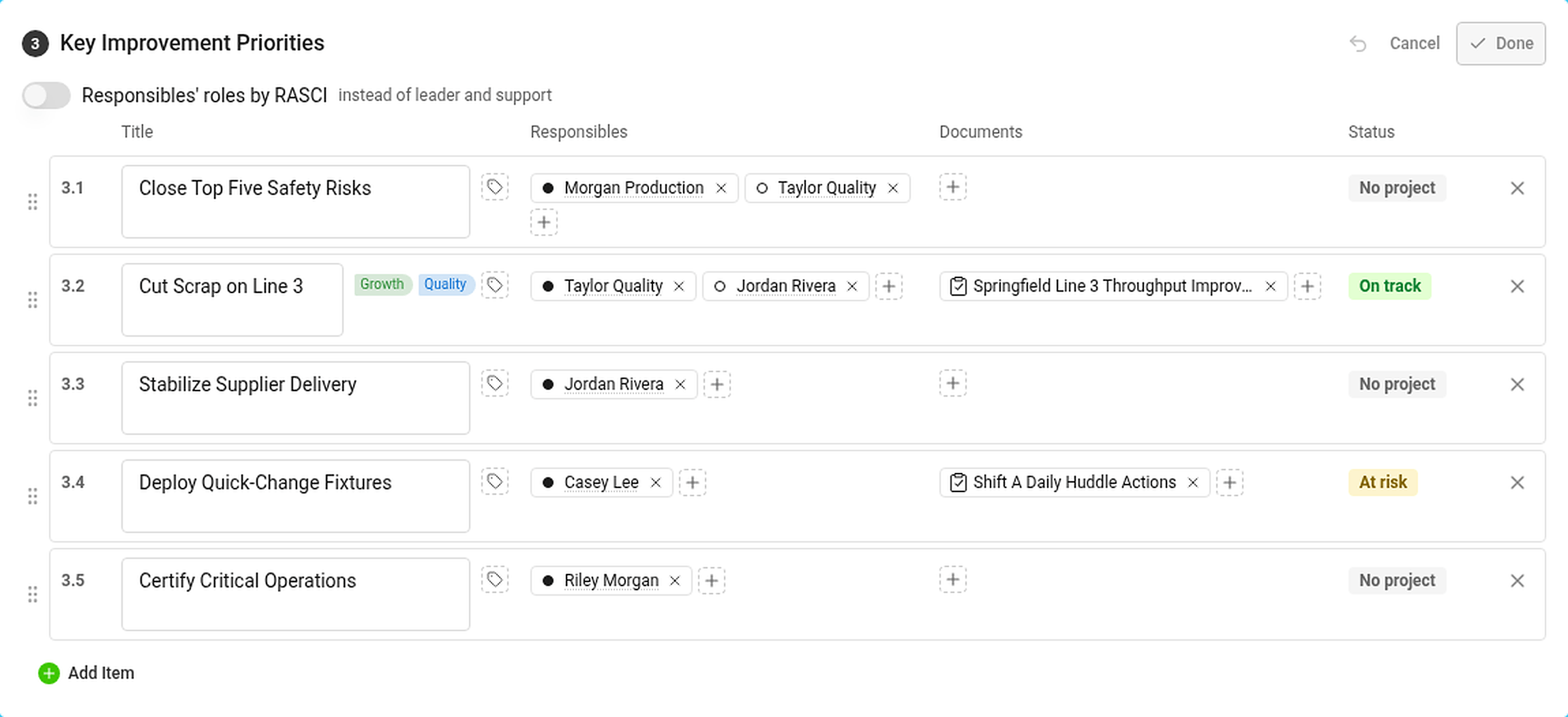
In the Responsibles column, click + to add the person who answers for the priority. The dot in front of the name is the role: filled for leader, hollow for support (or RASCI letters, if you turned RASCI on).
The Status column shows the status of the priority – see How statuses are calculated.
Where you see the progress

The Projects section lists every project linked to a priority:
- the status of the project and its progress bar – the black tick is where the project should be today according to its plan,
- the days left (or overdue) and the percentage done,
- the codes of the priorities and the pillars it belongs to.
Hover over a project for its leader, milestones and the number of tasks – total, closed and overdue. In the Strategic Plan view the projects are in the column Projects and documents.
If you are not allowed to open a project, its status still counts but its dates and progress are hidden.
A priority with its own X-matrix
Link another X-matrix to a priority and its overall status counts towards the status of the priority. Use this to connect the plan of a plant to the plan of a department. See How to link X-matrices into a plan hierarchy.
Priorytety (lista 3 matrycy) to praca, która przynosi zmianę. Powiąż każdy priorytet z projektem w module Listy działań, a dashboard przeglądu sam pokaże jego postęp.
Powiąż projekt, dashboard KPI lub podrzędną X-Matrix
- Kliknij Edytuj nad matrycą.
- Kliknij ikonę ołówka pod Kluczowe priorytety doskonalenia (nazwy list pochodzą z szablonu planu).
- W wierszu priorytetu kliknij + w kolumnie Dokumenty.
- Wyszukaj dokument i wybierz go: listę działań (projekt), dashboard KPI lub inną X-Matrix. Nowy dokument możesz też utworzyć bezpośrednio w oknie wyboru.
- Kliknij Gotowe.
W kolumnie Osoby odpowiedzialne kliknij +, aby dodać osobę odpowiedzialną za priorytet. Kropka przed nazwiskiem oznacza rolę: pełna to lider, pusta to wsparcie (albo litery RASCI, jeśli włączono RASCI).
Kolumna Status pokazuje status priorytetu; zobacz Jak obliczane są statusy.
Gdzie widać postęp
Sekcja Projekty zawiera wszystkie projekty powiązane z priorytetami:
- status projektu i pasek postępu (czarny znacznik pokazuje, gdzie projekt powinien być dziś według planu),
- liczbę pozostałych dni (lub dni po terminie) i procent wykonania,
- kody priorytetów i filary, do których należy projekt.
Najedź kursorem na projekt, aby zobaczyć jego lidera, kamienie milowe i liczbę zadań: wszystkich, zamkniętych i po terminie. W widoku Plan strategiczny projekty znajdują się w kolumnie Projekty i dokumenty.
Jeśli nie możesz otworzyć projektu, jego status nadal się liczy, ale daty i postęp są ukryte.
Priorytet z własną X-Matrix
Powiąż z priorytetem inną X-Matrix, a jej status ogólny wpłynie na status priorytetu. W ten sposób połączysz plan zakładu z planem działu. Zobacz Jak połączyć X-Matrix w hierarchię planów.
Potrzebujesz dalszej pomocy?
Napisz do nas. W dni robocze zwykle odpowiadamy w ciągu godziny.