How to delete a topic
You can delete a whole topic from your presentation, including all its history.
Delete the whole topic
To delete the whole topic from your presentation, click the Settings button in the upper left corner above your topic and choose Delete this topic from the submenu.
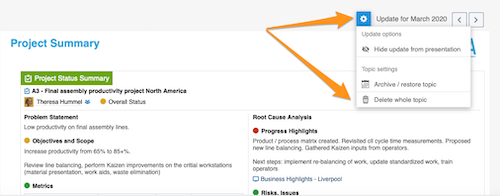
Please note: if you delete the whole topic, all the previous history of this topic is deleted too!
To learn how to archive a topic or hide it from your presentation, see How to archive or hide a topic.
To learn how to delete only an update, see How to delete a topic’s content.
Still need help?
Write to us. We usually reply within an hour on business days.