Jak usunąć temat
Tłumaczenie maszynowe z angielskiego. Wyświetlany jest oryginał po angielsku.
You can delete a whole topic from your presentation, including all its history.
Delete the whole topic
To delete the whole topic from your presentation, click the Settings button in the upper left corner above your topic and choose Delete this topic from the submenu.
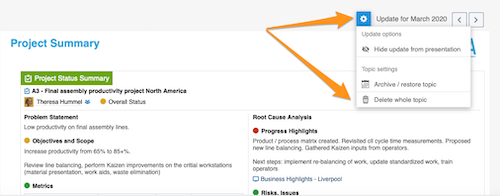
Please note: if you delete the whole topic, all the previous history of this topic is deleted too!
To learn how to archive a topic or hide it from your presentation, see How to archive or hide a topic.
To learn how to delete only an update, see How to delete a topic’s content.
Z prezentacji możesz usunąć cały temat wraz z całą jego historią.
Usuń cały temat
Aby usunąć z prezentacji cały temat, kliknij przycisk Ustawienia w lewym górnym rogu nad tematem i wybierz z podmenu Usuń ten temat.
Uwaga: usunięcie całego tematu usuwa też całą jego dotychczasową historię!
Jak zarchiwizować temat albo ukryć go w prezentacji, dowiesz się z artykułu Jak zarchiwizować lub ukryć temat.
Jak usunąć tylko aktualizację, dowiesz się z artykułu Jak usunąć zawartość tematu.
Potrzebujesz dalszej pomocy?
Napisz do nas. W dni robocze zwykle odpowiadamy w ciągu godziny.