Supprimer un sujet
Traduction automatique de l'anglais. Original en anglais affiché.
You can delete a whole topic from your presentation, including all its history.
Delete the whole topic
To delete the whole topic from your presentation, click the Settings button in the upper left corner above your topic and choose Delete this topic from the submenu.
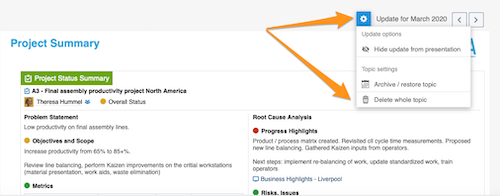
Please note: if you delete the whole topic, all the previous history of this topic is deleted too!
To learn how to archive a topic or hide it from your presentation, see How to archive or hide a topic.
To learn how to delete only an update, see How to delete a topic’s content.
Vous pouvez supprimer un sujet entier de votre présentation, avec tout son historique.
Supprimer le sujet entier
Pour supprimer un sujet entier de votre présentation, cliquez sur le bouton Paramètres en haut à gauche, au-dessus du sujet, et choisissez Supprimer ce sujet dans le sous-menu.
Remarque : si vous supprimez le sujet entier, tout son historique est supprimé lui aussi !
Pour archiver un sujet ou le masquer dans votre présentation, voir Archiver ou masquer un sujet.
Pour supprimer uniquement une mise à jour, voir Supprimer le contenu d’un sujet.
Besoin d'aide supplémentaire ?
Écrivez-nous. Les jours ouvrés, nous répondons en général en moins d'une heure.