如何在多个文档中共享同一行动:相关行动
本文由英文机器翻译。 当前显示英文原文。
Sometimes you need to show one action in two different documents.
Share an action
-
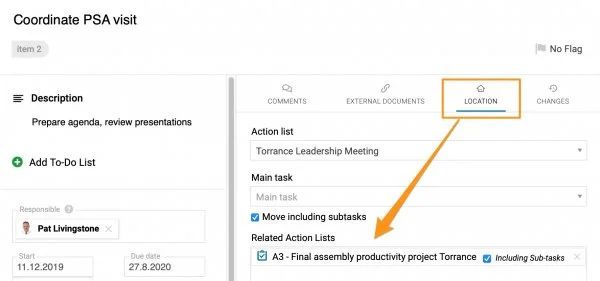
Select the related document. When creating a new action, go to the Action Location section and select Related Action Lists, as shown below. The related document can be an action list, a standardized meeting or any other document where you can assign an action.
-
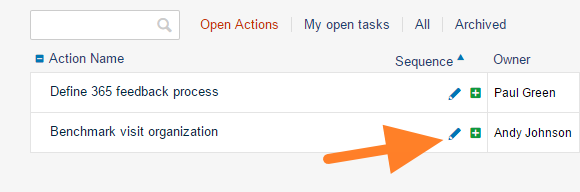
Share an existing action. To share an existing action, click the action’s edit icon and continue as described in step 1.
-
Save the action. Click Save + Close.
-
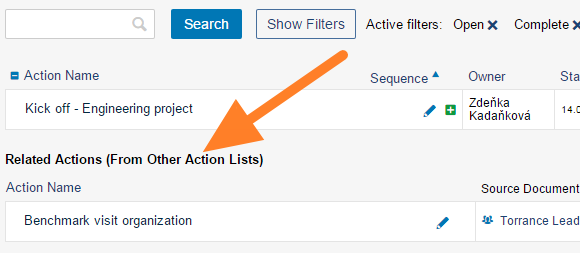
Find it in the related document. The action is shown in the Related Actions section of the related document.
-
Update it in either document. You can update the action either in the source document or in the related document. Both documents are updated.
Share a main task with its subtasks
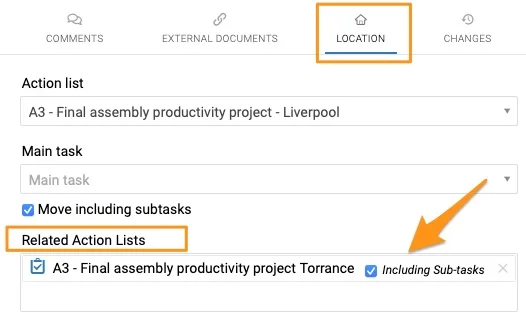
Please note that when you share a main task, you can also include all its subtasks. In that case, you only set up the related document in the main task; you don’t need to set up each subtask individually. When you create a new sub-action, it automatically appears in the related action list.
有时需要在两个不同的文档中显示同一个行动。
共享行动
-
选择相关文档。 新建行动时,在 行动位置 部分选择 相关行动清单,如下图所示。相关文档可以是行动清单、标准化会议或任何可以分配行动的文档。
-
共享现有行动。 要共享现有行动,请点击该行动的编辑图标,然后按第1步操作。
-
保存行动。 点击 保存并关闭。
-
在相关文档中查看。 该行动会显示在相关文档的 相关行动 部分。
-
在任一文档中更新。 您可以在源文档或相关文档中更新该行动,两个文档都会同步更新。
共享主任务及其子任务
请注意,共享主任务时,可以同时包含其所有子任务。这样只需在主任务中设置相关文档,无需逐个设置子任务。新建的子行动会自动显示在相关行动清单中。
还需要帮助吗?
请给我们留言。工作日我们通常会在一小时内回复。