如何归档或隐藏主题
本文由英文机器翻译。 当前显示英文原文。
If you want to remove a whole topic but NOT ALL ITS HISTORY (only the topic for a specific period), you can either archive the topic or just hide it from your presentation.
Archive the whole topic
Open the archive settings
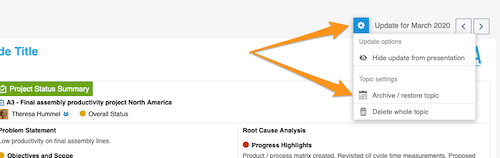
Click the Settings button above your topic and choose Archive / restore topic from the submenu.
Select the archived period
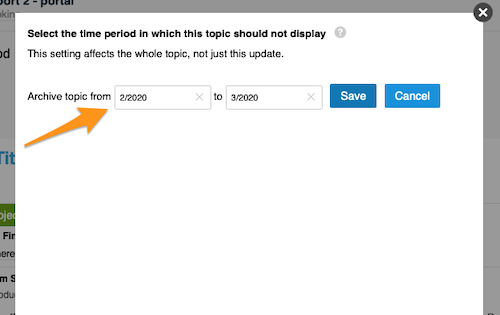
Select the time period in which the topic should not be displayed and click Save. The topic is then no longer included in your presentation.
Restore the topic
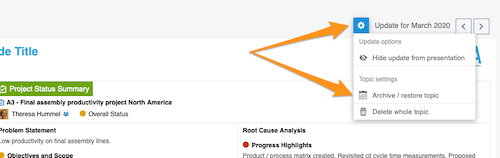
To restore your topic, follow the same steps as for archiving: click the Settings button and select Archive / restore topic from the submenu.
Deselect the archived period
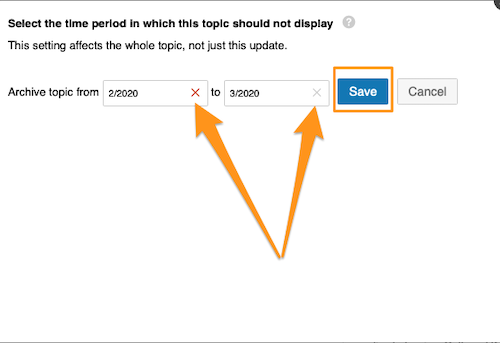
Then deselect the selected time period and click Save. Your topic is included in your presentation again.
Hide an update from the presentation
Hide the update
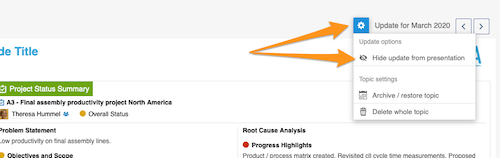
Click the Settings button and choose Hide update from presentation.
Check the greyed-out update
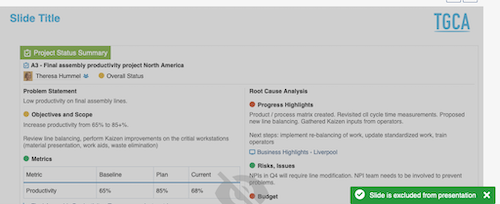
Your update is greyed out and not displayed in your presentation.
Show the update again
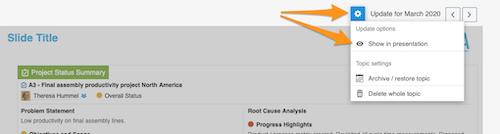
To show your update in the presentation again, click the Settings button and select Show in presentation.
如果您想移除整个主题,但不删除其全部历史记录(只移除特定周期的主题),可以将主题归档,或仅在演示中将其隐藏。
归档整个主题
打开归档设置
点击主题上方的 设置 按钮,从子菜单中选择 归档/恢复主题。
选择归档周期
选择不显示该主题的时间周期,然后点击 保存。该主题将不再出现在演示中。
恢复主题
要恢复主题,请按与归档相同的步骤操作:点击 设置 按钮,从子菜单中选择 归档/恢复主题。
取消选择归档周期
然后取消选择之前选中的时间周期,并点击 保存。主题会重新出现在演示中。
在演示中隐藏更新
隐藏更新
点击 设置 按钮,选择 在演示中隐藏更新。
检查灰显的更新
该更新会显示为灰色,且不会出现在演示中。
重新显示更新
要在演示中重新显示该更新,请点击 设置 按钮,选择 在演示中显示。
还需要帮助吗?
请给我们留言。工作日我们通常会在一小时内回复。