Cómo configurar los colores automáticos
Traducción automática del inglés. Se muestra el original en inglés.
Metric dashboard color coding can work automatically. For that, the metric type must be defined as positive (above the target) or negative (below the target).
Conditions for automatic color coding
- Actual and plan values. The metric dashboard contains both actual and plan values.
- Metric type. The metric is defined in its profile as described below.
Define the metric type
-
Open the metric list. Go to the Metric Dashboards module and select Metrics in the submenu.

-
Edit the metric. Click the Edit icon.

-
Select the metric type. Select Positive as the metric type for values that should be above the target, or Negative for values that should be below the target.
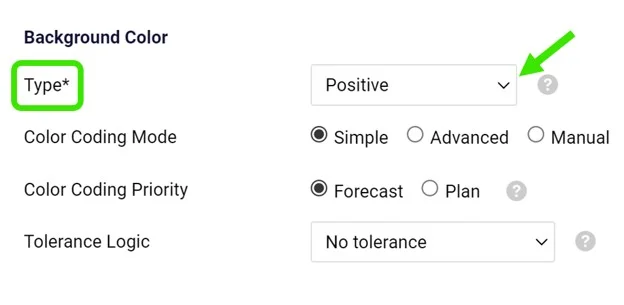
The basic color coding works with red and green. In addition, yellow (amber) can be used directly in your dashboard when the value is within the tolerance. See How to set up amber color for metrics in a dashboard.
Los colores del dashboard de KPI pueden asignarse automáticamente. Para ello, el tipo de indicador debe estar definido como positivo (por encima de la meta) o negativo (por debajo de la meta).
Condiciones para los colores automáticos
- Valores real y plan. El dashboard de KPI contiene tanto valores reales como de plan.
- Tipo de indicador. El indicador está definido en su ficha como se describe a continuación.
Definir el tipo de indicador
-
Abra la lista de indicadores. Abra el módulo Dashboards de KPI y elija Indicadores en el submenú.
-
Edite el indicador. Haga clic en el ícono Editar.
-
Elija el tipo de indicador. Elija Positivo como tipo de indicador para valores que deben estar por encima de la meta, o Negativo para valores que deben estar por debajo.
Los colores básicos son rojo y verde. Además, puede usar amarillo (ámbar) directamente en su dashboard cuando el valor está dentro de la tolerancia. Vea Cómo configurar el color ámbar para los indicadores de un dashboard.
¿Necesita más ayuda?
Escríbanos. En días laborables solemos responder en menos de una hora.