Cómo configurar las notificaciones de un dashboard de KPI
Traducción automática del inglés. Se muestra el original en inglés.
Would you like to keep data entry up to date in all your metric dashboards with ease? You can receive automatic notifications before your data entry due date, and you can also be notified if any data is missing and overdue.
Watch the video guide, or follow the text instructions below.
Set up automatic notifications
-
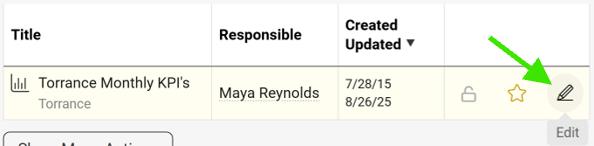
Open the dashboard settings. Go to your metric dashboard’s settings (click the edit pencil).
-
Define the notification settings. Scroll down, click the Automatic Notifications tab and define your settings.
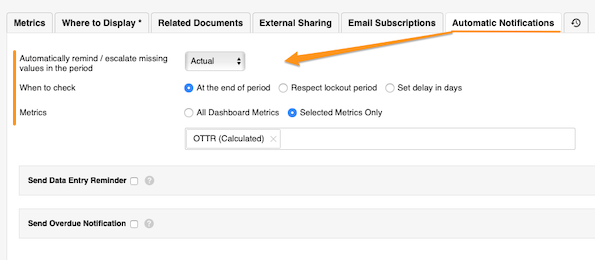
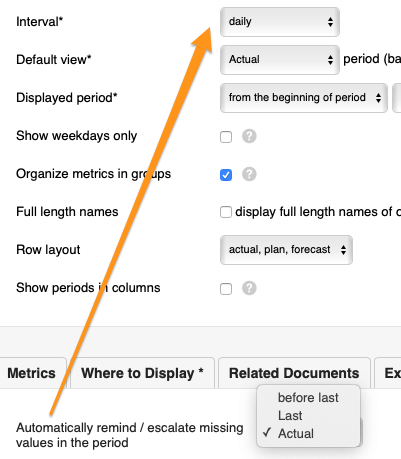
The Automatically remind/escalate missing values in the period setting is based on your dashboard’s interval.
-
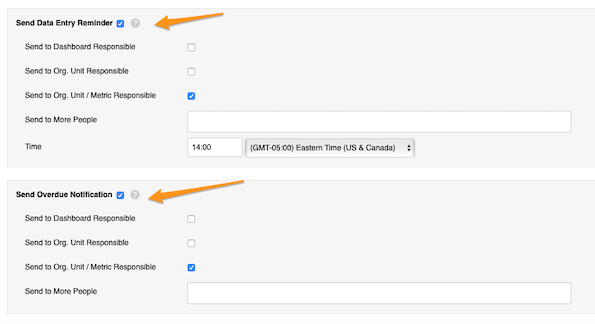
Set up reminders and overdue notifications. Set up your Send Data Entry Reminder and Send Overdue Notification settings.
Set up the responsible
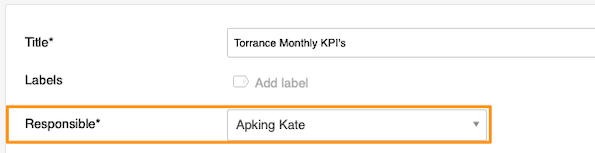
Dashboard responsible
Select a user under Responsible at the top of the settings.
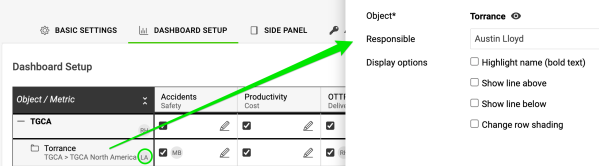
Org. unit responsible
Go to the Dashboard Setup tab, click your object and select the responsible. Their initials are displayed next to the object.
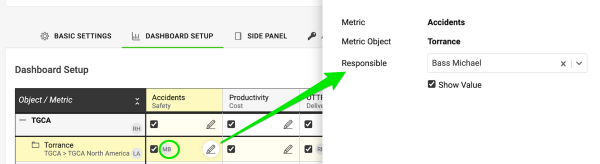
Org. unit and metric responsible
Click the edit pencil for the combination of your metric and object and select the responsible. Their initials are displayed as well.
¿Quiere mantener al día el ingreso de datos en todos sus dashboards de KPI sin esfuerzo? Puede recibir notificaciones automáticas antes de la fecha límite de ingreso de datos y también avisos cuando falten datos o estén vencidos.
Vea el video o siga las instrucciones escritas a continuación.
Configurar las notificaciones automáticas
-
Abra la configuración del dashboard. Vaya a la configuración de su dashboard de KPI (haga clic en el lápiz de edición).
-
Defina la configuración de notificaciones. Desplácese hacia abajo, haga clic en la pestaña Notificaciones automáticas y defina su configuración.
La opción Recordar/escalar automáticamente los valores faltantes del período se basa en el intervalo de su dashboard.
-
Configure los recordatorios y los avisos de vencimiento. Configure las opciones Enviar recordatorio de ingreso de datos y Enviar notificación de vencimiento.
Definir los responsables
Responsable del dashboard
Seleccione un usuario en Responsable, en la parte superior de la configuración.
Responsable de la unidad organizativa
Vaya a la pestaña Configuración del dashboard, haga clic en su objeto y seleccione el responsable. Sus iniciales aparecen junto al objeto.
Responsable de la unidad organizativa y la métrica
Haga clic en el lápiz de edición de la combinación de su métrica y su objeto, y seleccione el responsable. También aparecen sus iniciales.
¿Necesita más ayuda?
Escríbanos. En días laborables solemos responder en menos de una hora.