Metric's Advanced Settings
First see the basic metric settings, then follow these instructions to complete the Optional: Advanced Settings of your metric.
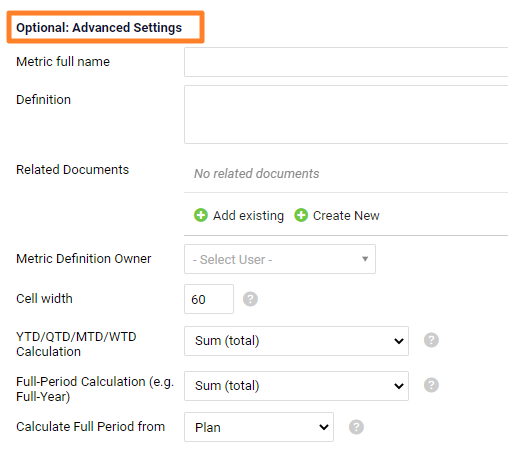
Describe the metric
- Metric’s full name explains an abbreviation used in the title of the metric (e.g. OTTR – On-Time to Request).
- The metric’s Definition helps the team understand how to measure and report data correctly.
- Related Documents link your metric to other documents that provide more details.
- Metric Definition Owner is an internal system user whom you can contact about the metric’s definition or other reporting details.
Set the cell width and to-date calculations
- Cell width in the metric dashboard.
- The To-Date (YTD, QTD, MTD, WTD) and Full Year Calculation formula fields can be set up as SUM, AVE, last value entered, or calculation according to a formula. You can define plan or forecast in Calculate Full Period from.
Set the chart axis and decimal places
- Chart axis minimum / maximum defines the values displayed on the chart’s Y-axis. Values below the minimum and above the maximum are hidden.
- Default no. of decimal places is the number of decimal places shown in a metric dashboard that uses this metric.
- How to assign weeks to months: select your preference.
Set up the roll-up
Set up the Roll-up function to see your daily or weekly values automatically rolled up into the monthly values. Choose the calculation from the submenu (Sum, Average etc.) and select the Calendar type.
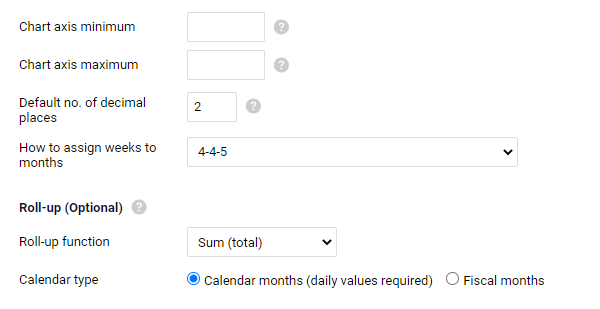
The Calendar month roll-up can be used for daily or monthly data only. If you collect data weekly, you have to roll up your monthly values according to the Fiscal Calendar (4-4-5 or 5-4-4).
If your company does not use a fiscal calendar, choose the Calendar months option and enter both the weekly and the monthly data manually, without system calculation. Quarterly and yearly numbers are calculated automatically. The system cannot calculate a calendar month value from weekly numbers, because one week can be split between two months.
Make it a calculated metric
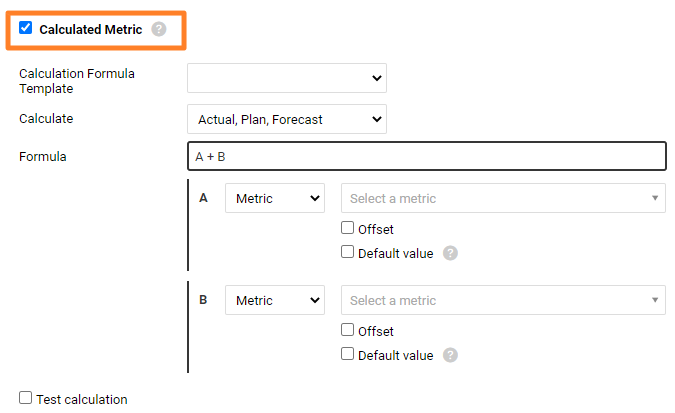
The last option in the metric’s advanced settings is Calculated metric.
- See the list of available functions in Calculated Metrics & Advanced Formulas.
- You can also read Metrics driven by other metrics – Calculated metrics.
Video guide: How to create a new metric
Related video guides: Enable Unit Conversion, Metric’s Definition & Related documents
Still need help?
Write to us. We usually reply within an hour on business days.