Jak tworzyć i przeglądać dokumenty
Tłumaczenie maszynowe z angielskiego. Wyświetlany jest oryginał po angielsku.
-
Understand where documents are stored. Documents are stored in folders as defined in the organization structure of your system (see How do I manage the organization structure). How you browse through the individual folders depends on the module they belong to (e.g. Strategy Deployment, Action Lists, etc.). User access to the individual folders is driven by the user rights assigned to a user’s profile.
-
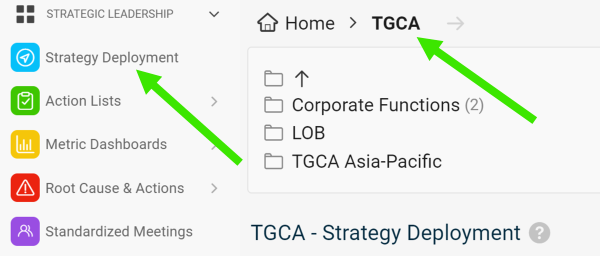
Select a module and a folder. To create a new document, select a module and an organization folder.
-
Create the document. Click the Add icon.

-
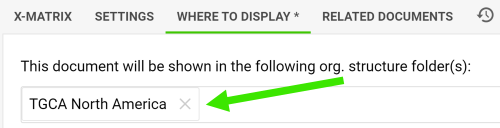
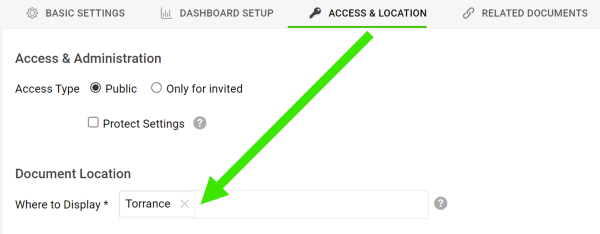
Change the location if needed. The new document is automatically located in the folder you created it in. You can change the location anytime on the Where to Display tab or the Access & Location tab.
-
Gdzie są przechowywane dokumenty. Dokumenty są przechowywane w folderach zgodnych ze strukturą organizacyjną ustawioną w systemie (zobacz Jak zarządzać strukturą organizacyjną). Sposób przeglądania folderów zależy od modułu, do którego należą (np. Cele strategiczne, Listy działań itd.). Dostęp do poszczególnych folderów wynika z uprawnień przypisanych w profilu użytkownika.
-
Wybierz moduł i folder. Aby utworzyć nowy dokument, wybierz moduł i folder organizacji.
-
Utwórz dokument. Kliknij ikonę Dodaj.
-
W razie potrzeby zmień lokalizację. Nowy dokument trafia automatycznie do folderu, w którym go utworzono. Lokalizację możesz zmienić w każdej chwili na karcie Gdzie wyświetlać lub Dostęp i lokalizacja.
Potrzebujesz dalszej pomocy?
Napisz do nas. W dni robocze zwykle odpowiadamy w ciągu godziny.