Como criar documentos e navegar entre eles
Tradução automática do inglês. Exibindo o original em inglês.
-
Understand where documents are stored. Documents are stored in folders as defined in the organization structure of your system (see How do I manage the organization structure). How you browse through the individual folders depends on the module they belong to (e.g. Strategy Deployment, Action Lists, etc.). User access to the individual folders is driven by the user rights assigned to a user’s profile.
-
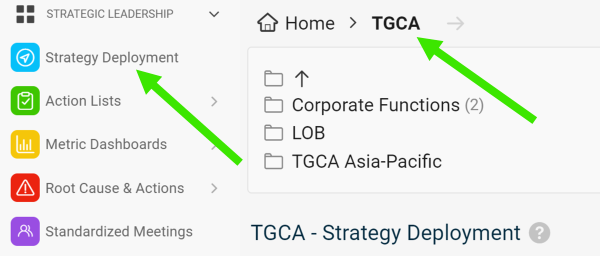
Select a module and a folder. To create a new document, select a module and an organization folder.
-
Create the document. Click the Add icon.

-
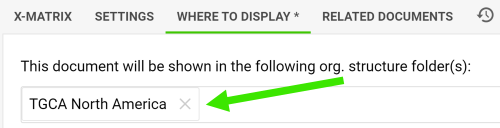
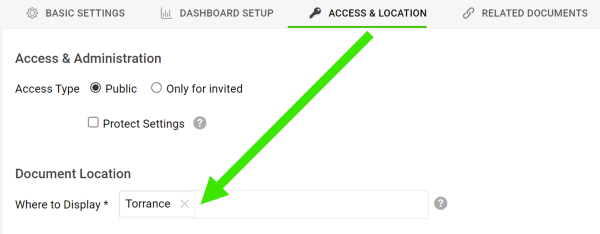
Change the location if needed. The new document is automatically located in the folder you created it in. You can change the location anytime on the Where to Display tab or the Access & Location tab.
-
Entenda onde os documentos ficam. Os documentos ficam em pastas, conforme a estrutura organizacional definida no seu sistema (veja Como gerenciar a estrutura organizacional). A forma de navegar pelas pastas depende do módulo a que elas pertencem (por exemplo, Objetivos estratégicos, Planos de ação etc.). O acesso de cada usuário às pastas depende das permissões atribuídas ao perfil dele.
-
Selecione um módulo e uma pasta. Para criar um novo documento, selecione um módulo e uma pasta da organização.
-
Crie o documento. Clique no ícone Adicionar.
-
Altere o local, se precisar. O novo documento fica automaticamente na pasta em que você o criou. Você pode alterar o local a qualquer momento na aba Onde exibir ou na aba Acesso e local.
Precisa de mais ajuda?
Escreva para nós. Em dias úteis, costumamos responder em até uma hora.