Ako vytvárať dokumenty a prechádzať nimi
Strojový preklad z angličtiny. Zobrazený je anglický originál.
-
Understand where documents are stored. Documents are stored in folders as defined in the organization structure of your system (see How do I manage the organization structure). How you browse through the individual folders depends on the module they belong to (e.g. Strategy Deployment, Action Lists, etc.). User access to the individual folders is driven by the user rights assigned to a user’s profile.
-
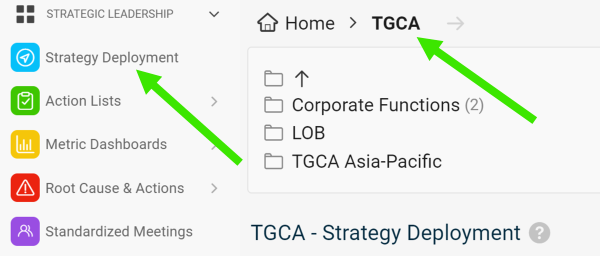
Select a module and a folder. To create a new document, select a module and an organization folder.
-
Create the document. Click the Add icon.

-
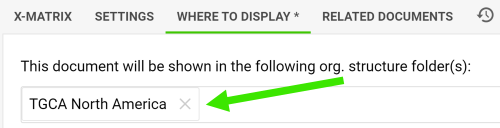
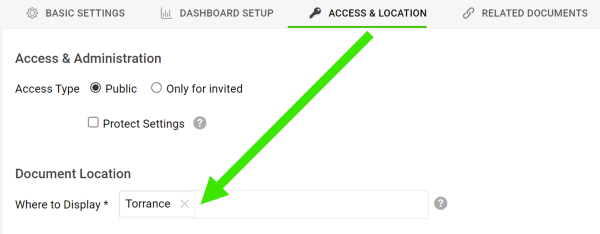
Change the location if needed. The new document is automatically located in the folder you created it in. You can change the location anytime on the Where to Display tab or the Access & Location tab.
-
Kde sú dokumenty uložené. Dokumenty sú uložené v priečinkoch podľa organizačnej štruktúry vášho systému (pozrite Ako spravovať organizačnú štruktúru). Spôsob prechádzania jednotlivými priečinkami závisí od modulu, do ktorého patria (napr. Strategické ciele, Akčné zoznamy a pod.). Prístup používateľov k jednotlivým priečinkom určujú oprávnenia priradené v profile používateľa.
-
Vyberte modul a priečinok. Ak chcete vytvoriť nový dokument, vyberte modul a priečinok organizačnej štruktúry.
-
Vytvorte dokument. Kliknite na ikonu Pridať.
-
Podľa potreby zmeňte umiestnenie. Nový dokument sa automaticky uloží do priečinka, v ktorom ste ho vytvorili. Umiestnenie môžete kedykoľvek zmeniť na karte Kde zobraziť alebo na karte Prístup a umiestnenie.
Potrebujete ďalšiu pomoc?
Napíšte nám. V pracovné dni zvyčajne odpovedáme do hodiny.