如何设置项目阶段
本文由英文机器翻译。 当前显示英文原文。
Predefine lists of project stages to suit your needs and assign them to your action lists.
Learn more about how to create an automatic project dashboard based on the project stage.
Create a list of project stages
Open the project stages
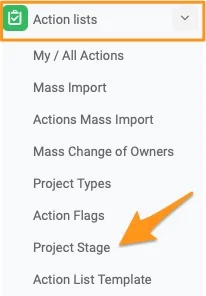
Go to the Action Lists module and select Project Stages from the submenu. Please note that only users with sufficient rights can add a project stage.
Create or edit a list
To create a new list, click the green plus button. To modify an existing list, click the edit pencil.

Add the stages
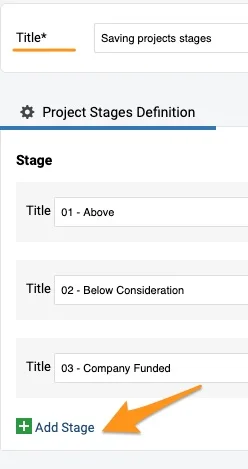
Define the title of the list and add specific stages with the green plus button.
Set up your action list with a project stage
Edit the action list settings
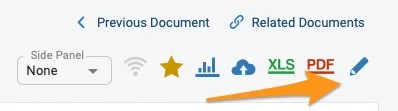
Open your action list settings with the edit pencil.
Choose the list of project stages
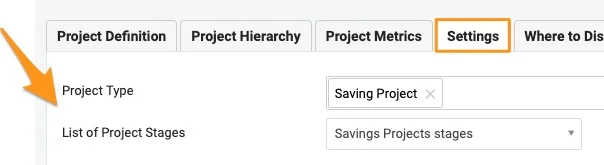
Scroll down to the Settings tab and choose a List of Project Stages from the submenu. You can select from the existing options.
Select the project stage
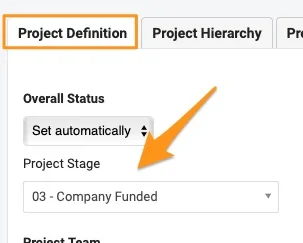
To set the project stage, go to the Project Definition tab and select it from the submenu. It offers the options set up in the List of Project Stages. If the project stage submenu is not displayed, follow the step below.
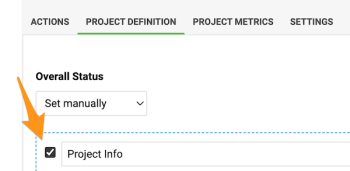
Enable Project Info in the template
Please note: If an action list template is used, the template’s Project Info field needs to be enabled for the Project Stage submenu to appear.
See the stage in the header
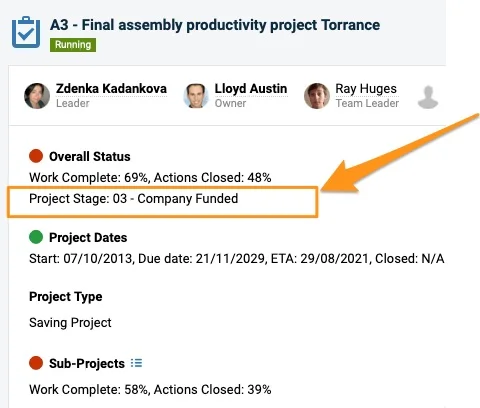
The project stage is displayed in the action list header.
Please note: If you need to create a new project type or list of project stages, or add a project stage to a list, please contact your system administrator or support@teamguru.com.
根据需要预定义项目阶段列表,并将其分配给行动清单。
详细了解如何根据项目阶段创建自动项目仪表板。
创建项目阶段列表
打开项目阶段
进入行动清单模块,从子菜单中选择项目阶段。请注意,只有具备相应权限的用户才能添加项目阶段。
创建或编辑列表
要创建新列表,请点击绿色加号按钮。要修改现有列表,请点击编辑铅笔图标。
添加阶段
定义列表标题,并使用绿色加号按钮添加具体阶段。
为行动清单设置项目阶段
编辑行动清单设置
使用编辑铅笔图标打开行动清单设置。
选择项目阶段列表
向下滚动到设置选项卡,从子菜单中选择项目阶段列表。您可以从现有选项中选择。
选择项目阶段
要设置项目阶段,请进入项目定义选项卡,从子菜单中选择。子菜单提供的是项目阶段列表中设置的选项。如果未显示项目阶段子菜单,请按照下面的步骤操作。
在模板中启用项目信息
请注意:如果使用了行动清单模板,必须在模板中启用项目信息字段,才会显示项目阶段子菜单。
在标题栏中查看阶段
项目阶段会显示在行动清单标题栏中。
请注意:如需创建新的项目类型或项目阶段列表,或向列表中添加项目阶段,请联系系统管理员或support@teamguru.com。
还需要帮助吗?
请给我们留言。工作日我们通常会在一小时内回复。