Weitere Einstellungen der Kennzahl – zusätzliche Regeln
Maschinelle Übersetzung aus dem Englischen. Englisches Original wird angezeigt.
Besides the metric’s basic settings, you can also set up additional rules in the following sections.
More Settings tab
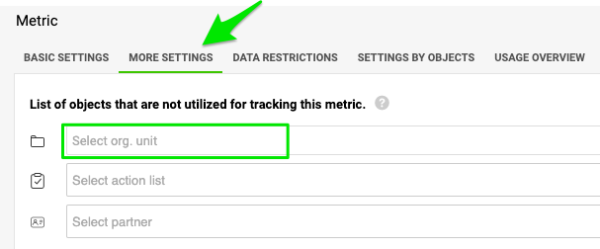
Exclude units from data collection
If you do not want to track data for a particular unit and metric and display this combination in the metric dashboard, add the unit to the units that will NOT collect the data. The same settings can be used for projects and partners.
If another unit in the same dashboard collects data for the metric, you still see the metric and org. unit combination in the dashboard, but its data entry field is greyed out (only greyed out, NOT LOCKED). Otherwise, the combination is not displayed in the dashboard.
Set the calculation priority
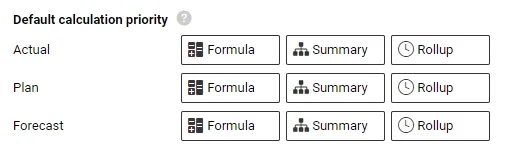
There are three different metric calculations in the system: Formula (e.g. Metric 1 + Metric 2), Summary (e.g. the sum of the units for a region) and Rollup (e.g. weekly values to monthly values).
You can change the company’s Default calculation priority individually for the actual, plan and forecast values, using drag and drop.
Adjust it either for the whole company, or set up a special rule per org. unit (on the next tab, Settings by Org. Units).
Data is displayed in your metric dashboard according to this priority (1st, 2nd and 3rd).
Enable approvals
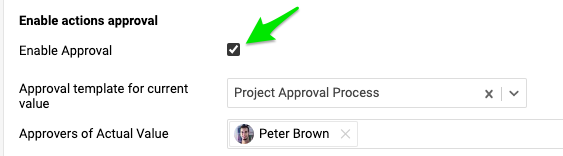
You can also enable approvals. If you gather data for a project metric, you can choose the approver for specific values. The approval process template must be set up first.
This tab also shows the custom fields, if any have been created in the system.
Other tabs
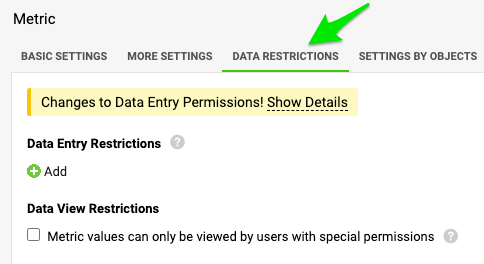
Data Restrictions
In this article, you learn how to lock specific values or time periods for data entry, and how to assign specific users to view or enter them.
Settings by Org. Units
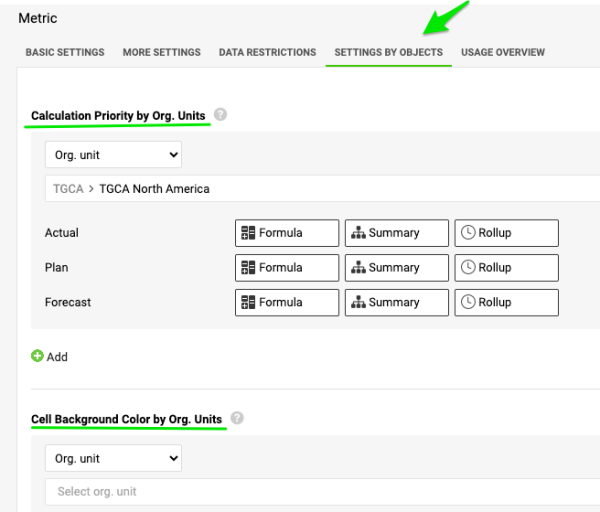
With Calculation Priority by Org. Units and Cell Background Color by Org. Units, you can specify different priorities based on organizational units or other data entry objects (e.g. action list, partner etc.).
Usage Overview
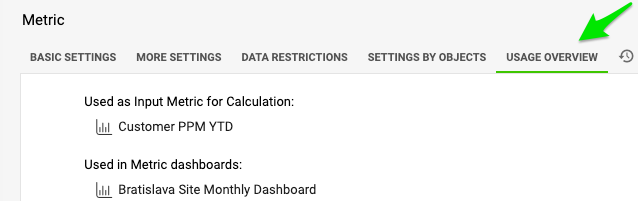
Here you find a list of other metrics or documents where the metric is used (Input Metric for Calculation, Used in metric dashboards etc.). You can use the live links as needed.
History Log
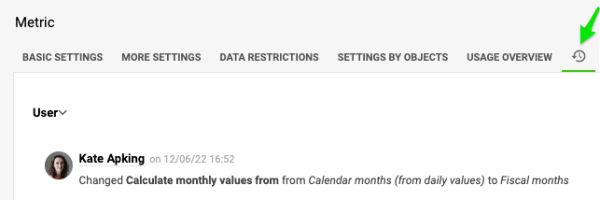
Here you find a log of all activity in your metric’s settings.
Neben den Grundeinstellungen der Kennzahl können Sie in den folgenden Bereichen zusätzliche Regeln festlegen.
Registerkarte Weitere Einstellungen
Einheiten von der Datenerfassung ausnehmen
Wenn Sie für eine bestimmte Einheit und Kennzahl keine Daten erfassen und diese Kombination nicht im KPI-Dashboard anzeigen möchten, fügen Sie die Einheit zu den Einheiten hinzu, die KEINE Daten erfassen. Dieselbe Einstellung gilt für Projekte und Partner.
Erfasst eine andere Einheit im selben Dashboard Daten für die Kennzahl, sehen Sie die Kombination aus Kennzahl und Org.-Einheit weiterhin im Dashboard, ihr Eingabefeld ist aber ausgegraut (nur ausgegraut, NICHT GESPERRT). Andernfalls wird die Kombination im Dashboard nicht angezeigt.
Berechnungspriorität festlegen
Das System kennt drei Arten der Kennzahlberechnung: Formel (z. B. Kennzahl 1 + Kennzahl 2), Summe (z. B. die Summe der Einheiten einer Region) und Verdichtung (z. B. Wochenwerte zu Monatswerten).
Die Standard-Berechnungspriorität des Unternehmens können Sie per Drag & Drop getrennt für Ist-, Plan- und Prognosewerte ändern.
Passen Sie sie für das gesamte Unternehmen an oder legen Sie eine eigene Regel pro Org.-Einheit fest (auf der nächsten Registerkarte Einstellungen nach Org.-Einheiten).
Die Daten im KPI-Dashboard werden nach dieser Priorität (1., 2. und 3.) angezeigt.
Freigaben aktivieren
Sie können auch Freigaben aktivieren. Wenn Sie Daten für eine Projektkennzahl erfassen, können Sie für bestimmte Werte einen Freigebenden wählen. Zuvor muss die Vorlage für den Freigabeprozess eingerichtet sein.
Auf dieser Registerkarte sehen Sie außerdem die benutzerdefinierten Felder, falls im System welche angelegt sind.
Weitere Registerkarten
Datenbeschränkungen
In diesem Artikel erfahren Sie, wie Sie bestimmte Werte oder Zeiträume für die Dateneingabe sperren und festlegen, welche Benutzer sie sehen oder eingeben dürfen.
Einstellungen nach Org.-Einheiten
Mit Berechnungspriorität nach Org.-Einheiten und Zellhintergrundfarbe nach Org.-Einheiten legen Sie unterschiedliche Prioritäten je Organisationseinheit oder anderem Dateneingabeobjekt fest (z. B. Maßnahmenliste, Partner usw.).
Verwendungsübersicht
Hier finden Sie eine Liste der Kennzahlen oder Dokumente, in denen die Kennzahl verwendet wird (Eingangskennzahl für Berechnung, In KPI-Dashboards verwendet usw.). Die Links führen Sie direkt dorthin.
Änderungsprotokoll
Hier finden Sie ein Protokoll aller Änderungen an den Einstellungen Ihrer Kennzahl.
Brauchen Sie weitere Hilfe?
Schreiben Sie uns. An Werktagen antworten wir meist innerhalb einer Stunde.