Więcej ustawień wskaźnika: dodatkowe reguły
Tłumaczenie maszynowe z angielskiego. Wyświetlany jest oryginał po angielsku.
Besides the metric’s basic settings, you can also set up additional rules in the following sections.
More Settings tab
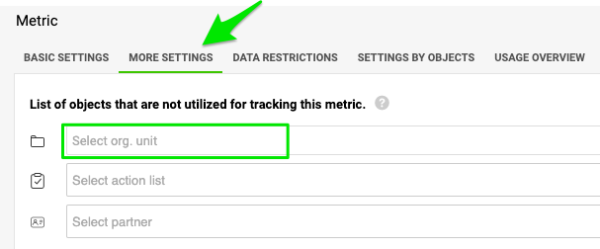
Exclude units from data collection
If you do not want to track data for a particular unit and metric and display this combination in the metric dashboard, add the unit to the units that will NOT collect the data. The same settings can be used for projects and partners.
If another unit in the same dashboard collects data for the metric, you still see the metric and org. unit combination in the dashboard, but its data entry field is greyed out (only greyed out, NOT LOCKED). Otherwise, the combination is not displayed in the dashboard.
Set the calculation priority
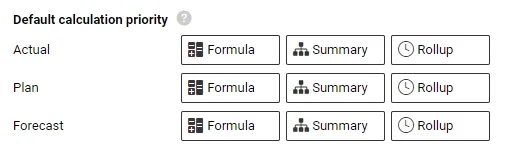
There are three different metric calculations in the system: Formula (e.g. Metric 1 + Metric 2), Summary (e.g. the sum of the units for a region) and Rollup (e.g. weekly values to monthly values).
You can change the company’s Default calculation priority individually for the actual, plan and forecast values, using drag and drop.
Adjust it either for the whole company, or set up a special rule per org. unit (on the next tab, Settings by Org. Units).
Data is displayed in your metric dashboard according to this priority (1st, 2nd and 3rd).
Enable approvals
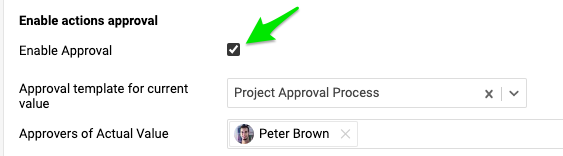
You can also enable approvals. If you gather data for a project metric, you can choose the approver for specific values. The approval process template must be set up first.
This tab also shows the custom fields, if any have been created in the system.
Other tabs
Data Restrictions
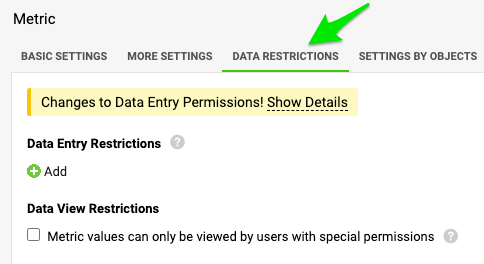
In this article, you learn how to lock specific values or time periods for data entry, and how to assign specific users to view or enter them.
Settings by Org. Units
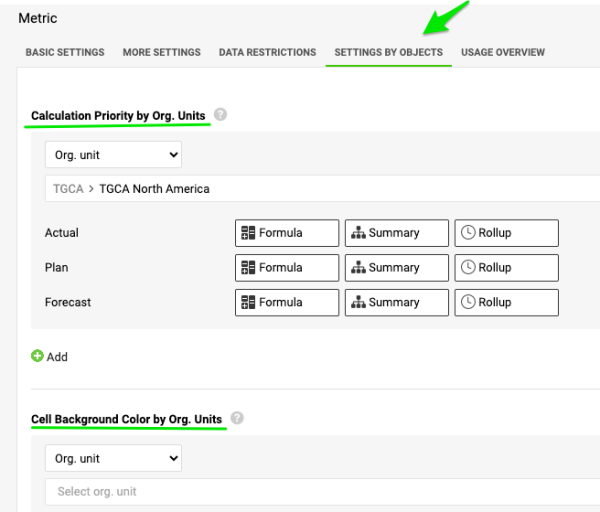
With Calculation Priority by Org. Units and Cell Background Color by Org. Units, you can specify different priorities based on organizational units or other data entry objects (e.g. action list, partner etc.).
Usage Overview
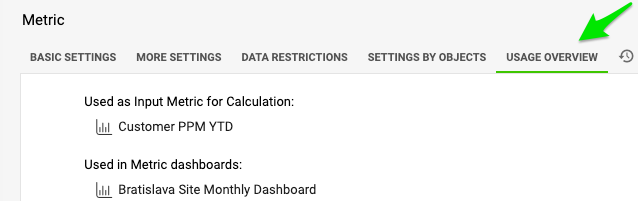
Here you find a list of other metrics or documents where the metric is used (Input Metric for Calculation, Used in metric dashboards etc.). You can use the live links as needed.
History Log
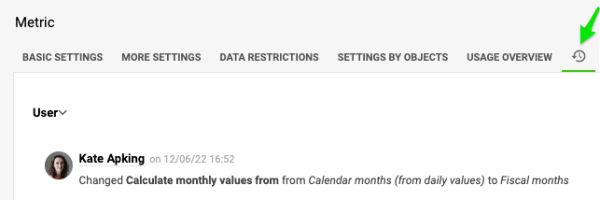
Here you find a log of all activity in your metric’s settings.
Oprócz podstawowych ustawień wskaźnika możesz ustawić dodatkowe reguły w poniższych sekcjach.
Karta Więcej ustawień
Wyklucz jednostki ze zbierania danych
Jeśli nie chcesz śledzić danych dla konkretnej jednostki i wskaźnika ani pokazywać tej kombinacji w dashboardzie KPI, dodaj jednostkę do jednostek, które NIE zbierają danych. Te same ustawienia działają dla projektów i partnerów.
Jeśli inna jednostka w tym samym dashboardzie zbiera dane dla tego wskaźnika, kombinacja wskaźnika i jednostki org. nadal jest widoczna w dashboardzie, ale jej pole do wprowadzania danych jest szare (tylko szare, NIE ZABLOKOWANE). W przeciwnym razie kombinacja w ogóle nie pojawia się w dashboardzie.
Ustaw priorytet obliczeń
System liczy wskaźniki na trzy sposoby: Formuła (np. Wskaźnik 1 + Wskaźnik 2), Podsumowanie (np. suma jednostek w regionie) i Agregacja (np. wartości tygodniowe do miesięcznych).
Domyślny priorytet obliczeń firmy możesz zmienić osobno dla wartości rzeczywistych, planu i prognozy, przeciągając pozycje.
Zmień go dla całej firmy albo ustaw osobną regułę dla jednostki org. (na następnej karcie, Ustawienia według jednostek org.).
Dashboard KPI wyświetla dane zgodnie z tym priorytetem (1., 2. i 3.).
Włącz zatwierdzanie
Możesz też włączyć zatwierdzanie. Jeśli zbierasz dane dla wskaźnika projektu, możesz wybrać zatwierdzającego dla konkretnych wartości. Najpierw trzeba ustawić szablon procesu zatwierdzania.
Na tej karcie są też pola niestandardowe, jeśli utworzono je w systemie.
Pozostałe karty
Ograniczenia danych
Z tego artykułu dowiesz się, jak zablokować wprowadzanie konkretnych wartości lub okresów i jak przydzielić konkretnym użytkownikom prawo do ich przeglądania lub wprowadzania.
Ustawienia według jednostek org.
W sekcjach Priorytet obliczeń według jednostek org. i Kolor tła komórki według jednostek org. ustawisz różne priorytety dla jednostek organizacyjnych lub innych obiektów, dla których wprowadza się dane (np. listy działań, partnera itd.).
Przegląd użycia
Tu znajdziesz listę innych wskaźników lub dokumentów, w których używany jest ten wskaźnik (Wskaźnik wejściowy do obliczeń, Używany w dashboardach KPI itd.). Możesz korzystać z aktywnych linków.
Historia zmian
Tu znajdziesz zapis wszystkich zmian w ustawieniach wskaźnika.
Potrzebujesz dalszej pomocy?
Napisz do nas. W dni robocze zwykle odpowiadamy w ciągu godziny.