如何将新创建的8D报告通知内部或外部供应商
本文由英文机器翻译。 当前显示英文原文。
Your suppliers can update the analysis steps and corrective actions online, giving you instant progress information. To have the system notify your suppliers, internal or external, automatically, follow the steps below:
-
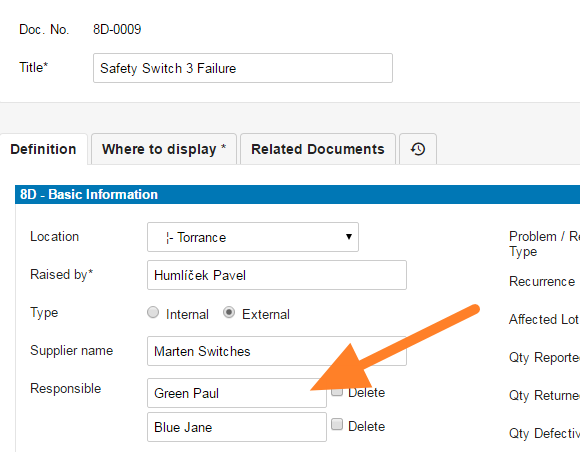
Choose the supplier. When creating an 8D report, choose a supplier with a contact person’s email address. That person is set up as an 8D partner with access to your instance for 8D reports.
-
Create a missing supplier. If the supplier or the contact person is not in the system, you have to create them first. See How to create a new supplier and his login details.
-
Fill in all the details.
-
Save the report. Click Save and View.
-
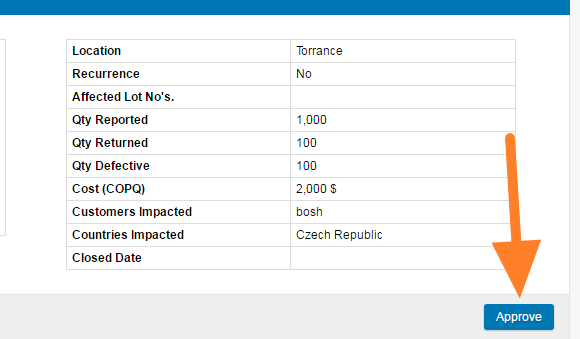
Approve the first step. Confirm the first step of your 8D, which contains the details about the issue, by clicking the Approve button.
-
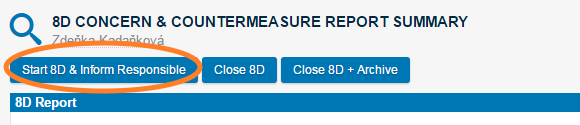
Start the 8D. Once the description data is approved and you are ready to inform your supplier about the new 8D report, click Start 8D & Inform Responsible.
-
The responsible people are notified. The responsible people receive an email notification about the new 8D report.
供应商可以在线更新分析步骤和纠正措施,让您即时掌握进展。要让系统自动通知内部或外部供应商,请按以下步骤操作:
-
选择供应商。 创建8D报告时,选择一个有联系人电子邮件地址的供应商。该联系人会被设为8D合作伙伴,可以访问您实例中的8D报告。
-
创建缺少的供应商。 如果系统中没有该供应商或联系人,需要先创建。参见如何创建新供应商及其登录信息。
-
填写所有详细信息。
-
保存报告。 点击 保存并查看。
-
批准第一步。 点击 批准 按钮,确认8D的第一步(包含问题的详细信息)。
-
启动8D。 描述数据获批后,如果您已准备好将新的8D报告通知供应商,请点击 启动8D并通知负责人。
-
负责人收到通知。 负责人会收到关于新8D报告的电子邮件通知。
还需要帮助吗?
请给我们留言。工作日我们通常会在一小时内回复。