Qualifikationsmatrix auf Basis einer Liste von Qualifikationen erstellen
Maschinelle Übersetzung aus dem Englischen. Englisches Original wird angezeigt.
The Skill Matrix module helps you manage your team’s skills and flexibility effectively. Learn how to create a skill matrix defined by a list of skills. (Video guide – 10:20)
Learn also how to create a skill matrix defined by job roles.
-
Define the skills and levels first. Before using the skill matrix, you need to define the skills (see How to create a new skill?) and the skill levels (see How to set up a skill level) in the system.
-
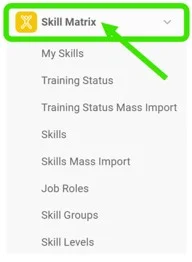
Create a new skill matrix. Go to the Skill Matrix submenu and click the Create New icon.

-
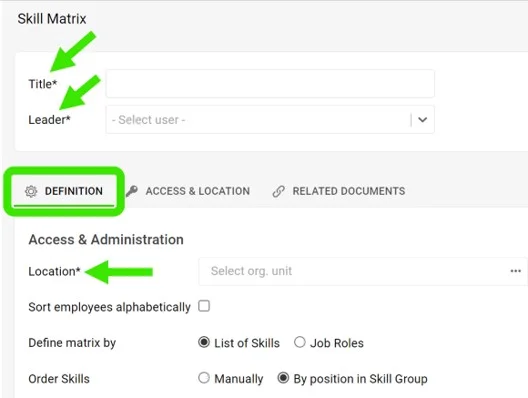
Complete the basic settings. Fill in the Title, Leader and Location. On the Access & Location tab, set the access type: Public or Only for invited. This tab is also where you can enable Protect Settings.
-
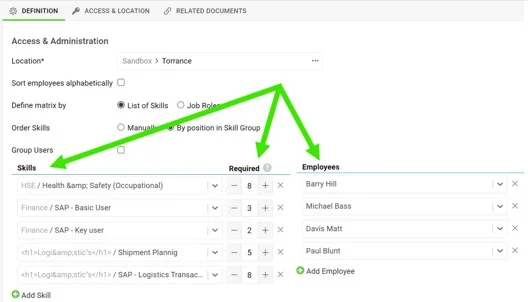
Choose the skills and the employees. Choose the skills, select the number of people required to be trained for each skill, and select the employees.
-
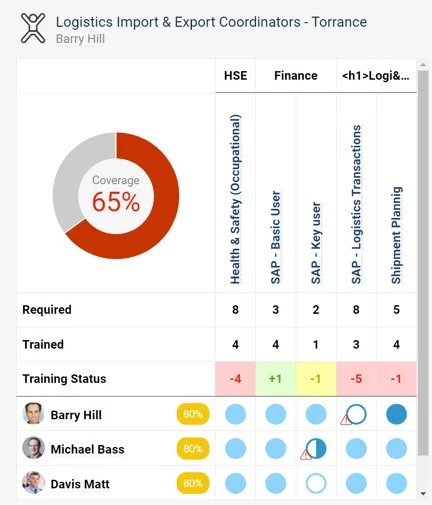
Save and view the matrix. Save and view your skill matrix.
Mit dem Modul Qualifikationsmatrix verwalten Sie die Qualifikationen und die Flexibilität Ihres Teams wirksam. Hier erfahren Sie, wie Sie eine Qualifikationsmatrix auf Basis einer Liste von Qualifikationen erstellen. (Video-Anleitung – 10:20)
Lesen Sie auch, wie Sie eine Qualifikationsmatrix auf Basis von Stellenrollen erstellen.
-
Legen Sie zuerst Qualifikationen und Stufen an. Bevor Sie die Qualifikationsmatrix nutzen, müssen im System die Qualifikationen (siehe Wie lege ich eine neue Qualifikation an?) und die Qualifikationsstufen (siehe So richten Sie eine Qualifikationsstufe ein) angelegt sein.
-
Erstellen Sie eine neue Qualifikationsmatrix. Öffnen Sie das Untermenü Qualifikationsmatrix und klicken Sie auf das Symbol Neu erstellen.
-
Füllen Sie die Grundeinstellungen aus. Geben Sie Titel, Leiter und Standort ein. Legen Sie auf der Registerkarte Zugriff und Ablage die Zugriffsart fest: Öffentlich oder Nur für Eingeladene. Auf dieser Registerkarte können Sie auch Einstellungen schützen aktivieren.
-
Wählen Sie Qualifikationen und Mitarbeiter. Wählen Sie die Qualifikationen, legen Sie für jede Qualifikation die Anzahl der Personen fest, die geschult sein müssen, und wählen Sie die Mitarbeiter aus.
-
Speichern Sie die Matrix und zeigen Sie sie an. Speichern Sie Ihre Qualifikationsmatrix und zeigen Sie sie an.
Brauchen Sie weitere Hilfe?
Schreiben Sie uns. An Werktagen antworten wir meist innerhalb einer Stunde.