Vytvorenie matice kompetencií podľa zoznamu zručností
Strojový preklad z angličtiny. Zobrazený je anglický originál.
The Skill Matrix module helps you manage your team’s skills and flexibility effectively. Learn how to create a skill matrix defined by a list of skills. (Video guide – 10:20)
Learn also how to create a skill matrix defined by job roles.
-
Define the skills and levels first. Before using the skill matrix, you need to define the skills (see How to create a new skill?) and the skill levels (see How to set up a skill level) in the system.
-
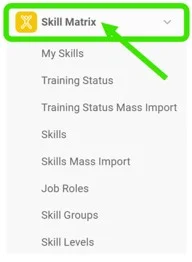
Create a new skill matrix. Go to the Skill Matrix submenu and click the Create New icon.

-
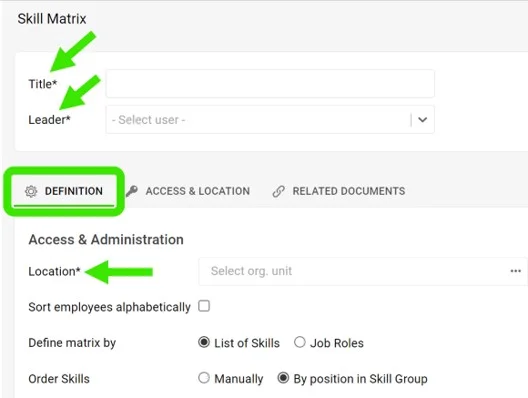
Complete the basic settings. Fill in the Title, Leader and Location. On the Access & Location tab, set the access type: Public or Only for invited. This tab is also where you can enable Protect Settings.
-
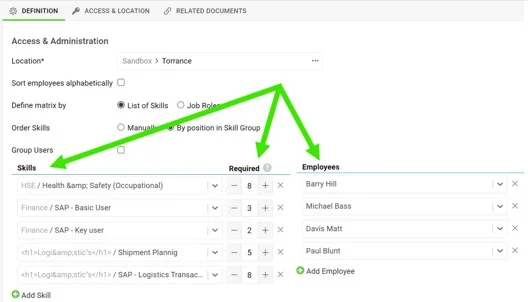
Choose the skills and the employees. Choose the skills, select the number of people required to be trained for each skill, and select the employees.
-
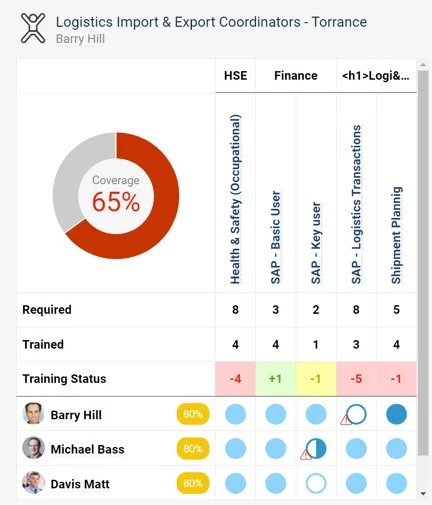
Save and view the matrix. Save and view your skill matrix.
Modul Matica kompetencií vám pomáha efektívne riadiť zručnosti a zastupiteľnosť vo vašom tíme. Naučte sa vytvoriť maticu kompetencií podľa zoznamu zručností. (Video návod – 10:20)
Pozrite si aj, ako vytvoriť maticu kompetencií podľa pracovných pozícií.
-
Najprv definujte zručnosti a úrovne. Pred použitím matice kompetencií musíte v systéme definovať zručnosti (pozrite Ako vytvoriť novú zručnosť?) a úrovne zručností (pozrite Ako nastaviť úroveň zručnosti).
-
Vytvorte novú maticu kompetencií. Otvorte podmenu Matica kompetencií a kliknite na ikonu Vytvoriť nový.
-
Vyplňte základné nastavenia. Vyplňte Názov, Vedúceho a Umiestnenie. Na karte Prístup a umiestnenie nastavte typ prístupu: Verejný alebo Iba pre pozvaných. Na tejto karte môžete zapnúť aj Chrániť nastavenia.
-
Vyberte zručnosti a zamestnancov. Vyberte zručnosti, pri každej zadajte počet ľudí, ktorí v nej majú byť zaškolení, a vyberte zamestnancov.
-
Uložte a zobrazte maticu. Maticu kompetencií uložte a zobrazte.
Potrebujete ďalšiu pomoc?
Napíšte nám. V pracovné dni zvyčajne odpovedáme do hodiny.