Tworzenie matrycy kompetencji na podstawie listy kompetencji
Tłumaczenie maszynowe z angielskiego. Wyświetlany jest oryginał po angielsku.
The Skill Matrix module helps you manage your team’s skills and flexibility effectively. Learn how to create a skill matrix defined by a list of skills. (Video guide – 10:20)
Learn also how to create a skill matrix defined by job roles.
-
Define the skills and levels first. Before using the skill matrix, you need to define the skills (see How to create a new skill?) and the skill levels (see How to set up a skill level) in the system.
-
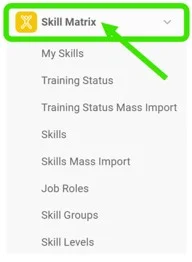
Create a new skill matrix. Go to the Skill Matrix submenu and click the Create New icon.

-
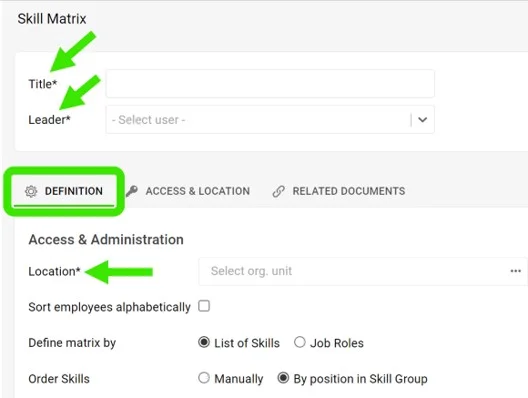
Complete the basic settings. Fill in the Title, Leader and Location. On the Access & Location tab, set the access type: Public or Only for invited. This tab is also where you can enable Protect Settings.
-
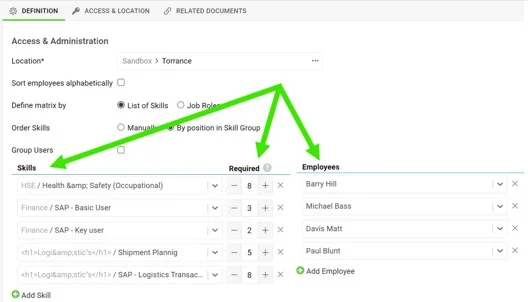
Choose the skills and the employees. Choose the skills, select the number of people required to be trained for each skill, and select the employees.
-
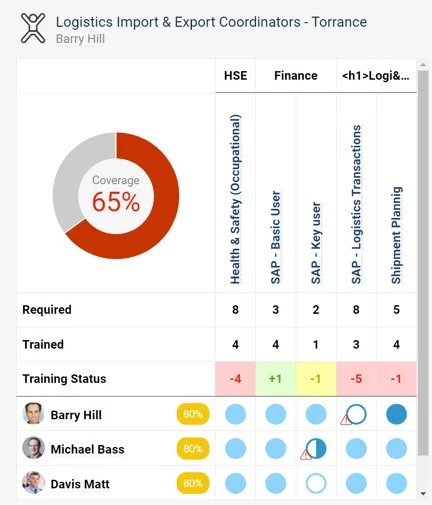
Save and view the matrix. Save and view your skill matrix.
Moduł Matryca kompetencji pomaga skutecznie zarządzać kompetencjami i elastycznością zespołu. Zobacz, jak utworzyć matrycę kompetencji na podstawie listy kompetencji. (Wideo – 10:20)
Zobacz też, jak utworzyć matrycę kompetencji na podstawie stanowisk.
-
Najpierw zdefiniuj kompetencje i poziomy. Zanim zaczniesz korzystać z matrycy, zdefiniuj w systemie kompetencje (zobacz Jak utworzyć nową kompetencję?) i poziomy kompetencji (zobacz Jak ustawić poziom kompetencji).
-
Utwórz nową matrycę. Otwórz podmenu Matryca kompetencji i kliknij ikonę Utwórz nowy.
-
Uzupełnij ustawienia podstawowe. Wpisz Tytuł, Lidera i Lokalizację. Na karcie Dostęp i lokalizacja ustaw typ dostępu: Publiczny lub Tylko dla zaproszonych. Tu możesz też włączyć Ochronę ustawień.
-
Wybierz kompetencje i pracowników. Wybierz kompetencje, ustal, ile osób musi być przeszkolonych w każdej z nich, i wybierz pracowników.
-
Zapisz i otwórz matrycę. Zapisz matrycę kompetencji i wyświetl ją.
Potrzebujesz dalszej pomocy?
Napisz do nas. W dni robocze zwykle odpowiadamy w ciągu godziny.