创建按技能列表定义的技能矩阵
本文由英文机器翻译。 当前显示英文原文。
The Skill Matrix module helps you manage your team’s skills and flexibility effectively. Learn how to create a skill matrix defined by a list of skills. (Video guide – 10:20)
Learn also how to create a skill matrix defined by job roles.
-
Define the skills and levels first. Before using the skill matrix, you need to define the skills (see How to create a new skill?) and the skill levels (see How to set up a skill level) in the system.
-
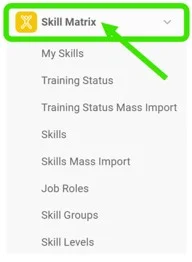
Create a new skill matrix. Go to the Skill Matrix submenu and click the Create New icon.

-
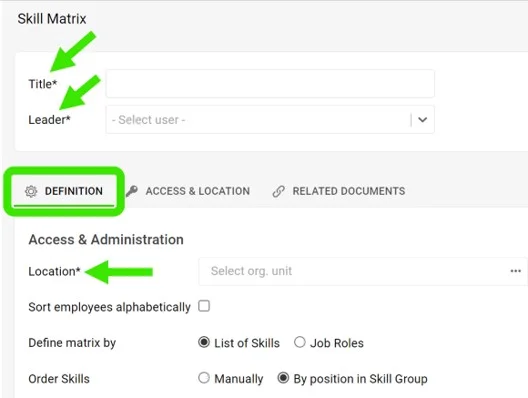
Complete the basic settings. Fill in the Title, Leader and Location. On the Access & Location tab, set the access type: Public or Only for invited. This tab is also where you can enable Protect Settings.
-
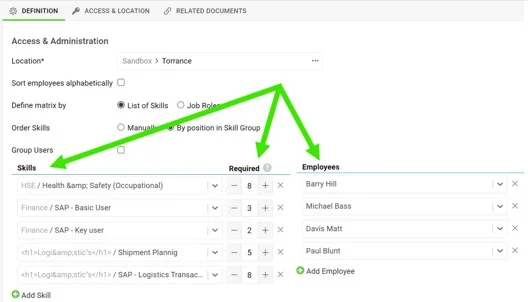
Choose the skills and the employees. Choose the skills, select the number of people required to be trained for each skill, and select the employees.
-
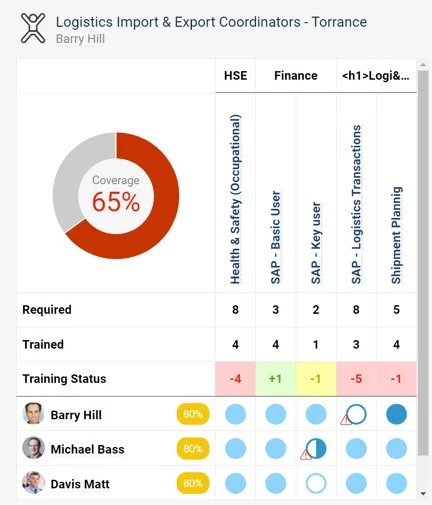
Save and view the matrix. Save and view your skill matrix.
技能矩阵模块可帮助您有效管理团队的技能和人员灵活性。本文介绍如何创建按技能列表定义的技能矩阵。(视频教程 – 10:20)
另请参阅如何创建按岗位角色定义的技能矩阵。
还需要帮助吗?
请给我们留言。工作日我们通常会在一小时内回复。