Utwórz matrycę kompetencji opartą na stanowiskach
Tłumaczenie maszynowe z angielskiego. Wyświetlany jest oryginał po angielsku.
Learn how to create a skill matrix defined by job roles. You can define different required knowledge levels for each job position, and at the same time predefine the list of all skills the position requires. Whenever you add a new skill to a job role, the change is automatically reflected in all skill matrices where the job role is used. (Video guide – Skill Matrix 17:30)
Learn also how to create a skill matrix defined by a list of skills.
-
Define the skills, levels and job roles first. Before creating a skill matrix, you need to define the skills (see How to create a new skill), the skill levels (see How to set up a skill level) and the job roles (see How to set up a job role) in the system.
-
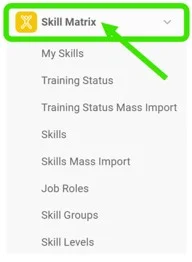
Open the Skill Matrix module. To create a new skill matrix, click the Skill Matrix module header.
-
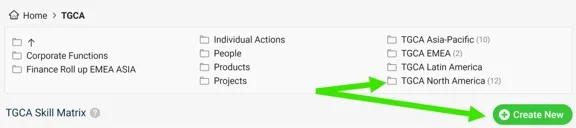
Choose the folder and create the matrix. Choose the folder where you want to display the skill matrix and add a new matrix by clicking the Create New button with the green plus sign.
-
Define the skill matrix settings.
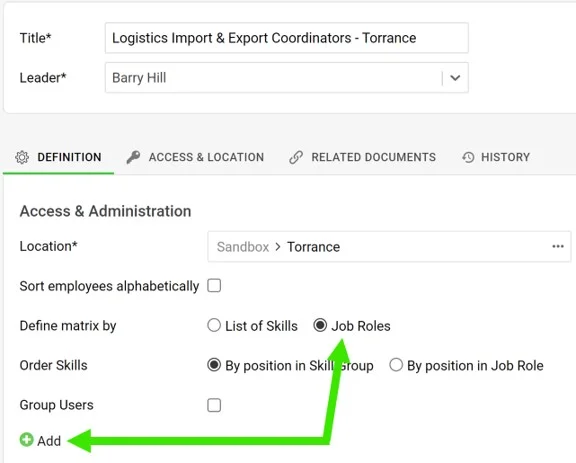
- Complete the basic settings, such as Title, Leader and Location. Don’t forget to define Access & Location if security settings are required.
- Define the skill matrix by Job roles.
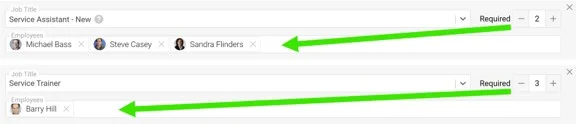
- Add new job roles by clicking the green plus button. Select a job title from the predefined options in the submenu, select the employees and the Required number (how many people need to be trained).
- When you are done with all the settings, click the Save & View button in the upper right corner.
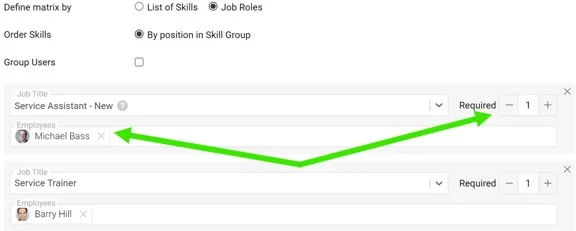
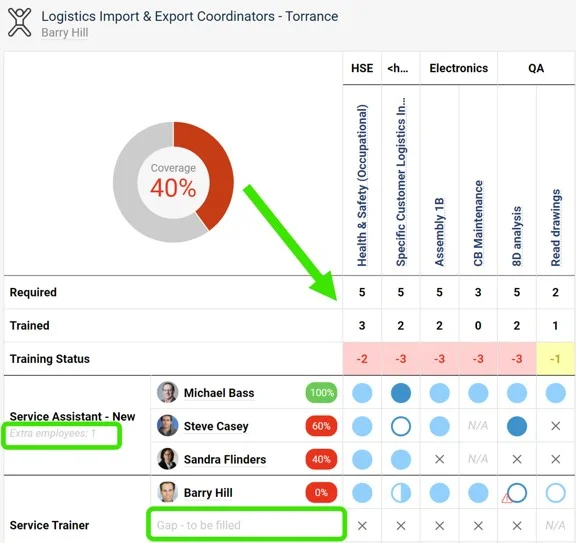
Please note: The Required number doesn’t always equal the number of selected employees. It can be higher (a free position to be filled) or lower (an extra position). This is reflected in the skill matrix statistics.
-
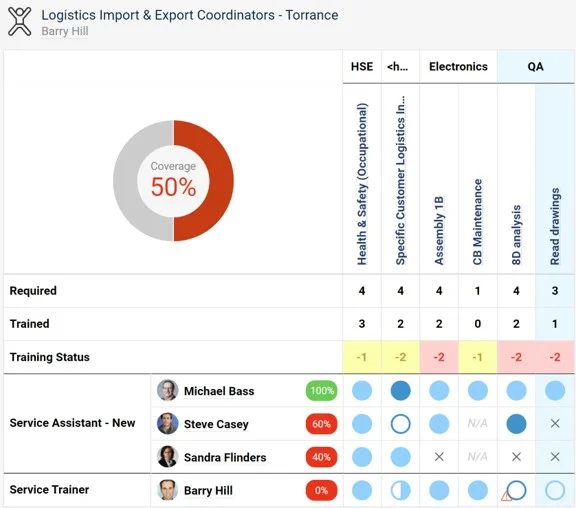
Review the skill matrix. The skill matrix is created.
Dowiedz się, jak utworzyć matrycę kompetencji opartą na stanowiskach. Dla każdego stanowiska możesz określić inne wymagane poziomy wiedzy i jednocześnie z góry zdefiniować listę wszystkich umiejętności, których to stanowisko wymaga. Każda nowa umiejętność dodana do stanowiska automatycznie pojawia się we wszystkich matrycach kompetencji, w których to stanowisko występuje. (Samouczek wideo – Matryca kompetencji 17:30)
Dowiedz się też, jak utworzyć matrycę kompetencji opartą na liście umiejętności.
-
Najpierw zdefiniuj umiejętności, poziomy i stanowiska. Zanim utworzysz matrycę kompetencji, zdefiniuj w systemie umiejętności (zobacz Jak utworzyć nową umiejętność), poziomy umiejętności (zobacz Jak ustawić poziom umiejętności) i stanowiska (zobacz Jak ustawić stanowisko).
-
Otwórz moduł Matryca kompetencji. Aby utworzyć nową matrycę kompetencji, kliknij nagłówek modułu Matryca kompetencji.
-
Wybierz folder i utwórz matrycę. Wybierz folder, w którym ma się wyświetlać matryca kompetencji, i dodaj nową matrycę, klikając przycisk Utwórz nowy z zielonym plusem.
-
Określ ustawienia matrycy kompetencji.
- Uzupełnij podstawowe ustawienia, takie jak Tytuł, Lider i Lokalizacja. Jeśli potrzebne są ustawienia zabezpieczeń, nie zapomnij skonfigurować sekcji Dostęp i lokalizacja.
- Zdefiniuj matrycę kompetencji według Stanowisk.
- Dodaj nowe stanowiska, klikając zielony przycisk z plusem. Wybierz nazwę stanowiska z predefiniowanych opcji w podmenu, wybierz pracowników i podaj liczbę Wymagane (ile osób trzeba przeszkolić).
- Po zakończeniu wszystkich ustawień kliknij przycisk Zapisz i wyświetl w prawym górnym rogu.
Uwaga: liczba Wymagane nie zawsze jest równa liczbie wybranych pracowników. Może być większa (wolne stanowisko do obsadzenia) lub mniejsza (dodatkowe stanowisko). Widać to w statystykach matrycy kompetencji.
-
Sprawdź matrycę kompetencji. Matryca kompetencji jest gotowa.
Potrzebujesz dalszej pomocy?
Napisz do nas. W dni robocze zwykle odpowiadamy w ciągu godziny.