创建按岗位角色定义的技能矩阵
本文由英文机器翻译。 当前显示英文原文。
Learn how to create a skill matrix defined by job roles. You can define different required knowledge levels for each job position, and at the same time predefine the list of all skills the position requires. Whenever you add a new skill to a job role, the change is automatically reflected in all skill matrices where the job role is used. (Video guide – Skill Matrix 17:30)
Learn also how to create a skill matrix defined by a list of skills.
-
Define the skills, levels and job roles first. Before creating a skill matrix, you need to define the skills (see How to create a new skill), the skill levels (see How to set up a skill level) and the job roles (see How to set up a job role) in the system.
-
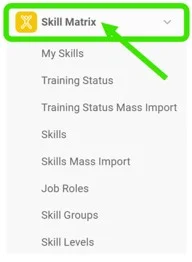
Open the Skill Matrix module. To create a new skill matrix, click the Skill Matrix module header.
-
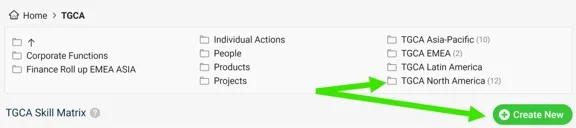
Choose the folder and create the matrix. Choose the folder where you want to display the skill matrix and add a new matrix by clicking the Create New button with the green plus sign.
-
Define the skill matrix settings.
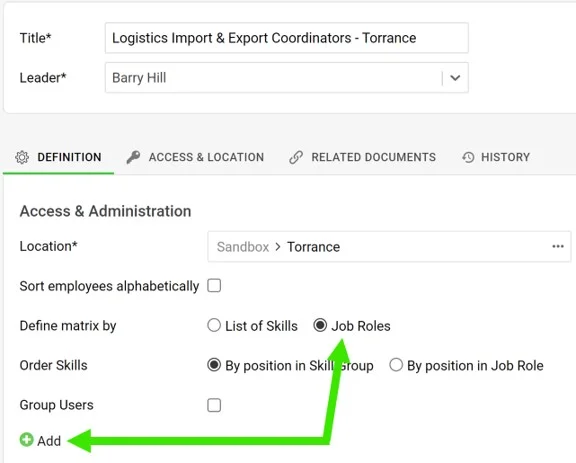
- Complete the basic settings, such as Title, Leader and Location. Don’t forget to define Access & Location if security settings are required.
- Define the skill matrix by Job roles.
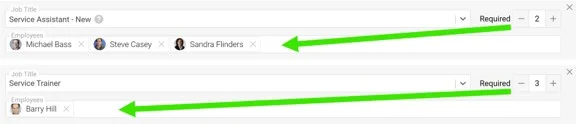
- Add new job roles by clicking the green plus button. Select a job title from the predefined options in the submenu, select the employees and the Required number (how many people need to be trained).
- When you are done with all the settings, click the Save & View button in the upper right corner.
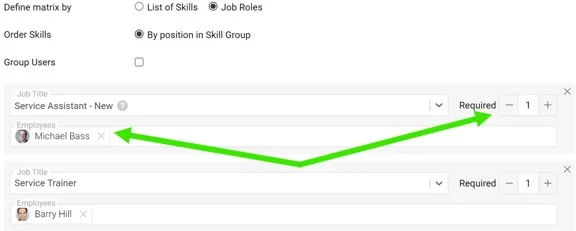
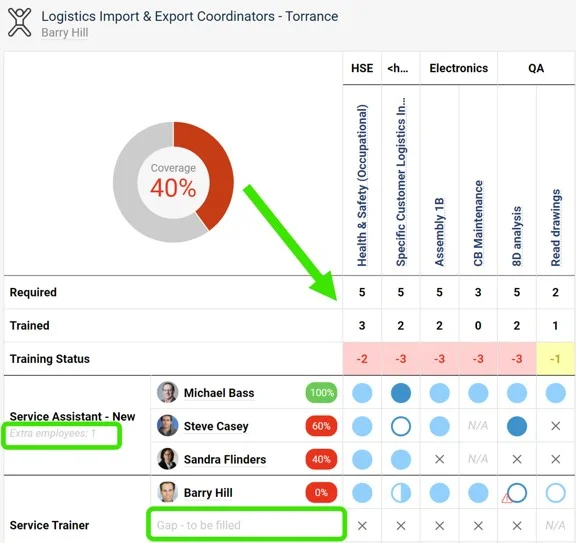
Please note: The Required number doesn’t always equal the number of selected employees. It can be higher (a free position to be filled) or lower (an extra position). This is reflected in the skill matrix statistics.
-
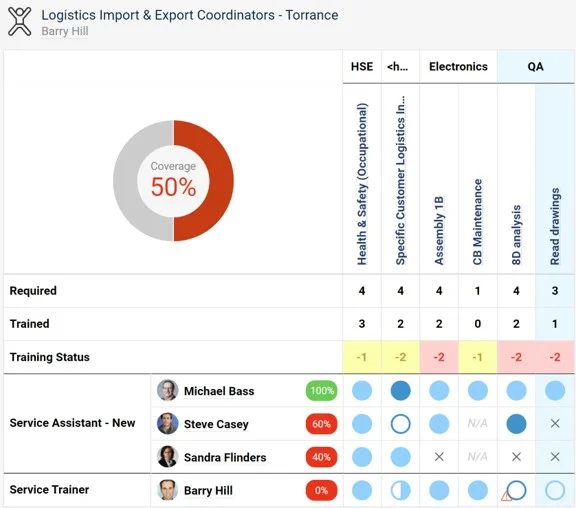
Review the skill matrix. The skill matrix is created.
了解如何创建按岗位角色定义的技能矩阵。您可以为每个岗位定义不同的知识水平要求,同时预先定义该岗位所需的全部技能。每当为岗位角色添加新技能时,所有使用该岗位角色的技能矩阵都会自动同步更改。(视频指南:技能矩阵,17:30)
另请了解如何创建按技能列表定义的技能矩阵。
-
先定义技能、等级和岗位角色。 创建技能矩阵之前,需要在系统中定义技能(参见如何创建技能)、技能等级(参见如何设置技能等级)和岗位角色(参见如何设置岗位角色)。
-
打开技能矩阵模块。 要创建新的技能矩阵,请点击 技能矩阵 模块标题。
-
选择文件夹并创建矩阵。 选择要显示技能矩阵的文件夹,然后点击带绿色加号的 新建 按钮添加新矩阵。
-
定义技能矩阵设置。
- 填写基本设置,例如 标题、主管 和 位置。如需安全设置,别忘了定义 访问与位置。
- 按 岗位角色 定义技能矩阵。
- 点击绿色加号按钮添加新的岗位角色。从子菜单的预定义选项中选择岗位名称,选择员工并填写 所需人数(需要培训的人数)。
- 完成所有设置后,点击右上角的 保存并查看 按钮。
请注意: 所需人数 不一定等于所选员工的人数。它可以更高(有待填补的空缺岗位),也可以更低(有多余岗位)。这会体现在技能矩阵的统计数据中。
-
查看技能矩阵。 技能矩阵已创建。
还需要帮助吗?
请给我们留言。工作日我们通常会在一小时内回复。