战略部署评审仪表板的工作原理
本文由英文机器翻译。 当前显示英文原文。
Every Strategy Deployment plan opens as a review dashboard: the X-matrix and everything you need for a strategy review – overall status, KPIs, projects and responsible people – on one page.
What you see on the page
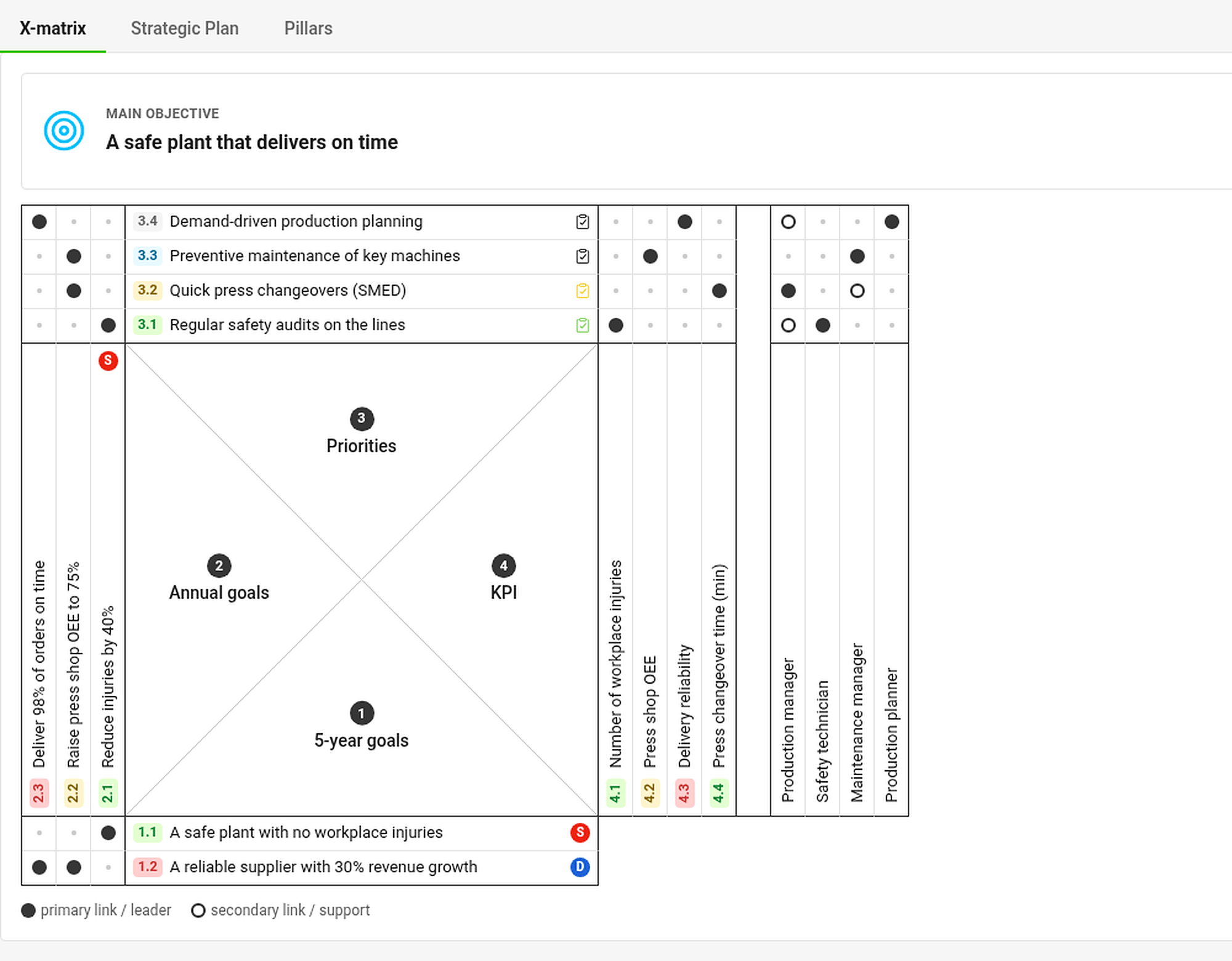
- Tabs – X-matrix, Strategic Plan and Pillars show the same plan in three different ways (see How to work with the Strategic Plan and Pillars views).
- Main objective and Plan hierarchy – the objective of the plan and the plans above and below it (see How to link X-matrices into a plan hierarchy).
- The X-matrix – the full matrix: 5-year goals at the bottom, annual goals on the left, priorities on top, KPIs (Targets to Improve) on the right and responsible people next to them. The names of the lists come from the template of the plan.
- Item codes – every item has a code made of the list number and its position, for example 2.3 is the third annual goal. The code is the same in the matrix and in every section below it.
- Dots – a filled dot is a primary link (leader), a hollow dot a secondary link (support). A small gray dot marks an empty cell that is not linked yet. The color of the code shows the status of the item.
Click an item to see what is connected
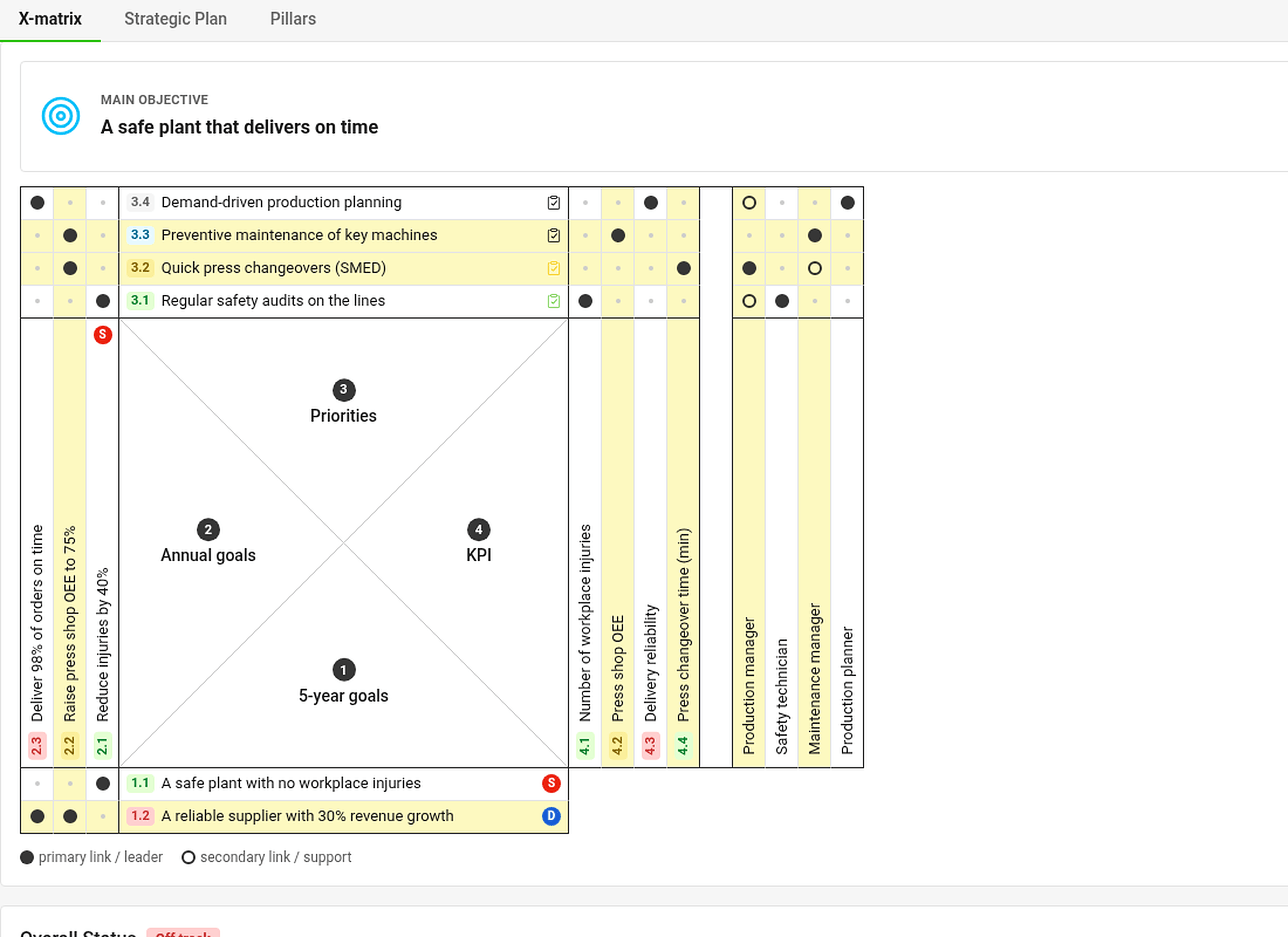
Click any label in the matrix. The item, everything above it and everything below it light up in yellow – the goals, priorities, KPIs and people that belong together. Click outside the matrix (or press Esc) to remove the highlight. The filter Show only the selected X-matrix items narrows the matrix to that chain.
Below the matrix

- Overall Status – one gauge per list of the matrix, showing how many items are on plan, and the share of the plan year that has already passed (Year elapsed). Click a gauge to jump to its section.
- Projects – every project linked to a priority, with its status, days left and percentage done (see How to link priorities to projects).
- Targets to Improve (KPIs) – a tile with a monthly chart for every KPI (see How to track KPIs).
- Responsibles – a card for every person with the codes of the priorities and KPIs they answer for.
Click any code (for example 3.2 in the Responsibles section) to jump to that item and see it briefly framed.
Who can do what
Everyone who may open the plan sees the same statuses. Buttons for editing and the settings icon appear only to people who may edit the plan. Projects, metrics and plans you are not allowed to open are shown as Hidden document or Hidden value – their status still counts, so everybody works with the same picture.
每个战略部署计划都以评审仪表板的形式打开:X-matrix以及战略评审所需的一切(整体状态、KPI、项目和负责人)都在同一页面上。
页面上显示的内容
- 选项卡:X-matrix、战略计划和支柱以三种不同方式显示同一计划(参见如何使用战略计划和支柱视图)。
- 主要目标和计划层级:计划的目标,以及它的上级和下级计划(参见如何将X-matrix链接为计划层级)。
- X-matrix:完整的矩阵,下方是5年目标,左侧是年度目标,上方是优先事项,右侧是KPI(改进目标),旁边是负责人。各列表的名称来自计划的模板。
- 条目编号:每个条目都有一个由列表编号和其所在位置组成的编号,例如2.3表示第三个年度目标。编号在矩阵和下方各部分中保持一致。
- 圆点:实心圆点表示主要关联(主导),空心圆点表示次要关联(支持)。灰色小圆点表示尚未关联的空单元格。编号的颜色表示条目的状态。
点击条目查看关联内容
点击矩阵中的任意标签。该条目及其上下所有关联内容(属于同一链条的目标、优先事项、KPI和人员)都会以黄色突出显示。点击矩阵外部(或按Esc键)即可取消突出显示。筛选条件仅显示选定的X-matrix条目可将矩阵缩小到这条链。
矩阵下方
- 整体状态:矩阵的每个列表对应一个仪表盘,显示有多少条目符合计划,以及计划年度已过去的比例(年度已过)。点击仪表盘可跳转到相应部分。
- 项目:与优先事项关联的所有项目,显示其状态、剩余天数和完成百分比(参见如何将优先事项关联到项目)。
- 改进目标(KPI):每个KPI一个图块,附带月度图表(参见如何跟踪KPI)。
- 负责人:每人一张卡片,列出其负责的优先事项和KPI的编号。
点击任意编号(例如负责人部分中的3.2),即可跳转到该条目,并短暂显示一个框线。
权限说明
所有可以打开该计划的人看到的状态都相同。编辑按钮和设置图标只对可以编辑该计划的人显示。您无权打开的项目、指标和计划会显示为隐藏文档或隐藏值,但其状态仍会计入,因此每个人看到的情况都一致。
还需要帮助吗?
请给我们留言。工作日我们通常会在一小时内回复。