Crear una matriz de habilidades por puestos de trabajo
Traducción automática del inglés. Se muestra el original en inglés.
Learn how to create a skill matrix defined by job roles. You can define different required knowledge levels for each job position, and at the same time predefine the list of all skills the position requires. Whenever you add a new skill to a job role, the change is automatically reflected in all skill matrices where the job role is used. (Video guide – Skill Matrix 17:30)
Learn also how to create a skill matrix defined by a list of skills.
-
Define the skills, levels and job roles first. Before creating a skill matrix, you need to define the skills (see How to create a new skill), the skill levels (see How to set up a skill level) and the job roles (see How to set up a job role) in the system.
-
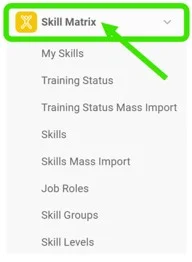
Open the Skill Matrix module. To create a new skill matrix, click the Skill Matrix module header.
-
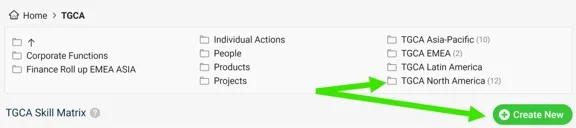
Choose the folder and create the matrix. Choose the folder where you want to display the skill matrix and add a new matrix by clicking the Create New button with the green plus sign.
-
Define the skill matrix settings.
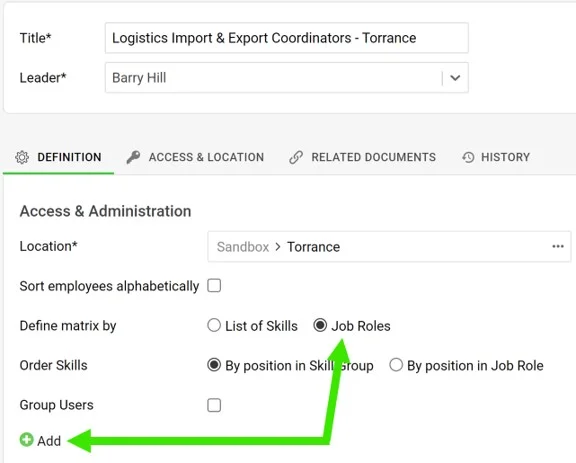
- Complete the basic settings, such as Title, Leader and Location. Don’t forget to define Access & Location if security settings are required.
- Define the skill matrix by Job roles.
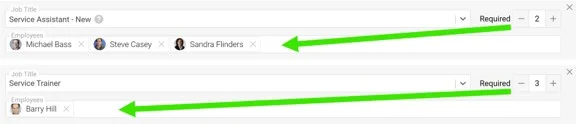
- Add new job roles by clicking the green plus button. Select a job title from the predefined options in the submenu, select the employees and the Required number (how many people need to be trained).
- When you are done with all the settings, click the Save & View button in the upper right corner.
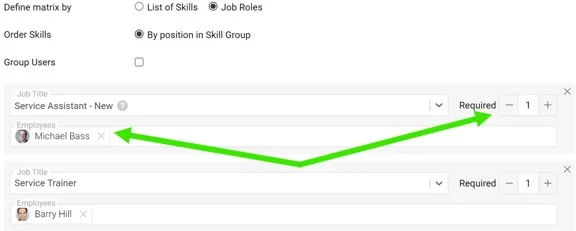
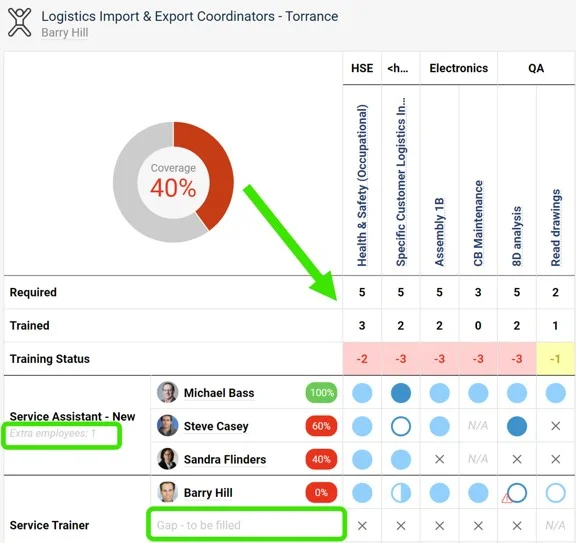
Please note: The Required number doesn’t always equal the number of selected employees. It can be higher (a free position to be filled) or lower (an extra position). This is reflected in the skill matrix statistics.
-
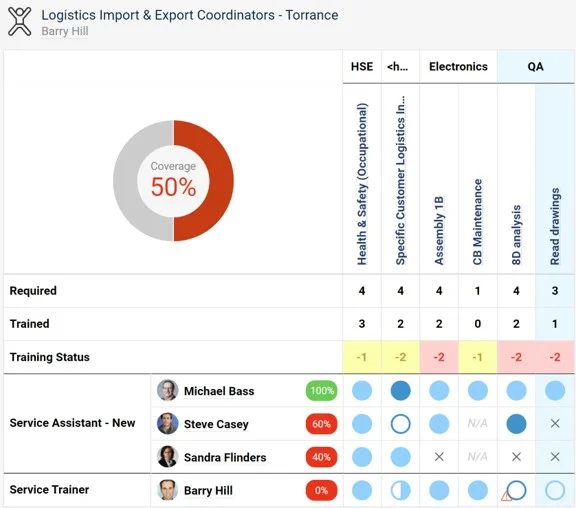
Review the skill matrix. The skill matrix is created.
Aprenda a crear una matriz de habilidades definida por puestos de trabajo. Puede definir distintos niveles de conocimiento requeridos para cada puesto y, al mismo tiempo, predefinir la lista de todas las habilidades que exige el puesto. Cada vez que agrega una habilidad a un puesto, el cambio se refleja automáticamente en todas las matrices de habilidades que usan ese puesto. (Video – Matriz de habilidades 17:30)
Aprenda también a crear una matriz de habilidades definida por una lista de habilidades.
-
Defina primero las habilidades, los niveles y los puestos. Antes de crear una matriz de habilidades, debe definir en el sistema las habilidades (consulte Cómo crear una habilidad), los niveles de habilidad (consulte Cómo configurar un nivel de habilidad) y los puestos de trabajo (consulte Cómo configurar un puesto de trabajo).
-
Abra el módulo Matriz de habilidades. Para crear una matriz de habilidades, haga clic en el encabezado del módulo Matriz de habilidades.
-
Elija la carpeta y cree la matriz. Elija la carpeta donde quiere mostrar la matriz de habilidades y agregue una matriz con el botón verde Crear nuevo con el signo más.
-
Defina la configuración de la matriz de habilidades.
- Complete la configuración básica, como Título, Líder y Ubicación. No olvide definir Acceso y ubicación si necesita configurar la seguridad.
- Defina la matriz de habilidades por Puestos de trabajo.
- Agregue puestos con el botón verde con el signo más. Seleccione un puesto entre las opciones predefinidas del submenú, seleccione los empleados y el número Requerido (cuántas personas deben estar capacitadas).
- Cuando termine toda la configuración, haga clic en el botón Guardar y ver en la esquina superior derecha.
Tenga en cuenta: el número Requerido no siempre coincide con el número de empleados seleccionados. Puede ser mayor (un puesto vacante por cubrir) o menor (un puesto adicional). Esto se refleja en las estadísticas de la matriz de habilidades.
-
Revise la matriz de habilidades. La matriz de habilidades queda creada.
¿Necesita más ayuda?
Escríbanos. En días laborables solemos responder en menos de una hora.