Ako zdieľať dokument s externým partnerom
Strojový preklad z angličtiny. Zobrazený je anglický originál.
TeamGuru enables you to share any of your documents with your external partners. Sharing a document online with an external partner takes three steps: create the partner’s card, create an account for the partner’s contact person, and share the document.
Prepare the partner
- Create the partner’s card. Create an external partner card: see How to create a new partner’s card.
- Create the contact person’s account. Create an account with system access for the external partner’s contact person: see How to create a new partner contact and access.
Share the document
-
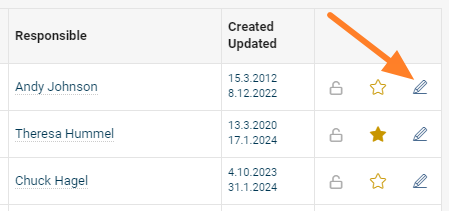
Open the document edit screen. Go to the document’s edit screen.
-
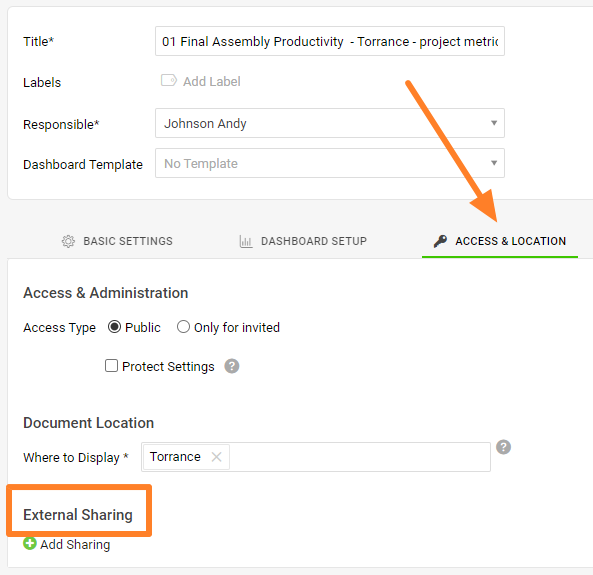
Go to External Sharing. Open the Access & Location tab, then the External Sharing section.
-
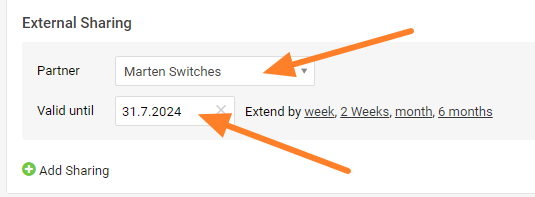
Add the sharing. Click the green plus button Add Sharing and search for the partner’s name in the directory. Set the Valid until date and confirm with the Save & View button in the top right corner.
-
Let your partner log in. The document is visible to your external partner once they log in to the system.
TeamGuru vám umožní zdieľať akýkoľvek dokument s externými partnermi. Online zdieľanie dokumentu s externým partnerom má tri kroky: vytvoríte kartu partnera, vytvoríte účet kontaktnej osobe partnera a dokument nazdieľate.
Príprava partnera
- Vytvorte kartu partnera. Vytvorte kartu externého partnera: pozrite Ako vytvoriť novú kartu partnera.
- Vytvorte účet kontaktnej osoby. Vytvorte kontaktnej osobe externého partnera účet s prístupom do systému: pozrite Ako vytvoriť nový kontakt partnera a prístup.
Zdieľanie dokumentu
-
Otvorte úpravu dokumentu. Prejdite na obrazovku úpravy dokumentu.
-
Prejdite na Externé zdieľanie. Otvorte kartu Prístup a umiestnenie a v nej sekciu Externé zdieľanie.
-
Pridajte zdieľanie. Kliknite na zelené tlačidlo plus Pridať zdieľanie a vyhľadajte meno partnera v adresári. Nastavte dátum Platné do a potvrďte tlačidlom Uložiť a zobraziť v pravom hornom rohu.
-
Partner sa prihlási. Externý partner uvidí dokument po prihlásení do systému.
Potrebujete ďalšiu pomoc?
Napíšte nám. V pracovné dni zvyčajne odpovedáme do hodiny.