Cómo configurar un proyecto principal que incluya automáticamente todos los subproyectos
Traducción automática del inglés. Se muestra el original en inglés.
You can add subprojects to your main project automatically, based on the project type and location. This gives you a simple overview of your subprojects: you can see their completion status and their open and total actions, and navigate from one place to all subproject documents via live links.
Video guide (text instructions below):
Set up the subprojects
Assign a project type to each subproject
Set up your A3 projects (action lists) with a project type; do this for your subprojects. Open the action list settings, scroll down to the Settings tab and choose a Project Type from the submenu. You can select from the project types already created in the system.

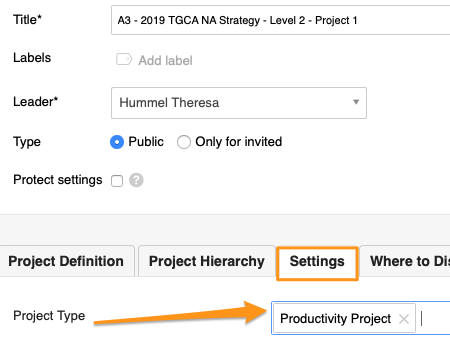
Please note: If you need to create a new project type and don’t have a sufficient role to do so, please contact us or your system administrator for assistance.
Set up the main action list
Add subprojects automatically
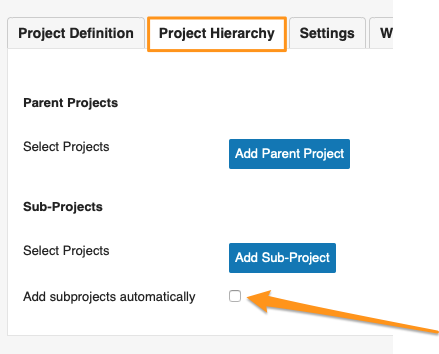
Open the settings of your main action list (parent project), scroll down to the Project Hierarchy tab and tick Add subprojects automatically.
Select the subproject criteria
Select the Project Type, Project Location and Project Status. Then scroll up and click Save & View.
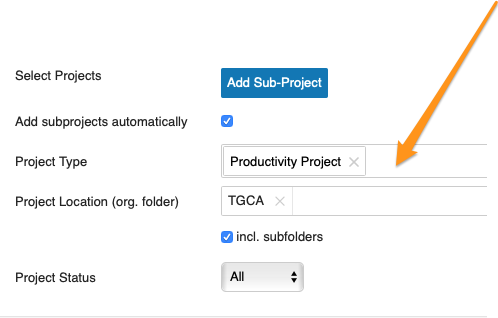
Please note: If you don’t specify a location, your action list includes all subprojects set up with that project type across your whole company.
Review the subprojects
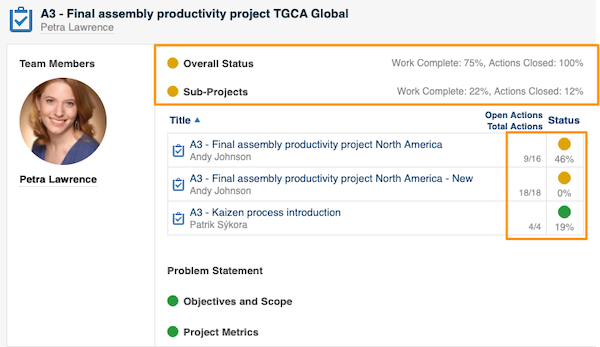
Your main action list now includes all subprojects based on your selection. You can use the live links and view the open/total actions and the completion status of each subproject.
Related articles
Puede agregar subproyectos a su proyecto principal de forma automática, según el tipo de proyecto y la ubicación. Así obtiene un resumen sencillo de sus subproyectos: ve su grado de avance y sus acciones abiertas y totales, y llega desde un solo lugar a todos los documentos de los subproyectos mediante enlaces directos.
Video (instrucciones escritas a continuación):
Configurar los subproyectos
Asigne un tipo de proyecto a cada subproyecto
Asigne un tipo de proyecto a sus proyectos A3 (planes de acción); hágalo en sus subproyectos. Abra la configuración del plan de acción, desplácese hasta la pestaña Configuración y elija un Tipo de proyecto en el submenú. Puede elegir entre los tipos de proyecto ya creados en el sistema.
Tenga en cuenta: si necesita crear un nuevo tipo de proyecto y su rol no tiene permisos para hacerlo, contáctenos o comuníquese con su administrador del sistema.
Configurar el plan de acción principal
Agregue subproyectos automáticamente
Abra la configuración de su plan de acción principal (proyecto padre), desplácese hasta la pestaña Jerarquía del proyecto y marque Agregar subproyectos automáticamente.
Seleccione los criterios de los subproyectos
Seleccione el Tipo de proyecto, la Ubicación del proyecto y el Estado del proyecto. Luego desplácese hacia arriba y haga clic en Guardar y ver.
Tenga en cuenta: si no indica una ubicación, su plan de acción incluye todos los subproyectos con ese tipo de proyecto en toda su empresa.
Revise los subproyectos
Su plan de acción principal ya incluye todos los subproyectos según su selección. Puede usar los enlaces directos y ver las acciones abiertas/totales y el grado de avance de cada subproyecto.
Artículos relacionados
¿Necesita más ayuda?
Escríbanos. En días laborables solemos responder en menos de una hora.