Jak utworzyć nowy raport
Tłumaczenie maszynowe z angielskiego. Wyświetlany jest oryginał po angielsku.
The Reports module can completely replace PowerPoint presentations in your standard reporting. All your reported data are in one place and traceable in history.
TeamGuru lets you add live data directly from the system, e.g. metric charts or statistics from your 8D reports.
Create the report
-
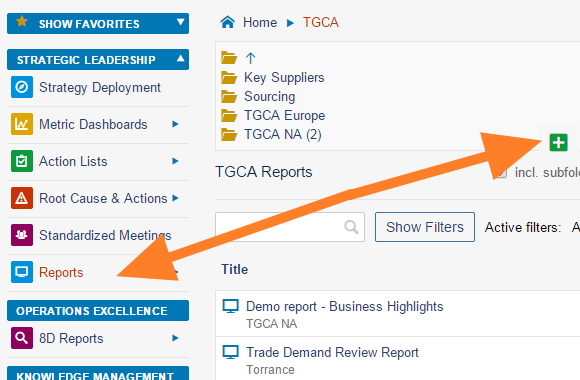
Create a new document. Go to the Reports module and click the Add icon to create a new document.
-
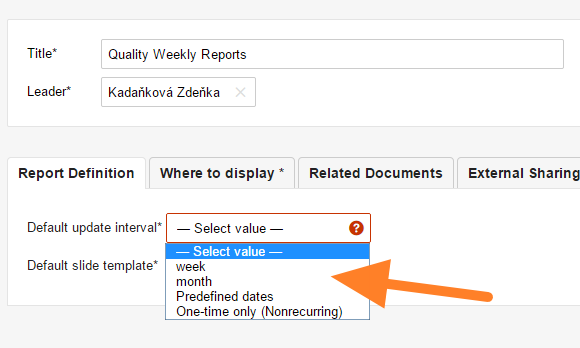
Fill in the basic settings. Enter the report name and the responsible person, and select the Default update interval.
-
Select the slide template. Select the default slide template for your report (see How to create a new report template) and save the document.
-
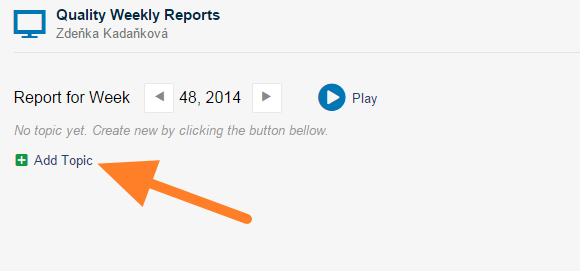
Add a slide. Click the Add Topic button to add a new slide.
-
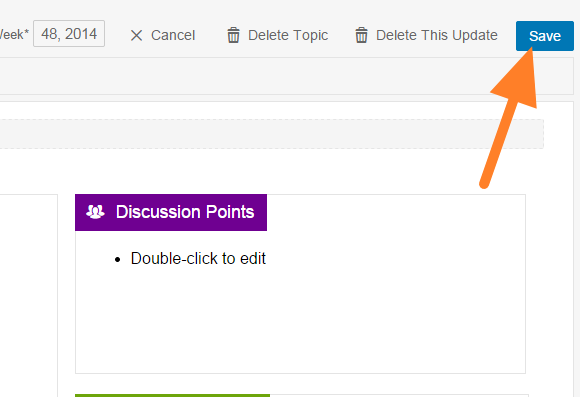
Fill in the report. Fill in your report and save it. Tips: add 8D Reports statistics, add a metric chart, add a picture.
-
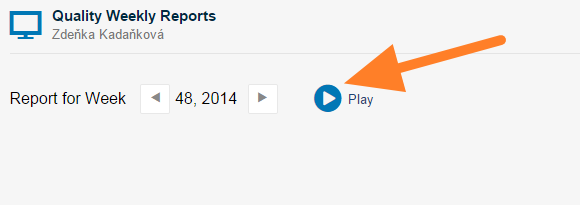
Present the report. Click the Play button to get a full-screen view for your presentation.
You may also be interested in: How to update your report
Video guide
Watch how to create a new report
Moduł Raporty może w pełni zastąpić prezentacje PowerPoint w standardowym raportowaniu. Wszystkie raportowane dane są w jednym miejscu, a ich historia jest zawsze dostępna.
W TeamGuru możesz dodawać do raportu bieżące dane prosto z systemu, np. wykresy wskaźników albo statystyki raportów 8D.
Utwórz raport
-
Utwórz nowy dokument. Otwórz moduł Raporty i kliknij ikonę Dodaj, aby utworzyć nowy dokument.
-
Uzupełnij podstawowe ustawienia. Wpisz nazwę raportu i osobę odpowiedzialną, a następnie wybierz Domyślny interwał aktualizacji.
-
Wybierz szablon slajdu. Wybierz domyślny szablon slajdu dla raportu (zobacz Jak utworzyć nowy szablon raportu) i zapisz dokument.
-
Dodaj slajd. Kliknij przycisk Dodaj temat, aby dodać nowy slajd.
-
Wypełnij raport. Uzupełnij raport i zapisz go. Wskazówki: dodaj statystyki raportów 8D, dodaj wykres wskaźnika, dodaj obraz.
-
Zaprezentuj raport. Kliknij przycisk Odtwórz, aby wyświetlić raport na pełnym ekranie.
Może Cię też zainteresować: Jak zaktualizować raport
Samouczek wideo
Zobacz, jak utworzyć nowy raport
Potrzebujesz dalszej pomocy?
Napisz do nas. W dni robocze zwykle odpowiadamy w ciągu godziny.