Ako vytvoriť nový report
Strojový preklad z angličtiny. Zobrazený je anglický originál.
The Reports module can completely replace PowerPoint presentations in your standard reporting. All your reported data are in one place and traceable in history.
TeamGuru lets you add live data directly from the system, e.g. metric charts or statistics from your 8D reports.
Create the report
-
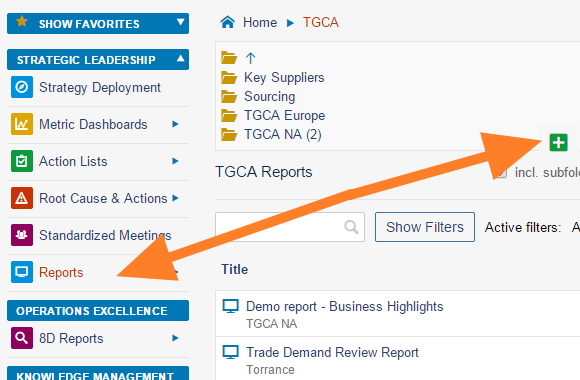
Create a new document. Go to the Reports module and click the Add icon to create a new document.
-
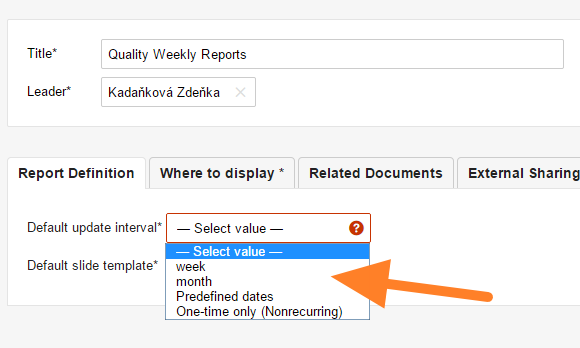
Fill in the basic settings. Enter the report name and the responsible person, and select the Default update interval.
-
Select the slide template. Select the default slide template for your report (see How to create a new report template) and save the document.
-
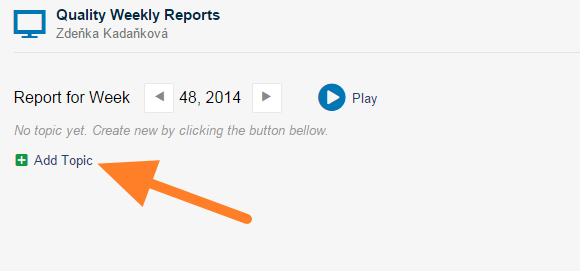
Add a slide. Click the Add Topic button to add a new slide.
-
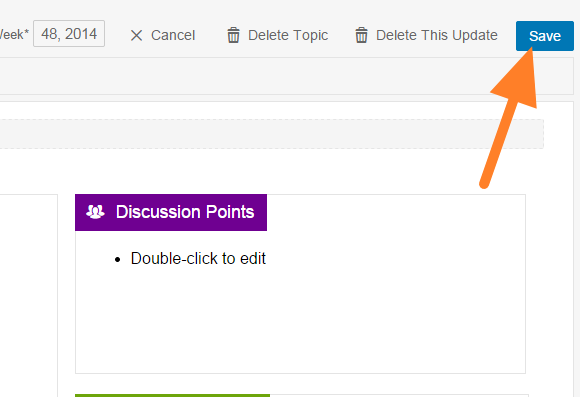
Fill in the report. Fill in your report and save it. Tips: add 8D Reports statistics, add a metric chart, add a picture.
-
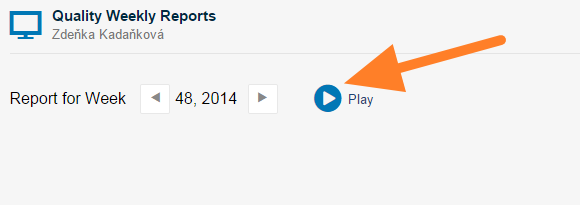
Present the report. Click the Play button to get a full-screen view for your presentation.
You may also be interested in: How to update your report
Video guide
Watch how to create a new report
Modul Reporty môže v bežnom reportovaní úplne nahradiť prezentácie v PowerPointe. Všetky reportované údaje máte na jednom mieste a s dohľadateľnou históriou.
TeamGuru vám umožní vložiť živé dáta priamo zo systému, napríklad grafy metrík alebo štatistiky z 8D reportov.
Vytvorenie reportu
-
Vytvorte nový dokument. V module Reporty kliknite na ikonu Pridať a vytvorte nový dokument.
-
Vyplňte základné nastavenia. Zadajte názov reportu a zodpovednú osobu a zvoľte Predvolený interval aktualizácie.
-
Zvoľte šablónu snímky. Vyberte predvolenú šablónu snímky pre váš report (pozrite Ako vytvoriť novú šablónu reportu) a dokument uložte.
-
Pridajte snímku. Novú snímku pridáte tlačidlom Pridať tému.
-
Vyplňte report. Vyplňte report a uložte ho. Tipy: pridanie štatistík 8D reportov, pridanie grafu metriky, pridanie obrázka.
-
Prezentujte report. Kliknite na tlačidlo Prehrať a report sa zobrazí na celú obrazovku.
Mohlo by vás zaujímať aj: Ako aktualizovať report
Video návod
Pozrite si, ako vytvoriť nový report
Potrebujete ďalšiu pomoc?
Napíšte nám. V pracovné dni zvyčajne odpovedáme do hodiny.